Pepe Berba has created a nice overview of linux persistence techniques as a map: https://pberba.github.io/security/2021/11/22/linux-threat-hunting-for-persistence-sysmon-auditd-webshell/
Linux persistence techniques as a map
Git for Windows - Git uses certificate from internal PKI
If you initially want to git clone a repository from an internal git system from a windows system and the internal git system uses a certificate from a internal PKI, you'll receive an error: SSL certificate problem: self signed certificate in certificate chain
PS C:\Users\flo\Splunk>
PS C:\Users\flo\Splunk> git clone https://git.domain.tld/ansible-playbooks/carbonblack-threatfeeds.git
Cloning into 'carbonblack-threatfeeds'...
fatal: unable to access 'https://git.domain.tld/ansible-playbooks/carbonblack-threatfeeds.git/': SSL certificate problem: self signed certificate in certificate chain
PS C:\Users\flo\Splunk>
Check your windows git settings with git config -l. In the attribute http.sslcainfo is the ca-cert-bundle-file, which is used by git as certification authority certificate store.
PS C:\Users\flo\Splunk>
PS C:\Users\flo\Splunk> git config -l
diff.astextplain.textconv=astextplain
filter.lfs.clean=git-lfs clean -- %f
filter.lfs.smudge=git-lfs smudge -- %f
filter.lfs.process=git-lfs filter-process
filter.lfs.required=true
http.sslbackend=openssl
http.sslcainfo=C:/Program Files/Git/mingw64/ssl/certs/ca-bundle.crt
core.autocrlf=true
core.fscache=true
core.symlinks=false
pull.rebase=false
credential.helper=manager-core
credential.https://dev.azure.com.usehttppath=true
init.defaultbranch=master
user.email=flo@some.mail
user.name=flo
core.editor="C:\Users\flo\AppData\Local\Programs\Microsoft VS Code\Code.exe" --wait
PS C:\Users\flo\Splunk>
So append your CA certificate in the file "C:/Program Files/Git/mingw64/ssl/certs/ca-bundle.crt". Then it works:
PS C:\Users\flo\Splunk>
PS C:\Users\flo\Splunk> git clone https://git.domain.tld/ansible-playbooks/carbonblack-threatfeeds.git
Cloning into 'carbonblack-threatfeeds'...
remote: Enumerating objects: 104, done.
remote: Counting objects: 100% (104/104), done.
remote: Compressing objects: 100% (58/58), done.
remote: Total 104 (delta 50), reused 93 (delta 40), pack-reused 0 eceiving objects: 34% (36/104)
Receiving objects: 100% (104/104), 20.03 KiB | 2.86 MiB/s, done.
Resolving deltas: 100% (50/50), done.
PS C:\Users\flo\Splunk>
Azure CLI - list ip-addresses & show Azure Network Security Group & create Azure NSG rule
List Azure VM ip-addresses
Azure:~$
Azure:~$ az vm list-ip-addresses
[
{
"virtualMachine": {
"name": "my-vm",
"network": {
"privateIpAddresses": [
"10.0.0.4"
],
"publicIpAddresses": [
{
"id": "/subscriptions/9aaaaaaa-aaaa-aaaa-aaaa-aaaaaaaaaaaa7/resourceGroups/learn-f00f00f0-f00f-f00f-f00f-f00f00f00f00/providers/Microsoft.Network/publicIPAddresses/my-vmPublicIP",
"ipAddress": "13.64.0.1",
"ipAllocationMethod": "Dynamic",
"name": "my-vmPublicIP",
"resourceGroup": "learn-f00f00f0-f00f-f00f-f00f-f00f00f00f00"
}
]
},
"resourceGroup": "learn-f00f00f0-f00f-f00f-f00f-f00f00f00f01"
}
}
]
Azure:~$
Azure:~$
Put IP-address of VM in variable
IPADDRESS="$(az vm list-ip-addresses \
--resource-group learn-f00f00f0-f00f-f00f-f00f-f00f00f00f00 \
--name my-vm \
--query "[].virtualMachine.network.publicIpAddresses[*].ipAddress" \
--output tsv)"
Azure:~$
Azure:~$ IPADDRESS="$(az vm list-ip-addresses \
> --resource-group learn-f00f00f0-f00f-f00f-f00f-f00f00f00f00 \
> --name my-vm \
> --query "[].virtualMachine.network.publicIpAddresses[*].ipAddress" \
> --output tsv)"
Azure:~$
Azure:~$
Azure:~$ echo $IPADDRESS
13.64.0.1
Azure:~$
Azure:~$
Azure:~$ curl --connect-timeout 5 http://$IPADDRESS
curl: (28) Connection timed out after 5000 milliseconds
Show Azure Network Security Group
Azure:~$
Azure:~$ az network nsg list \
> --resource-group learn-f00f00f0-f00f-f00f-f00f-f00f00f00f00 \
> --query '[].name' \
> --output tsv
my-vmNSG
Azure:~$
Azure:~$
Azure Network Security Group Name = my-vmNSGWhat is defined in Network Security Group Name my-vmNSG?Azure:~$
Azure:~$
Azure:~$ az network nsg rule list \
> --resource-group learn-f00 \f00f0-f00f-f00f-f00f-f00f00f00f00
> --nsg-name my-vmNSG
[
{
"access": "Allow",
"description": null,
"destinationAddressPrefix": "*",
"destinationAddressPrefixes": [],
"destinationApplicationSecurityGroups": null,
"destinationPortRange": "22",
"destinationPortRanges": [],
"direction": "Inbound",
"etag": "W/\"ae2ae2ae-ae2a-ae2a-ae2a-ae2aae2a\"",ae2a
"id": "/subscriptions/9aaaaaaa-aaaa-aaaa-aaaa-aaaaaaaaaaaa7/resourceGroups//providers/Microsoft.Network/networkSecurityGroups/my-vmNSG/securityRules/default-allow-ssh",learn-f00f00f0-f00f-f00f-f00f-f00f00f00f00
"name": "default-allow-ssh",
"priority": 1000,
"protocol": "Tcp",
"provisioningState": "Succeeded",
"resourceGroup": "",learn-f00f00f0-f00f-f00f-f00f-f00f00f00f01
"sourceAddressPrefix": "*",
"sourceAddressPrefixes": [],
"sourceApplicationSecurityGroups": null,
"sourcePortRange": "*",
"sourcePortRanges": [],
"type": "Microsoft.Network/networkSecurityGroups/securityRules"
}
]
Azure:~$
Azure:~$
Show again that JSON formated by Name, Prio, Dst-Port & Access-Action:
Azure:~$
Azure:~$ az network nsg rule list \
> --resource-group \learn-f00f00f0-f00f-f00f-f00f-f00f00f00f01
> --nsg-name my-vmNSG \
> --query '[].{Name:name, Priority:priority, Port:destinationPortRange, Access:access}' \
> --output table
Name Priority Port Access
----------------- ---------- ------ --------
default-allow-ssh 1000 22 Allow
Azure:~$
Azure:~$
Create Azure Network Security Group Rule for HTTP
Azure:~$
Azure:~$ az network nsg rule create \
> --resource-group learn-f00f00f0-f00f-f00f-f00f-f00f00f00f01 \
> --nsg-name my-vmNSG \
> --name allow-http \
> --protocol tcp \
> --priority 100 \
> --destination-port-range 80 \
> --access Allow
{- Finished ..
"access": "Allow",
"description": null,
"destinationAddressPrefix": "*",
"destinationAddressPrefixes": [],
"destinationApplicationSecurityGroups": null,
"destinationPortRange": "80",
"destinationPortRanges": [],
"direction": "Inbound",
"etag": "W/\"ae2ae2ae-ae2a-ae2a-ae2a-ae2aae2aae2a\"",
"id": "/subscriptions/9aaaaaaa-aaaa-aaaa-aaaa-aaaaaaaaaaaa7/resourceGroups/learn-f00f00f0-f00f-f00f-f00f-f00f00f00f01/providers/Microsoft.Network/networkSecurityGroups/my-vmNSG/securityRules/allow-http",
"name": "allow-http",
"priority": 100,
"protocol": "Tcp",
"provisioningState": "Succeeded",
"resourceGroup": "learn-f00f00f0-f00f-f00f-f00f-f00f00f00f01",
"sourceAddressPrefix": "*",
"sourceAddressPrefixes": [],
"sourceApplicationSecurityGroups": null,
"sourcePortRange": "*",
"sourcePortRanges": [],
"type": "Microsoft.Network/networkSecurityGroups/securityRules"
}
Azure:~$
Azure:~$
Show that in JSON:
Azure:~$
Azure:~$ az network nsg rule list \
> --resource-group learn-f00f00f0-f00f-f00f-f00f-f00f00f00f01 \
> --nsg-name my-vmNSG
[
{
"access": "Allow",
"description": null,
"destinationAddressPrefix": "*",
"destinationAddressPrefixes": [],
"destinationApplicationSecurityGroups": null,
"destinationPortRange": "22",
"destinationPortRanges": [],
"direction": "Inbound",
"etag": "W/\"ae2ae2ae-ae2a-ae2a-ae2a-ae2aae2aae2a\"",
"id": "/subscriptions/9aaaaaaa-aaaa-aaaa-aaaa-aaaaaaaaaaaa7/resourceGroups/learn-f00f00f0-f00f-f00f-f00f-f00f00f00f01/providers/Microsoft.Network/networkSecurityGroups/my-vmNSG/securityRules/default-allow-ssh",
"name": "default-allow-ssh",
"priority": 1000,
"protocol": "Tcp",
"provisioningState": "Succeeded",
"resourceGroup": "learn-f00f00f0-f00f-f00f-f00f-f00f00f00f01",
"sourceAddressPrefix": "*",
"sourceAddressPrefixes": [],
"sourceApplicationSecurityGroups": null,
"sourcePortRange": "*",
"sourcePortRanges": [],
"type": "Microsoft.Network/networkSecurityGroups/securityRules"
},
{
"access": "Allow",
"description": null,
"destinationAddressPrefix": "*",
"destinationAddressPrefixes": [],
"destinationApplicationSecurityGroups": null,
"destinationPortRange": "80",
"destinationPortRanges": [],
"direction": "Inbound",
"etag": "W/\"ae2ae2ae-ae2a-ae2a-ae2a-ae2aae2aae2a\"",
"id": "/subscriptions/9aaaaaaa-aaaa-aaaa-aaaa-aaaaaaaaaaaa7/resourceGroups/learn-f00f00f0-f00f-f00f-f00f-f00f00f00f01/providers/Microsoft.Network/networkSecurityGroups/my-vmNSG/securityRules/allow-http",
"name": "allow-http",
"priority": 100,
"protocol": "Tcp",
"provisioningState": "Succeeded",
"resourceGroup": "learn-f00f00f0-f00f-f00f-f00f-f00f00f00f01",
"sourceAddressPrefix": "*",
"sourceAddressPrefixes": [],
"sourceApplicationSecurityGroups": null,
"sourcePortRange": "*",
"sourcePortRanges": [],
"type": "Microsoft.Network/networkSecurityGroups/securityRules"
}
]
Azure:~$
Azure:~$
Azure:~$ az network nsg rule list \
> --resource-group learn-f00f00f0-f00f-f00f-f00f-f00f00f00f01 \
> --nsg-name my-vmNSG \
> --query '[].{Name:name, Priority:priority, Port:destinationPortRange, Access:access}' \
> --output table
Name Priority Port Access
----------------- ---------- ------ --------
default-allow-ssh 1000 22 Allow
allow-http 100 80 Allow
Azure:~$
Azure:~$
IT-Security newsletter recommendations
There are many newsletters, a few of them I can recommend:
SANS NewsBites
I'd compare it to reading international newspapers, narrowed down to IT-Security news only and to a very short summary of each topic. Keeps you informed about things that happen outside your tiny view of the world and about topics which are not covered by your daily website like https://www.heise.de/security/
"SANS NewsBites is a semiweekly high-level executive summary of the most important news articles that have been published on computer security during the last week. Each news item is very briefly summarized and includes a reference on the web for detailed information, if possible."
=> https://www.sans.org/newsletters/ Registration for newsletter
=> Archive Available Examples
SANS @RISK: The Consensus Security Alert
"@RISK provides a reliable weekly summary of (1) newly discovered attack vectors, (2) vulnerabilities with active new exploits, (3) insightful explanations of how recent attacks worked, and other valuable data"
=> https://www.sans.org/newsletters/ Registration for newsletter
=> Archive Available Exmples
FullDisclosure
"A public, vendor-neutral forum for detailed discussion of vulnerabilities and exploitation techniques, as well as tools, papers, news, and events of interest to the community. The relaxed atmosphere of this quirky list provides some comic relief and certain industry gossip. More importantly, fresh vulnerabilities sometimes hit this list many hours or days before they pass through the Bugtraq moderation queue."
=> https://seclists.org/fulldisclosure/ Registration for newsletter
PRTG Hardening Security CSRF
New log4j 1.x vulnerabilities
CVE-2022-23302
CVE-2022-23305
CVE-2022-23307
iPhone iOS SMB CIFS connection
How to establish a SMB CIFS connection from your iOS device (iPhone or iPad), for example to your NAS storage system or some other network share:
- Open the "files-app"

- Select the three dots in the upper right corner
- Select "connect to server" (in german "Mit Server verbinden"):
- Enter your SMB CIFS destination as IPv4 address or FQDN:

Detect "log4shell" log4j RCE - CVE-2021-44228
The very critical CVE-2021-44228 can be detected by the following methods as Florian Roth has posted them on GitHub: https://gist.github.com/Neo23x0/e4c8b03ff8cdf1fa63b7d15db6e3860b
Log4Shell - log4j RCE exploitation detection
You can use these commands and rules to search for exploitation attempts against log4j RCE vulnerability CVE-2021-44228
Grep / Zgrep
This command searches for exploitation attempts in uncompressed files in folder /var/log and all sub folders
sudo egrep -i -r '\$\{jndi:(ldap[s]?|rmi|dns):/[^\n]+' /var/logThis command searches for exploitation attempts in compressed files in folder /var/log and all sub folders
sudo find /var/log -name \*.gz -print0 | xargs -0 zgrep -E -i '\$\{jndi:(ldap[s]?|rmi|dns):/[^\n]+'YARA
Preliminary YARA rules (work in progress)
rule EXPL_Log4j_CVE_2021_44228_Dec21_Soft {
meta:
description = "Detects indicators in server logs that indicate an exploitation attempt of CVE-2021-44228"
author = "Florian Roth"
reference = "https://twitter.com/h113sdx/status/1469010902183661568?s=20"
date = "2021-12-10"
score = 60
strings:
$x1 = "${jndi:ldap:/"
$x2 = "${jndi:rmi:/"
$x3 = "${jndi:ldaps:/"
$x4 = "${jndi:dns:/"
condition:
1 of them
}
rule EXPL_Log4j_CVE_2021_44228_Dec21_Hard {
meta:
description = "Detects indicators in server logs that indicate the exploitation of CVE-2021-44228"
author = "Florian Roth"
reference = "https://twitter.com/h113sdx/status/1469010902183661568?s=20"
date = "2021-12-10"
score = 80
strings:
$x1 = /\$\{jndi:(ldap|ldaps|rmi|dns):\/[\/]?[a-z-\.0-9]{3,120}:[0-9]{2,5}\/[a-zA-Z\.]{1,32}\}/
$fp1r = /(ldap|rmi|ldaps|dns):\/[\/]?(127\.0\.0\.1|192\.168\.|172\.[1-3][0-9]\.|10\.)/
condition:
$x1 and not 1 of ($fp*)
}
rule SUSP_Base64_Encoded_Exploit_Indicators_Dec21 {
meta:
description = "Detects base64 encoded strings found in payloads of exploits against log4j CVE-2021-44228"
author = "Florian Roth"
reference = "https://twitter.com/Reelix/status/1469327487243071493"
date = "2021-12-10"
score = 70
strings:
/* curl -s */
$sa1 = "Y3VybCAtcy"
$sa2 = "N1cmwgLXMg"
$sa3 = "jdXJsIC1zI"
/* |wget -q -O- */
$sb1 = "fHdnZXQgLXEgLU8tI"
$sb2 = "x3Z2V0IC1xIC1PLS"
$sb3 = "8d2dldCAtcSAtTy0g"
condition:
1 of ($sa*) and 1 of ($sb*)
} Source: https://gist.github.com/Neo23x0/e4c8b03ff8cdf1fa63b7d15db6e3860b Nextcloud repairing missing indexes in database
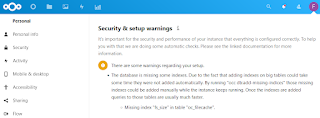
When your nextcloud installation is showing an error like the following, then you could use "occ db:add-missing-indices" to repair it:
"Security & setup warnings
It's important for the security and performance of your instance that everything is configured correctly. To help you with that we are doing some automatic checks. Please see the linked documentation for more information.
- The
database is missing some indexes. Due to the fact that adding indexes
on big tables could take some time they were not added automatically. By
running "occ db:add-missing-indices" those missing indexes could be
added manually while the instance keeps running. Once the indexes are
added queries to those tables are usually much faster.
Missing index "fs_size" in table "oc_filecache".
How to fix it:
privusrA17@nextcloud042:~#
privusrA17@nextcloud042:~# cd /var/www/nextcloud; sudo -u www-data php ./occ db:add-missing-indices
Check indices of the share table.
Check indices of the filecache table.
Adding additional size index to the filecache table, this can take some time...
Filecache table updated successfully.
Check indices of the twofactor_providers table.
Check indices of the login_flow_v2 table.
Check indices of the whats_new table.
Check indices of the cards table.
Check indices of the cards_properties table.
Check indices of the calendarobjects_props table.
Check indices of the schedulingobjects table.
Check indices of the oc_properties table.
privusrA17@nextcloud042:/var/www/nextcloud#
Apache Shiro Vulnerability RCE CVE-2016-4437 - not detected by Qualys and Tenable
Vulnerability-scanning and management is one of the most important topics in IT-security and unfortunately most companies forget or even dont know about it. Recently the US agency CISA published a list of 292 known exploited critical vulnerabilities and a binding operational directive 22-01, which forces US institutions to patch/fix/mitigate the vulnerabilites of the list within 15 or 30 days.
However the vulnerability-scanner-vendors Qualys and Tenable both do not detect the critical rce vulnerability CVE-2016-4437 in apache shiro, or at least not yet:
- Qualys on 07th of November 2021:
- Tenable on 07th of November 2021:
https://www.tenable.com/cve/CVE-2016-4437
Both vendors have been contacted, maybe they'll add the signature for the critical vulnerability.
Qualys also has published a dashboard for the binding operational directive 22-01: https://blog.qualys.com/vulnerabilities-threat-research/2021/11/08/qualys-response-to-cisa-alert-binding-operational-directive-22-01
Offtopic PS: I'm a bit excited that a CVE is on the list or CISA, which I reported :-)
Windows VMs have issues resolving DNS names, run into network timeouts or packet loss
Problem
Windows VMs (VMware vSphere) have issues when trying to resolve DNS names and run into network timeouts or packet loss on other protocols, too.
For example running a simple PowerShell script shows the issue (Change *YourFQDN* to your FQDN and '*DNS-Server-IP*' to your DNS server ip-address) :
1..1000 | Foreach-Object -Process {
[pscustomobject]@{
Try = $_
ElapsedTime = (Measure-Command -Expression {
Resolve-DnsName -DnsOnly -QuickTimeout -NoHostsFile -Name
'*YourFQDN*' -Server '*DNS-Server-IP*'
}).TotalMilliseconds -as [int]
}
} |
Group-Object -Property 'ElapsedTime' |
Sort-Object -Property ‚Count'
From 1000 DNS-queries 541x were answered within 2ms
From 1000 DNS-queries 243x were answered within 1ms
From 1000 DNS-queries 57x were answered within 3ms
From 153 DNS-queries were not answered, timeout >1000ms
Debug-Logs of vnetWFP show the event „DEBUG: ALEInspectInjectComplete : Packet injection status is : c000021b”.
Solution
Update your VMware Tools 11.x with Guest Introspection Driver to version 11.2.6 and reboot your VM or uninstall the Guest Introspection Driver. We first suspected it is VMware NSX-T or VMware Carbon Black EDR, but it was not. It was the NSX Guest Introspection Driver.
Root Cause: Packet drop is seen due to intermittent failure reported by the Microsoft WFP packet injection API.
https://kb.vmware.com/s/article/79185
After the update or removal of the driver the issues were gone:
From 1000 DNS-queries 985x were answered within 1ms
From 1000 DNS-queries 10x were answered within 2ms
From 1000 DNS-queries 3x were answered within 3ms
From 1000 DNS-queries 1x was answered within 4ms
From 1000 DNS-queries 1x was answered within 35ms
From 1000 DNS-queries 0x timed out.
Microsoft SmartScreen - Mark of the Web Zone.Identifier ReferrerUrl in NTFS Alternate DataStream
From where does Windows know, if a file is from a trusted or untrusted source? Microsofts Smartscreen writes the downloaded origin into the NTFS Alternate DataStreams of the file. In earlier version of windows it was the Zone, since Windows10 its the source URL, too.
Example: I've downloaded procexp.com from https://live.sysinternals.com/procexp.exe:
as ZoneID, ReferrerURL and HostUrl. This is also called Windows Defender SmartScreen Extended Mark of the Web.
Additional testing for Microsoft Defender Smartscreen can be found here: https://demo.smartscreen.msft.net/ & https://docs.microsoft.com/en-us/deployedge/microsoft-edge-security-smartscreen
Splunk GUI enhancement - 100% client-side - browser DOM manipulation
Problem Cisco Splunk Enterprise is awesome and the Splunk GUI is, too. However sometimes you need to quickly search the result data. Solutio...
-
You can either use the GUI of the FortiGate to list all certificates, or use the CLI. Either using the commands: Using the "get...
-
The FortiGate uses OFTP (Fortinets proprietary Optimized Fabric Transfer Protocol, not Odette File Transfer Protocol ) to transfer data betw...
-
FortiGate HA-Cluster Troubleshooting using Checksums Comparing checksums of cluster units You can use the diagnose sys ha checksum show ...