Discover the used SSHv2 algorithms/cipher suite using nmap or zenmap can be done using the follwing nse-script and steps:
URL: https://nmap.org/nsedoc/scripts/ssh2-enum-algos.html
Download: https://svn.nmap.org/nmap/scripts/ssh2-enum-algos.nse
Howto Use Guide
- Download NSE-Script
- Save nse-script-file into your
...\NMap\Scripts\folder
- Run nmap or zenmap and the command:
nmap --script ssh2-enum-algos *your-target*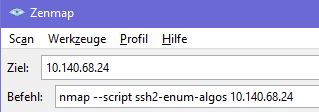


Example Output
Starting Nmap 7.80 ( https://nmap.org ) at 2021-07-03 21:18 Mitteleuropäische Zeit
Nmap scan report for 10.140.68.24
Host is up (0.016s latency).
Not shown: 997 filtered ports
PORT     STATE  SERVICE
22/tcp   open   ssh
| ssh2-enum-algos:
|   kex_algorithms: (10)
|       curve25519-sha256
|       curve25519-sha256@libssh.org
|       ecdh-sha2-nistp256
|       ecdh-sha2-nistp384
|       ecdh-sha2-nistp521
|       diffie-hellman-group-exchange-sha256
|       diffie-hellman-group16-sha512
|       diffie-hellman-group18-sha512
|       diffie-hellman-group14-sha256
|       diffie-hellman-group14-sha1
|   server_host_key_algorithms: (5)
|       rsa-sha2-512
|       rsa-sha2-256
|       ssh-rsa
|       ecdsa-sha2-nistp256
|       ssh-ed25519
|   encryption_algorithms: (6)
|       chacha20-poly1305@openssh.com
|       aes128-ctr
|       aes192-ctr
|       aes256-ctr
|       aes128-gcm@openssh.com
|       aes256-gcm@openssh.com
|   mac_algorithms: (10)
|       umac-64-etm@openssh.com
|       umac-128-etm@openssh.com
|       hmac-sha2-256-etm@openssh.com
|       hmac-sha2-512-etm@openssh.com
|       hmac-sha1-etm@openssh.com
|       umac-64@openssh.com
|       umac-128@openssh.com
|       hmac-sha2-256
|       hmac-sha2-512
|       hmac-sha1
|   compression_algorithms: (2)
|       none
|_      zlib@openssh.com
Author: Kris Katterjohn
License: Same as Nmap--See https://nmap.org/book/man-legal.html


