Showing posts with label authentication. Show all posts

Splunk UseCase for attacks against FortiGate Firewall management interfaces

If you are using Splunk as your SIEM you can try to detect attacks against your FortiGate firewalls by using the following SPL query:


index=firewall type=event subtype=system msg IN ("Failed to match community*", "Message authentication or checking failed*", "Negotiation failed: no matching*", "Negotiation failed: Broken pipe*")
| stats earliest(_time) as FirstEvent count by devname,msg,result,logdesc
| eval FirstEvent=strftime(FirstEvent,"%Y-%m-%d %H:%M:%S")

Splunk UseCase FortiGate Firewall Management Interface Attacks


Additionally: It is imperative that you protect your FortiGate interfaces with TrustedHosts AND Local-In-Policies. Only using TrustHosts protects HTTPS, SSH, etc but not other protocols like SIP, IPsec, CAPWAP, BGP, OSPF, SSLVPN etc which are also local services running on the FortiGate, which need to be protected, too.
See https://how2itsec.blogspot.com/2022/10/fortigate-admin-interface.html

Microsoft Office access does not work to WebDav shares

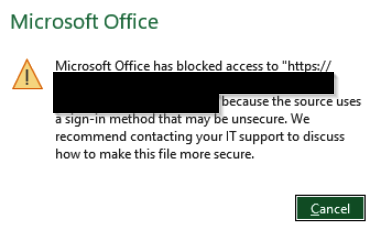
Since Microsoft released a patch for Windows in Q4-2023, access to WebDav shares which use basic authentication is blocked:

Example

Office Error WebDav sign-in method

Example with ionos webdav share:

English: "Microsoft Office has blocked access to https://webdav.hidrive.ionos.com because the source uses a sign-in method that may be unsecure

German: "Microsoft Office hat den Zugriff auf https://webdav.hidrive.ionos.com blockiert, da die Quelle eine Anmeldemethode verwendet, die möglicherweise unsicher ist."


Solution

To fix this, you have to add the following registry key to Windows 11 with the URL to your destination (in this example it is webdav.hidrive.ionos.com):

[HKEY_CURRENT_USER\Software\Microsoft\Office\16.0\Common\Identity]
"basichostallowlist"="webdav.hidrive.ionos.com" 


Overview of public interfaces for SOC/IT-Security staff

In case of an IT-security incident, emergency oder if a new critical vulnerability (like log4j in December 2021) arises, it is good to be prepared, so you can quickly answer questions like:

  • "Are we affected?"
  • "Do we use this technology?"
  • "Where do we use this vulnerable protocol?"
  • "To whom is the attack surface exposed to?"
  • "Are there mitigations in place?"
  • "Is is exploitable without authentication in our setup?"
  • "Which is the best place to place a first mitigation?"
  • etc..
An overview like the following can and will be helpful for your IT-security staff or your Security Operations Center SOC:

System Internet Facing Protocol Authentication Security Used Products/Vendors Logs send to SIEM Contact Person Known Weaknesses
Websites Yes, exposed to all public-ip-addresses HTTPS (TCP:443) & HTTP (TCP:80 - HTTP 301 Redirect to HTTPS) None Web Application Firewall F5 BigIP LoadBalancer WAF & Apache Container on OpenShift Yes Link to CMDB Websites may contain 3rd party code, SBOM see CMDB
Managed File Transfer Yes, but limited to dedicated public ip-addresses of partners HTTPS (TCP:443) HTTPS Tokens Web Application Firewall F5 BigIP LoadBalancer WAF IPSwitch Yes Link to CMDB Runs on VM as appliance, OS might not be hardend from vendor
Citrix Yes, exposed to all public-ip-addresses HTTPS (TCP:443) MFA Netscaler WAF Citrix Systems + Okta MFA Yes Link to CMDB NetScaler WAF Ruleset might be out-of-date
Mailserver Yes, exposed to all public-ip-addresses SMTP (TCP:25) None AntiSpam Mailgatway & AV-Sandbox Cisco E-Mail Security Yes Link to CMDB Mailgateways run on Hardware, might not be hardended from vendor
SSLVPN S2E Yes, exposed to all public-ip-addresses HTTPS (TCP:443) Mutual TLS Certbased + MFA Azure DDoS FortiGate SSLVPN Azure VM + Okta MFA Yes Link to CMDB Possible FortiGate FortiOS SSLVPN Vulnerabilities
M365 ActiveSync Yes, exposed to all public-ip-addresses HTTPS (TCP:443) Mutual TLS Certbased Azure DDoS Microsoft 365 + Intunes Yes Link to CMDB Not part of own Vulnerability-Scanner
VPN S2S Yes, but limited to dedicated public ip-addresses of partners IPSec UDP:500 & UDP:4500 & ESP IPsec IKEv2 Certbased Auth Azure DDoS FortiGate SSLVPN Azure VM Link to CMDB -
DMARC SaaS Yes, exposed to all public-ip-addresses DNS (UDP:53), HTTP (TCP:80), HTTPS (TCP:443), SMTP (TCP:25) None - dmarcadvisor.com SaaS No Link to CMDB Not part of own Vulnerability-Scanner
DNS Server Yes, but limited to dedicated public ip-addresses of partners DNS (UDP:53 & TCP:53) None Azure Network Security Groups RHEL Bind Yes Link to CMDB -
ISP Routers Yes, but limited to dedicated public ip-addresses of ISP routers BGP (TCP:179), BFD, Ping (ICMP:0/8) BGP MD5 Auth - Extreme Networks XOS Yes Link to CMDB
etc.. etc.. etc.. etc.. etc.. etc.. etc.. etc.. etc..


Of course you can add many more columns like e.g.:

  • "SBOM technologys used" (for example: RHEL, Apache Tomcat, OpenSSL, log4j, puppet, ansible, splunk universal forwarder, appdynamics,..)
  • Direct links to your Firewall Management System, WAF or SIEM
  • "Is it part of our vulnerability scanner?"
  • "Is the vulnerability scanner scanning it authenticated?"
  • "Is the system/application hardended?"
  • and so on :-)
This list will help in case of an IT-security emergency to sort out the first steps in order to mitigate and fix the issue of the public exposed interfaces (like to the internet or to business partners). However this is only one of many steps necessary - always "asume breach" and make sure an attacker controlling a client or server still is unable to spread (unnoticed) in your companies (cloud) network.

New LAPS version explained

Microsoft will release a new version of Local Administrator Password Solution (LAPS), which   provides new Azure AD features as well as new Active Directory OnPrem features and some migration features from the old version to the new one.

A video explaining everything in detail can be found here:


This video includes a nice overview showing how LAPS is working internally using CSP (lapscsp.dll), PowerShell (lapspsh.dll) or GPOs and LAPS core logic (laps.dll) which then reads and updates the expiry of accounts as well as updates their password, either in Azure Active Directory or in Windows Server Active Directory on premise:LAPS internal logic and flow architecture

Source: https://learn.microsoft.com/en-us/windows-server/identity/laps/laps-concepts

LAPS can be used as solution against pass-the-hash (https://attack.mitre.org/techniques/T1550/002) and lateral-traversal attacks (https://attack.mitre.org/tactics/TA0008), as well as for securing user help desk access or recover to devices with a fine-grained security model and for RBAC in Azure AD.


FortiGate admin interface authentication bypass

There are rumors about a vulnerability in Fortinets FortiGate firewalls where you may bypass authentication on their admin interfaces. Affected seem to be FortiOS 7.0.x and FortiOS 7.2.0/1. A fix is included in FortiOS 7.0.7 and FortiOS 7.2.2. It is written the vulnerability has CVE-2022-40684.

It is imperative that you protect your FortiGate interfaces with TrustedHosts AND Local-In-Policies. Only using TrustHosts protects HTTPS, SSH, etc but not other protocols like SIP, IPsec, CAPWAP, BGP, SSLVPN* etc which are also local services running on the FortiGate, which need to be protected, too.

*SSLVPN = Even though SSLVPN might be not configured and therefore seems to be inactive, in some cases for example vulnerability-scanners still trigger the SSLVPN service to log errors in FortiGates log. This only is solved by setting up local-in-polices.

Example for trusthost & local-in-policy:

CLI configuration:
System > Administrators >
config system admin
    edit "admin"
        set trusthost1 172.26.73.48 255.255.255.255
        set accprofile "super_admin"
        set vdom "root"
    next
end

Configuring address and address group as per the trusted hosts:
config firewall address
    edit "trusted-1"
        set type ipmask
        set comment ''
        set visibility enable
        set associated-interface ''
        set color 0
        set allow-routing disable
        set subnet 172.26.73.48 255.255.255.255
    next
end

config firewall addrgrp
    edit "trusted_grp"
        set member "trusted-1"
        set comment ''
        set visibility enable
        set color 0
    next
end
Configuring Firewall local in policies:
config firewall local-in-policy
    edit 2
        set intf "port1"
        set srcaddr "trusted_grp"
        set dstaddr "all"
        set action accept
        set service "PING"
        set schedule "always"
        set status enable
        set comments ''
    next
    edit 1
        set intf "port1"
        set srcaddr "all"
        set dstaddr "all"
        set action deny
        set service "PING"
        set schedule "always"
        set status enable
        set comments ''
    next
end

Remember: This example shows the local-in-policy only for "ping". You want to protect all services (except for example SSLVPN or IPsec if you use them).

Citrix ICA SSO saved credentials in XOR obfuscated readable storage

The Citrix ICA application stores user credentials for its SingleSignOn SSO functionality in readable form using XOR obfuscation with the key „C“, as Benjam Delpy wrote: https://twitter.com/gentilkiwi/status/1570525137962930176

Mimikatz version 3 will be able to reveal this as shown in the following GIF with Windows 11 and Credential Guard enabled: https://video.twimg.com/tweet_video/Fcudz49XoAAfNHO.mp4


Quick win securing Azure AD

An easy quick win for securing Azure Active Directory passwords is the feature "Azure AD Password Protection". This helps you in mitre att&cks tactic credential access, for example in the technique brute force and its sub-techniques password guessing, password spraying, credential stuffing, etc.

Users are recommended to avoide simple passwords and instead should use pass-sentences. Password breaches of the recent past reveal that the majority still chose simple passwords. Azure AD Password Protection finds (audit mode) or enforces (enforce mode) stronger passwords for everybody. There is a hidden global banned password list which is applied to every user in the Azure AD tenant. Additionally you can block custom words like your companys name, your companys slogan, the founders or CEOs name, most used childerens names or your country or famous sport team names, which are often used as weak passwords.

Azure AD security custom banned passwords

Microsoft promises the "password validation algorithm" automatically detects/blocks variants and combinations like "password!1", "!password", "p@ssw0rd" and so on.

This is also available for on-premise Active Directory using an agent:

On-Premise Active Directory security quick win


However this needs an additional license, you need to install and agent on your domain controllers, you need to reboot the domain controllers and you need Azure AD. Also you do not see the changing content of Microsofts global password list and there is no enforcement based on Active Directory groups or OUs, so you for example cant just enforce it to priviledged accounts but must enforce it for everybody.

Of course I highly recommend to use Multi Factor Authentication MFA everywhere.

Forget the phrase "password" - it should be pass-sentence

It is unfortunate that the word "password" has the word "word" in it. That leads to people almost always use one word, add one or two numbers to it, maybe a special character and thats it:

Classic passwords:
alina11$
456peter
nadine030
target123
cowboy123

etc..

word + number (+ special char) ==> ❌very bad security

Solution

So how can that be fixed because remembering long complex passwords like oT(O§%isaB"4 is hard. Answer: Instead of using "words" in passwords, use sentences.

Example:
ilikenewyorkquitealot
natureisimportanttome
danhasbeautifuleyes
ireallylovethehow2itsecblog

=> 🔒✅ Stronger passwords
=> 🔒✅ Fast to type
=> 🔒✅ Easy to remember

Additional tipps:
1. Always use two or multi-factor-authentication (2FA/MFA)
2. Use a password-manager (like the free keepass)
3. Protect your mailaccounts! Use unique and long passwords with 2FA for them. Because that is the place were you reset your passwords.


German:

Vergessen Sie "Passwort", es sollte "Pass-Satz" heißen

Unglücklicherweise heißt es "Passwort". Darin steckt das Wort "wort". Viel besser wäre, wenn es "Pass-Satz" heißen würde. Das klassische Password sieht wie folgt aus:

alina11$
456peter
nadine030
target123
cowboy123

etc..

Wort + Zahl (+ Sonderzeichen) ==> ❌Sehr schlechte Sicherheit

Solution

Was kann man in der Praxis dagegen tun? Denn sich lange komplexe Passwörter merken wie oT(O§%isaB"4 ist schwierig. Antwort: Statt "Pass-Wörter" zu verwenden, lieber "Pass-Sätze" verwenden:

Beispiel::
ilikenewyorkquitealot
natureisimportanttome
danhasbeautifuleyes
ireallylovethehow2itsecblog

=> 🔒✅ Bessere Sicherheit
=> 🔒✅ Schnell eingetippt
=> 🔒✅ Leicht zu merken

Zusätzliche Tipps
1. Immer Zwei- oder Mehrfaktor-Authentifizierung verwenden (2FA/MFA)
2. Einen Passwort-Manager verwenden (wie das kostenfreie keepass)
3. Schützen Sie Ihre Mailaccounts! Nutzen Sie mindestens dort immer einzigartige lange Passwörter + 2FA. Denn hier werden Passwörter zurückgesetzt.

Real world examples of attack chains with Att&ck mapping

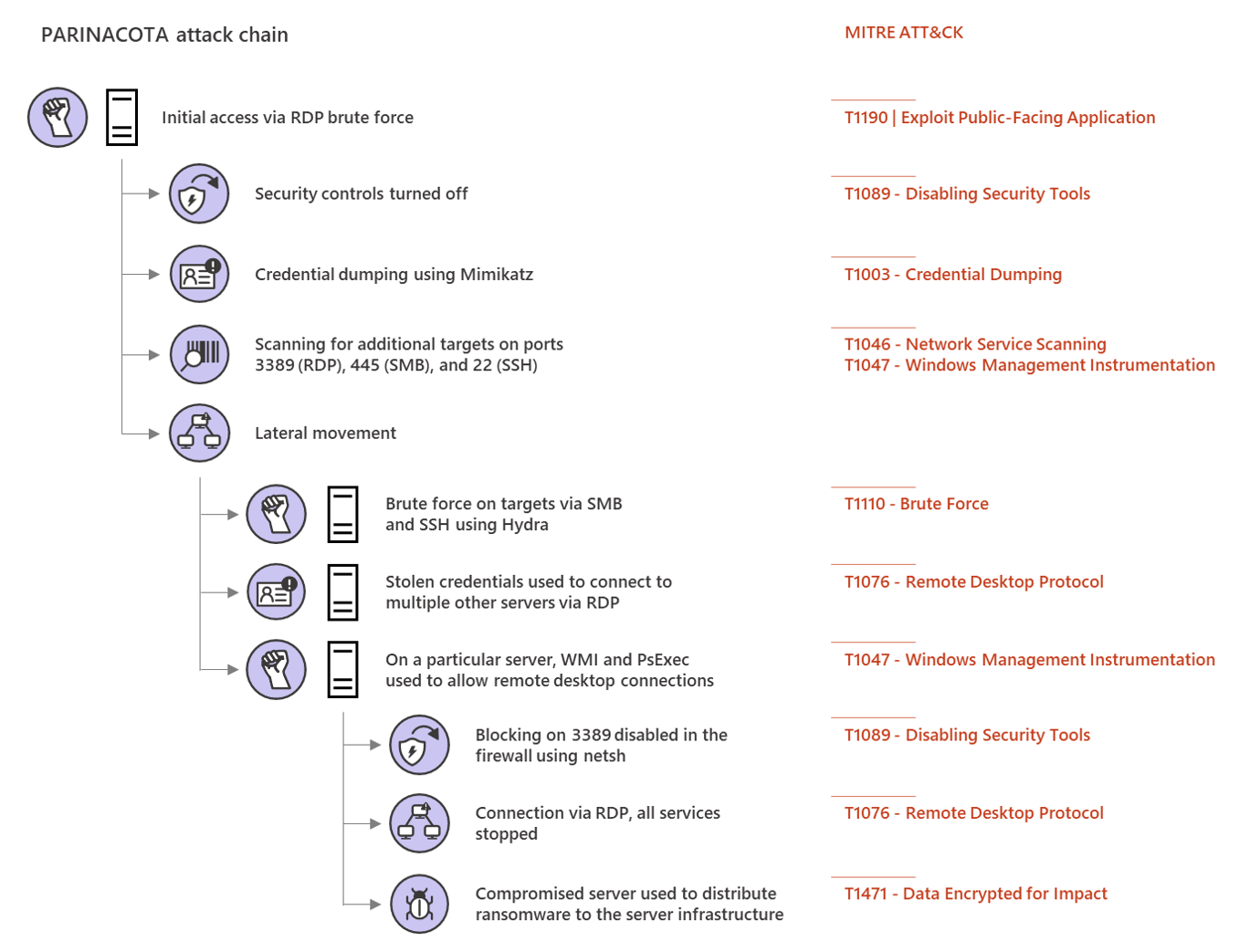
Microsoft Threat Protection Intelligence Team released in the past some great detailed articles (e.g. 2020-03 Ransomware, 2018-03 FinFisher, 2017-05 wannacry, 2017-06 petya) about different real world attack chains including a mapping to MITREs framework Att&ck. 

Parinacota attack chain


Picture from Microsoft Security https://www.microsoft.com/security/blog/2020/03/05/human-operated-ransomware-attacks-a-preventable-disaster/ 
The article on Parinacota includes details like how for example persistence is archived:
  • Windows Registry modifications using .bat or .reg files to allow RDP connections Picture from https://www.microsoft.com/security/blog/2020/03/05/human-operated-ransomware-attacks-a-preventable-disaster/
  • Setting up access through existing remote assistance apps or installing a backdoor
  • Creating new local accounts and adding them to the local administrators group 
    Picture from https://www.microsoft.com/security/blog/2020/03/05/human-operated-ransomware-attacks-a-preventable-disaster/

 Wadhrama attack chain

Microsoft Threat Protection Intelligence Team https://www.microsoft.com/security/blog/2020/03/05/human-operated-ransomware-attacks-a-preventable-disaster/

 Ryuk attack chain

Doppelpaymer attack chain


Microsoft Threat Protection Intelligence Team https://www.microsoft.com/security/blog/2020/03/05/human-operated-ransomware-attacks-a-preventable-disaster/

Outlook connection protocol, auth, encryption & status

A quick way to check or beginn to troubleshoot the used protocol, authentication, encryption and connection status of Microsofts Outlook client as well as to find out which version is running on your Microsoft Exchange server or Microsoft Office 365 server is to use:
  1. CTRL + right-click on the outlook icon:
     
  2. Select "connection status":
  3. The following window will appear:

    There the server, the proxy-server, the used protocol, the authentication method, the encryption, the status and the exchange-server version can be quickly checked.
More in the Microsoft support article.

Monitor UniFi WLAN Access Point with PRTG with SNMPv3 Auth+Encrypted

This is a tiny guide howto monitor your UniFi wireless accesspoint, in this case a Unifi U7 pro with SNMPv3 with AES-Encryption and SHA-Auth...