Showing posts with label forensics. Show all posts

Windows Persistence Map v0.1

Mitres Att&ck framework writes about persistence TA0003: "The adversary is trying to maintain their foothold.

There are multiple ways to get persistence in a Microsoft Windows operating system. Pepe Berba has created a nice overview of linux persistence techniques as a map, so I tried to do the same thing for Windows. This is version v0.1 of it:

Windows Persistence Map v0.1


AKS Security - SIEM UseCase of Get Credentials

A SIEM usecase or forensic security alert for Azure Kubernetes Service AKS should be setup for az aks get-credentials as it reveals sensitive data of AKS.

Example for Azure Cloud Shell Bash:

azureksmoq [ ~ ]$
azureksmoq [ ~ ]$ az aks get-credentials --resource-group rgaks04app23 --name AKS04
Merged "AKS04" as current context in /home/azureksmoq/.kube/config
azureksmoq [ ~ ]$ 
azureksmoq [ ~ ]$
azureksmoq [ ~ ]$ cat /home/azureksmoq/.kube/config
apiVersion: v1
clusters:
- cluster:
    certificate-authority-data: LS0tLS1CRUdJTiBDRVJUSUZ[...]RVJUSUZJQ0FURS0tLS0tCg==
    server: https://mykubernetescluster-dns-[...].hcp.eastus.azmk8s.io:443
  name: AKS04
contexts:
- context:
    cluster: AKS04
    user: clusterUser_rgaks04app23_AKS04
  name: AKS04
current-context: AKS04
kind: Config
preferences: {}
users:
- name: clusterUser_rgaks04app23_AKS04
  user:
    client-certificate-data: LS0tLS1CRUdJTiBDRVJUSUZJQ[...]RS0tLS0tCg==
    client-key-data: LS0tLS1CRUdJTiBSU0EgUFJJV[...]0VZLS0tLS0K
    token: bl0c8ko2[...]73m4ltf
azureksmoq [ ~ ]$ 
azureksmoq [ ~ ]$ 

This command can be helpful for developers or admins - but it is dual use as it reveals sensitive information. I recommend increasing your SIEM risk score or even make a use case with alerting.

Azure Documentation

Microsoft documentation for az aks get-credentials can be found here: https://learn.microsoft.com/en-us/cli/azure/aks?view=azure-cli-latest#az-aks-get-credentials or see here: https://azure.github.io/kubelogin/quick-start.html. See also https://learn.microsoft.com/en-us/azure/aks/control-kubeconfig-access

Get access credentials for a managed Kubernetes cluster.

By default, the credentials are merged into the .kube/config file so kubectl can use them. See -f parameter for details.

az aks get-credentials --name
                       --resource-group
                       [--admin]
                       [--context]
                       [--file]
                       [--format]
                       [--overwrite-existing]
                       [--public-fqdn]

Examples

Get access credentials for a managed Kubernetes cluster. (autogenerated)

az aks get-credentials --name MyManagedCluster --resource-group MyResourceGroup

Required Parameters

--name -n

Name of the managed cluster.

--resource-group -g

Name of resource group. You can configure the default group using az configure --defaults group=<name>.

Optional Parameters

--admin -a

Get cluster administrator credentials. Default: cluster user credentials.

default value: False
--context

If specified, overwrite the default context name. The --admin parameter takes precedence over --context.

--file -f

Kubernetes configuration file to update. Use "-" to print YAML to stdout instead.

default value: ~\.kube\config
--format

Specify the format of the returned credential. Available values are ["exec", "azure"]. Only take effect when requesting clusterUser credential of AAD clusters.

--overwrite-existing

Overwrite any existing cluster entry with the same name.

default value: False
--public-fqdn

Get private cluster credential with server address to be public fqdn.

default value: False
Global Parameters
--debug

Increase logging verbosity to show all debug logs.

--help -h

Show this help message and exit.

--only-show-errors

Only show errors, suppressing warnings.

--output -o

Output format.

--query

JMESPath query string. See http://jmespath.org/ for more information and examples.

--subscription

Name or ID of subscription. You can configure the default subscription using az account set -s NAME_OR_ID.

--verbose

Increase logging verbosity. Use --debug for full debug logs.


Mitre Att&ck Micro Emulations - Test your own security

It is a very good idea to test your own IT-security systems and processes, if they detect something and what level of detail they provide. Mitre Engenuity launched a new project called: Micro Emulation

Mitre Micro Emulations

On GitHub version 4 was already released providing the first set of tools, which contains ActiveDirectory Enumeration, FileAccess, NamedPipes, ProcessInjection, UserExecution ISOBypass, Marcos and Shortcuts, WebShells, WindowsRegistry: https://github.com/center-for-threat-informed-defense/adversary_emulation_library/releases .

Linux persistence techniques as a map

Pepe Berba has created a nice overview of linux persistence techniques as a maphttps://pberba.github.io/security/2021/11/22/linux-threat-hunting-for-persistence-sysmon-auditd-webshell/

Linux persistence map v0.2 from pberba

It shows places/locations/paths for persistense in systemd-generators, motd, /usr/sbin/cron (Cron Scheduler), rootkits, /sbin/init [PID 1] (System systemd), web server (web shells), systemd --user (User systemd), /usr/sbin/sshd (SSH Daemon), /bin/bash (Login Shell), user systemd-generators, user systemd timers, user systemd services, etc and its mitre attack technique ids. 

Splunk PowerShell SIEM use cases from splunk .conf

Ryan Kovar and Steve Brant from Splunk released on Splunk .conf 2016 a bunch of useful PowerShell SIEM use cases: https://conf.splunk.com/files/2016/slides/hunting-the-known-unknowns-the-powershell-edition.pdf

Finding Un-­encoded IEX Acivity  

Splunk search: sourcetype="WinEventLog:Security" Process_Command_Line=* | evalProcess_Command_Line=lower(Process_Command_Line) | search Process_Command_Line="*iex (new-­‐object net.webclient).downloadstring(*" | stats VALUES(Process_Command_Line) BY host

Screenshot Page 70 from https://conf.splunk.com/files/2016/slides/hunting-the-known-unknowns-the-powershell-edition.pdf

Source: Page 69 and 70 from https://conf.splunk.com/files/2016/slides/hunting-the-known-unknowns-the-powershell-edition.pdf

New Process Started (EventCode 4688)

Splunk search: index=windows source="WinEventLog:Security" (EventCode=4688) NOT (Account_Name=*$) (at.exe OR bcdedit.exe OR chcp.exe OR cmd.exe OR cscript.exe OR ipconfig.exe OR mimikatz.exe OR nbtstat.exe OR nc.exe OR netcat.exe OR netstat.exe OR nmap OR nslookup.exe OR bcp.exe OR sqlcmd.exe OR OSQL.exe OR ping.exe OR powershell.exe OR powercat.ps1 OR psexec.exe OR psexecsvc.exe OR psLoggedOn.exe OR procdump.exe OR rar.exeOR reg.exe OR route.exe OR runas.exe OR sc.exe OR schtasks.exe OR sethc.exe OR ssh.exe OR sysprep.exe OR systeminfo.exe OR system32\\net.exe OR tracert.exe OR vssadmin.exe OR whoami.exe OR winrar.exe OR wscript.exe OR winrm.* OR winrs.* OR wmic.exe OR wsmprovhost.exe) | evalMessage=split(Message,".") | evalShort_Message=mvindex(Message,0) | table _Ome, host, Account_Name, Process_Name, Process_ID, Process_Command_Line, New_Process_Name, New_Process_ID, Creator_Process_ID, Short_Message

Page 83 from https://conf.splunk.com/files/2016/slides/hunting-the-known-unknowns-the-powershell-edition.pdf
 

Source: Page 82 and 83 from https://conf.splunk.com/files/2016/slides/hunting-the-known-unknowns-the-powershell-edition.pdf

Finding Modules (EventCode 4103 or 4104)  

Splunk search: sourcetype="WinEventLog:Microsoft-Windows-PowerShell/Operational" (EventCode=4104) OR (EventCode=4103)(Set-ExecutionPolicyOR Set-MasterBootRecordl OR Get-WMIObject OR Get-GPPPassword OR Get-Keystrokes OR Get-TimedScreenshot OR Get-VaultCredential OR GetServiceUnquoted OR Get-ServiceEXEPerms OR Get-ServicePerms OR Get-RegAlwaysInstallElevated OR Get-RegAutoLogon OR Get-UnattendedInstallFiles OR Get-Webconfig OR Get-ApplicationHost OR Get-PassHashes OR Get-LsaSecret OR GetInformation OR Get-PSADForestInfo OR Get-KerberosPolicy OR Get-PSADForestKRBTGTInfo OR Get-PSADForestInfo OR GetKerberosPolicy OR Invoke-Command OR Invoke-Expression OR iex OR Invoke-Shellcode OR Invoke--Shellcode OR Invoke-ShellcodeMSIL OR InvokeMimikatzWDigestDowngrade OR Invoke-NinjaCopy OR Invoke-CredentialInjection OR Invoke-TokenManipulation OR InvokeCallbackIEX OR Invoke-PSInject OR Invoke-DllEncode OR Invoke-ServiceUserAdd OR Invoke-ServiceCMDOR Invoke-ServiceStart OR Invoke-ServiceStop OR Invoke-ServiceEnable OR Invoke-ServiceDisable OR Invoke-FindDLLHijack OR Invoke-FindPathHijack OR Invoke-AllChecks OR Invoke-MassCommand OR Invoke-MassMimikatz OR Invoke-MassSearch OR Invoke-MassTemplate OR Invoke-MassTokens OR Invoke-ADSBackdoor OR Invoke-CredentialsPhish OR Invoke-BruteForce OR Invoke-PowerShellIcmp OR Invoke-PowerShellUdp OR Invoke-PsGcatAgent OR Invoke-PoshRatHttps OR Invoke-PowerShellTcp OR Invoke-PoshRatHttp OR Invoke-PowerShellWmi OR Invoke-PSGcat OR Invoke-Encode OR Invoke-Decode OR Invoke-CreateCertificate OR InvokeNetworkRelay OR EncodedCommand OR New-ElevatedPersistenceOption OR wsman OR Enter-PSSession OR DownloadString OR DownloadFile OR Out-Word OR Out-Excel OR Out-Java OR Out-Shortcut OR Out-CHM OR Out-HTA OR Out-Minidump OR HTTP-Backdoor OR FindAVSignature OR DllInjection OR ReflectivePEInjection OR Base64 OR System.Reflection OR System.Management OR Restore-ServiceEXE OR Add-ScrnSaveBackdoor OR Gupt-Backdoor OR Execute-OnTime OR DNS_TXT_Pwnage OR WriteUserAddServiceBinary OR Write-CMDServiceBinary OR Write-UserAddMSI OR Write-ServiceEXE OR Write-ServiceEXECMD OR Enable-DuplicateToken  OR Remove-Update OR Execute-DNSTXT-Code OR Download-Execute-PS OR Execute-CommandMSSQL OR Download_Execute OR Copy-VSS OR Check-VM OR Create-MultipleSessions OR Run-EXEonRemote OR Port-Scan OR Remove-PoshRat OR TexttoEXE OR Base64ToString OR StringtoBase64 OR Do-Exfiltration OR Parse_Keys OR Add-Exfiltration OR AddPersistence OR Remove-Persistence OR Find-PSServiceAccounts OR Discover-PSMSSQLServers OR DiscoverPSMSExchangeServers OR Discover-PSInterestingServices OR Discover-PSMSExchangeServers OR DiscoverPSInterestingServices OR Mimikatz OR powercat OR powersploit OR PowershellEmpire OR Payload OR GetProcAddress) 

Page 85 from https://conf.splunk.com/files/2016/slides/hunting-the-known-unknowns-the-powershell-edition.pdf

Source: Page 84 and 85 from https://conf.splunk.com/files/2016/slides/hunting-the-known-unknowns-the-powershell-edition.pdf

Real world examples of attack chains with Att&ck mapping

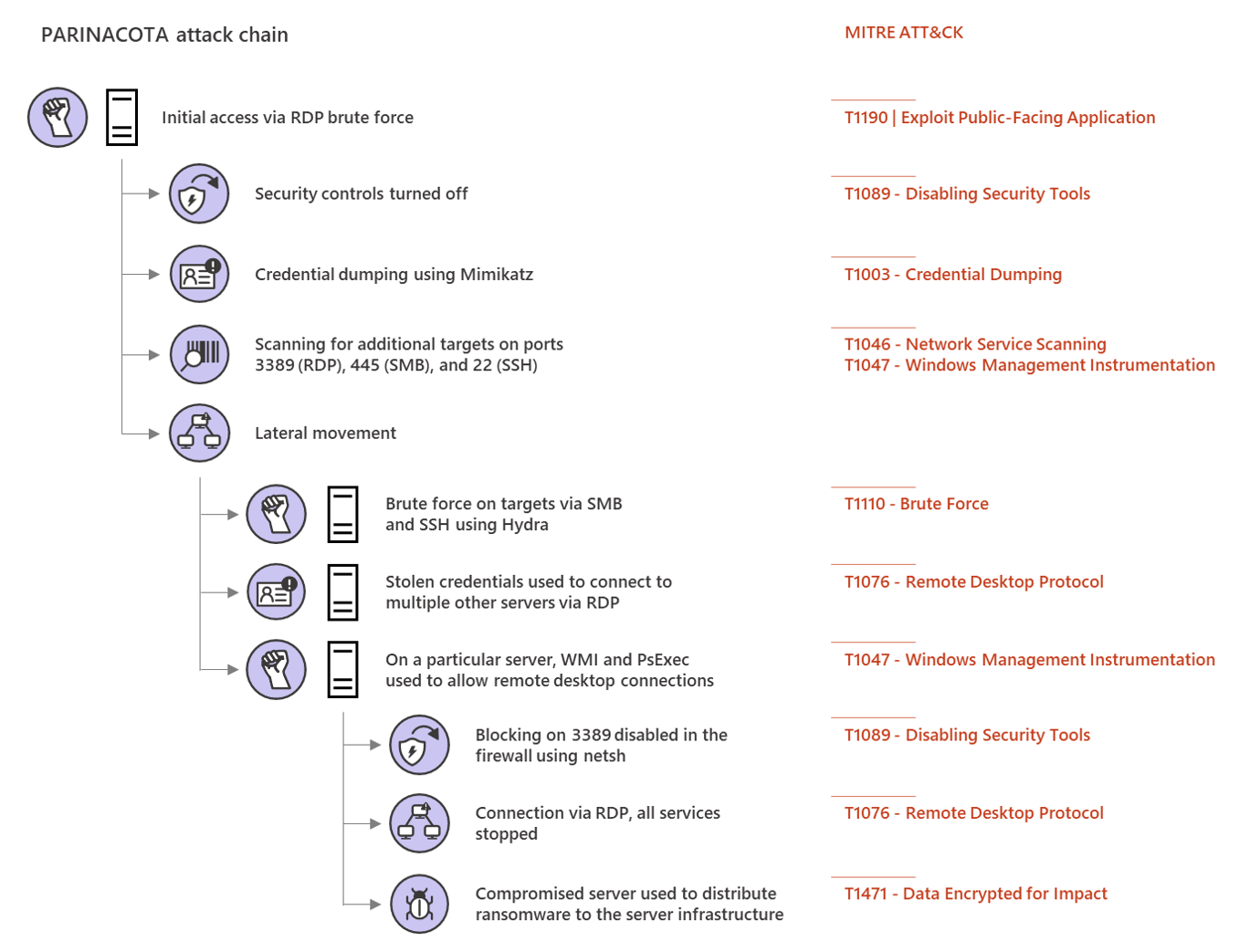
Microsoft Threat Protection Intelligence Team released in the past some great detailed articles (e.g. 2020-03 Ransomware, 2018-03 FinFisher, 2017-05 wannacry, 2017-06 petya) about different real world attack chains including a mapping to MITREs framework Att&ck. 

Parinacota attack chain


Picture from Microsoft Security https://www.microsoft.com/security/blog/2020/03/05/human-operated-ransomware-attacks-a-preventable-disaster/ 
The article on Parinacota includes details like how for example persistence is archived:
  • Windows Registry modifications using .bat or .reg files to allow RDP connections Picture from https://www.microsoft.com/security/blog/2020/03/05/human-operated-ransomware-attacks-a-preventable-disaster/
  • Setting up access through existing remote assistance apps or installing a backdoor
  • Creating new local accounts and adding them to the local administrators group 
    Picture from https://www.microsoft.com/security/blog/2020/03/05/human-operated-ransomware-attacks-a-preventable-disaster/

 Wadhrama attack chain

Microsoft Threat Protection Intelligence Team https://www.microsoft.com/security/blog/2020/03/05/human-operated-ransomware-attacks-a-preventable-disaster/

 Ryuk attack chain

Doppelpaymer attack chain


Microsoft Threat Protection Intelligence Team https://www.microsoft.com/security/blog/2020/03/05/human-operated-ransomware-attacks-a-preventable-disaster/

Windows file or folder in use - cant be deleted or modified

When trying to delete files or folders, clean malware, or just modify something on your Windows system, windows won't let you, because the file is open in another programm:

Folder In Use / File In Use
The action can't be completed because the folder or a file in it is open in another program
Chose the folder or file and try again

How to find the program which is using the file?

1. Download Microsofts sysinternals tool "process explorer":

2. Open procexp.exe with admin rights
3. Use the magnifying glass or press CTRL + F


4. Search for the file or foldername (only parts of it will do)

5. Doubleclick the found process or use the process id PID to find the process


In order to show the Handles, which are opened by a process, either go to View\Lower Pane View\Handles or press CTRL+D


6. You can no close the process or close the handle, however closing the handle might crash your application or cause system instability, as process explorer will tell you, too.

OS Credential Dumping - Att&ck T1003

Some places to start to monitor (e.g. for unexpected processes interacting with one of the following), collector forensics and try to protect for OS Credential Dumping Mitre Att&ck T1003 are:

Place ----- ATT&CK Subtechnique ID
LSASS Memory -----T1003.001
Security Account Manager ----- T1003.002
NTDS ----- T1003.003
LSA Secrets ----- T1003.004
Cached Domain Credentials ----- T1003.005
DCSync ----- T1003.006
Proc Filesystem ----- T1003.007
/etc/passwd ----- T1003.008
/etc/shadow ----- T1003.008

Each attack technique is described with examples, as well as possible mitigations and detections.

Sysmon 11 released

Many SIEM installations use sysinternals sysmon as one of many data sources. Mark Russinovich (Microsoft Azure CTO, co-creator of sysinternals) released a video explaining some of the new features of Sysmon 11, which was released on 28th April.

A new useful feature is archiving a file, just before it is deleted. Some attackers delete their tools after gathering information. In order to understand their tools or even search for MD5 or imphashes, the sysmon 11 archiving function can be helpful.


(Source: https://www.youtube.com/watch?v=_MUP4tgdM7s)

Malware using PowerShell - PowerShell Logging "Script Block Logging"

More and more so called "fileless malware" uses powershell in order to execute malicious actions. In order to find possible malicious powershell commands or ps-scripts, it is very useful to log them, automatically send them to your SIEM and analyze them. Also if possible, disable Powershell for your users, but this is in the real-world sometimes hard or even not possible.

1. Disable PowerShell for users if possible via GPO
2. Fileless malware using PowerShell - PowerShell Logging using Script Block Logging

https://docs.microsoft.com/en-us/powershell/module/microsoft.powershell.core/about/about_logging_windows?view=powershell-6#enabling-script-block-logging


Enabling Script Block Logging

When you enable Script Block Logging, PowerShell records the content of all script blocks that it processes. Once enabled, any new PowerShell session logs this information. It's recommended to enable Protected Event Logging.

Using Group Policy

To enable automatic transcription, enable the Turn on PowerShell Script Block Logging feature in Group Policy through Administrative Templates -> Windows Components -> Windows PowerShell.

Using the Registry

Run the following function:
PowerShell
function Enable-PSScriptBlockLogging
{
    $basePath = 'HKLM:\Software\Policies\Microsoft\Windows' +
      '\PowerShell\ScriptBlockLogging'

    if(-not (Test-Path $basePath))
    {
        $null = New-Item $basePath -Force
    }

    Set-ItemProperty $basePath -Name EnableScriptBlockLogging -Value "1"
}
 
Powershell-Commands will be logged in Windows Eventlog with Event-ID 4104.

Monitor UniFi WLAN Access Point with PRTG with SNMPv3 Auth+Encrypted

This is a tiny guide howto monitor your UniFi wireless accesspoint, in this case a Unifi U7 pro with SNMPv3 with AES-Encryption and SHA-Auth...