Showing posts with label Att&ck. Show all posts

Windows Persistence Map v0.1

Mitres Att&ck framework writes about persistence TA0003: "The adversary is trying to maintain their foothold.

There are multiple ways to get persistence in a Microsoft Windows operating system. Pepe Berba has created a nice overview of linux persistence techniques as a map, so I tried to do the same thing for Windows. This is version v0.1 of it:

Windows Persistence Map v0.1


Almost perfect protection for websites and other services - Mutual TLS

Its hard to secure your IT services and applications. The list of possible attacks is long, as shown in the Mitre Att&ck framework, the OWASP lists and so on.

What helps drastically reducing the attack surface is to use mutual TLS (explanations see https://www.cloudflare.com/learning/access-management/what-is-mutual-tls/ or https://en.wikipedia.org/wiki/Mutual_authentication#mTLS or https://www.youtube.com/watch?v=x7B5CwcxCDI or https://www.ietf.org/rfc/rfc5246.txt) for authentication to establish access to your service/application. If you use certificates to authenticate your clients before accessing the first byte to of your service/application, you stop attacks at OSI layer 5. The attackers cant reach OSI layer 6 and 7 which  contain the most vulnerabilites and weaknesses by far.

I've asked ChatGPT to make a list to compare regular web applications with web applications, which use mutual TLS:

Attack TypeRegular Web ApplicationSecured Web Application (Mutual TLS)Mitre ATT&CK Tactic(s)
Cross-Site Scripting (XSS)VulnerableProtectedInitial Access, Execution, Persistence
SQL InjectionVulnerableProtectedCollection, Credential Access, Execution
Cross-Site Request Forgery (CSRF)VulnerableProtectedInitial Access, Collection
Session HijackingVulnerableProtectedCollection, Credential Access
Brute Force AttacksVulnerableProtectedCredential Access, Execution
ClickjackingVulnerableProtectedCollection, Defense Evasion
Directory TraversalVulnerableProtectedCollection, Exfiltration
File Upload VulnerabilitiesVulnerableProtectedExecution, Collection
LDAP InjectionVulnerableProtectedCollection, Credential Access
Man-in-the-Middle (MitM) AttacksVulnerableProtectedCollection, Credential Access, Execution
Remote File InclusionVulnerableProtectedExecution, Collection
XML External Entity (XXE) InjectionVulnerableProtectedCollection, Credential Access
Security MisconfigurationsVulnerableWay less vulnerableDefense Evasion, Discovery
HTTP Header InjectionVulnerableProtectedDefense Evasion, Execution
DDoS AttacksVulnerableWay less vulnerableImpact
API Security IssuesVulnerableProtectedCollection, Credential Access, Execution
HTTP Parameter PollutionVulnerableProtectedDefense Evasion, Execution
Session SidejackingVulnerableProtectedCredential Access, Collection
Social Engineering AttacksVulnerableProtectedCollection, Defense Evasion
Cross-Site Tracing (XST)VulnerableProtectedCredential Access, Collection
Fuzzing AttacksVulnerableProtectedExecution, Defense Evasion
CryptanalysisVulnerableWay less vulnerableCollection, Credential Access
Reverse EngineeringVulnerableProtectedCollection, Credential Access
Subdomain TakeoverVulnerableProtectedInitial Access, Collection
Session Token TheftVulnerableProtectedCredential Access, Collection
Vulnerabilies/0daysVulnerableWay less vulnerableInitial Access
Broken Object Level Authorization (BOLA)VulnerableProtectedCredential Access, Authorization
Improper Rate LimitingVulnerableWay less vulnerableDefense Evasion, Impact
Insecure Direct Object References (IDOR)VulnerableProtectedCollection, Credential Access
Insufficient Logging and MonitoringVulnerableWay less vulnerableDiscovery, Defense Evasion
Insecure DeserializationVulnerableProtectedExecution, Defense Evasion
Lack of Resources and Rate LimitingVulnerableProtectedDefense Evasion, Impact
Mass AssignmentVulnerableProtectedCredential Access, Collection
Insecure Cryptographic StorageVulnerableVulnerableCollection, Credential Access
Use of Components with Known VulnerabilitiesVulnerableWay less vulnerableCollection, Execution
Unvalidated Redirects and ForwardsVulnerableProtectedDefense Evasion, Initial Access
XML External Entity (XXE) InjectionVulnerableProtectedCollection, Credential Access

Caution: This is a simplified point of view - it is only focusing on the inital access. Mutual TLS certificate based authentication make the initial access for attackers almost impossible. Therefore most attacks are not possible anymore without the attackers gets his hands on a client certificate with its private key. However your IT stack is still vulnerable to OSI layer 1-5 attacks as well as e.g. to vulnerabilities within OpenSSL, LibreSSL etc.


Mitre D3fend Framework - Att&ck from a defenders perspective

Mitre published another awesome framework called d3fend.mitre.org

Mitre D3fend

It is using the att&ck framework but from a defenders perspective :-) 

D3fend Att&ck relationship


Windows fileless persistence local privilege escalation using sc.exe sdset

Alh4zr3d and Grzegorz Tworek wrote about a fileless, local privilege escalation backdoor in order to gain persistence (TA0003) using the following Windows command:

sc.exe sdset scmanager D:(A;;KA;;;WD) 

Windows sc.exe persistence fileless backdoor

Setting the security descriptor on the service manager allows anyone to start SYSTEM services.

To show the security descriptor of service manager:

sc.exe sdshow scmanager


The Mitre Att&ck framework has technique T1569.002 for this "System Services: Service Execution", writing: "Adversaries may abuse the Windows service control manager to execute malicious commands or payloads. The Windows service control manager (services.exe) is an interface to manage and manipulate services. The service control manager is accessible to users via GUI components as well as system utilities such as sc.exe and Net."

Microsofts own documentation about sc.exe sdset:

Sets a service's security descriptor, using the Service Descriptor Definition Language (SDDL).

Syntax

sc [<ServerName>] sdset <ServiceName> <ServiceSecurityDescriptor>

Parameters

Parameter

Description

<ServerName>

Specifies the name of the remote server on which the service is located. The name must use the Universal Naming Convention (UNC) format (for example, \\myserver). To run SC.exe locally, omit this parameter.

<ServiceName>

Specifies the service name returned by the getkeyname operation.

<ServiceSecurityDescriptor>

Specifies the service descriptor in SDDL.

/?

Displays help at the command prompt.


To explain the DACL D:(A;;KA;;;WD) gav_gall asked ChatGPT to explain:

ChatGPT DACL Windows persistence backdoor


New LAPS version explained

Microsoft will release a new version of Local Administrator Password Solution (LAPS), which   provides new Azure AD features as well as new Active Directory OnPrem features and some migration features from the old version to the new one.

A video explaining everything in detail can be found here:


This video includes a nice overview showing how LAPS is working internally using CSP (lapscsp.dll), PowerShell (lapspsh.dll) or GPOs and LAPS core logic (laps.dll) which then reads and updates the expiry of accounts as well as updates their password, either in Azure Active Directory or in Windows Server Active Directory on premise:LAPS internal logic and flow architecture

Source: https://learn.microsoft.com/en-us/windows-server/identity/laps/laps-concepts

LAPS can be used as solution against pass-the-hash (https://attack.mitre.org/techniques/T1550/002) and lateral-traversal attacks (https://attack.mitre.org/tactics/TA0008), as well as for securing user help desk access or recover to devices with a fine-grained security model and for RBAC in Azure AD.


Security Testing - Review LAPS

It is a good idea to review your companys Microsoft's Local Administrator Password Solution LAPS installation. Leo Loobeek published a nice powershell-script which helps in finding groups which are specifically delegated by sysadmins and finding users with "All Extended Rights" that can view passwords, and viewing all computers with LAPS enabled.

https://github.com/leoloobeek/LAPSToolkit
https://github.com/leoloobeek/LAPSToolkit/blob/master/LAPSToolkit.ps1

  • Get-LAPSComputers
    Displays all computers with LAPS enabled, password expriation, and password if user has access

  • Find-LAPSDelegatedGroups
    Searches through all OUs to see which AD groups can read the ms-Mcs-AdmPwd attribute

  • Find-AdmPwdExtendedRights
    Parses through ExtendedRights for each AD computer with LAPS enabled and looks for which group has read access and if any user has "All Extended Rights". Sysadmins may not be aware the users with All Extended Rights can view passwords and may be less protected than the users in the delegated groups. An example is the user which adds a computer to the domain automatically receives the "All Extended Rights" permission. Since this function will parse ACLs for each AD computer, this can take very long with a larger domain.
I've seen installations, where LAPS was implemented to improve security. However due to wrong configuration way to many people where able to read passwords in Active Directory (Mitre Att&ck Tactic Credential Access)

Mitre Att&ck Micro Emulations - Test your own security

It is a very good idea to test your own IT-security systems and processes, if they detect something and what level of detail they provide. Mitre Engenuity launched a new project called: Micro Emulation

Mitre Micro Emulations

On GitHub version 4 was already released providing the first set of tools, which contains ActiveDirectory Enumeration, FileAccess, NamedPipes, ProcessInjection, UserExecution ISOBypass, Marcos and Shortcuts, WebShells, WindowsRegistry: https://github.com/center-for-threat-informed-defense/adversary_emulation_library/releases .

Citrix ICA SSO saved credentials in XOR obfuscated readable storage

The Citrix ICA application stores user credentials for its SingleSignOn SSO functionality in readable form using XOR obfuscation with the key „C“, as Benjam Delpy wrote: https://twitter.com/gentilkiwi/status/1570525137962930176

Mimikatz version 3 will be able to reveal this as shown in the following GIF with Windows 11 and Credential Guard enabled: https://video.twimg.com/tweet_video/Fcudz49XoAAfNHO.mp4


Quick win securing Azure AD

An easy quick win for securing Azure Active Directory passwords is the feature "Azure AD Password Protection". This helps you in mitre att&cks tactic credential access, for example in the technique brute force and its sub-techniques password guessing, password spraying, credential stuffing, etc.

Users are recommended to avoide simple passwords and instead should use pass-sentences. Password breaches of the recent past reveal that the majority still chose simple passwords. Azure AD Password Protection finds (audit mode) or enforces (enforce mode) stronger passwords for everybody. There is a hidden global banned password list which is applied to every user in the Azure AD tenant. Additionally you can block custom words like your companys name, your companys slogan, the founders or CEOs name, most used childerens names or your country or famous sport team names, which are often used as weak passwords.

Azure AD security custom banned passwords

Microsoft promises the "password validation algorithm" automatically detects/blocks variants and combinations like "password!1", "!password", "p@ssw0rd" and so on.

This is also available for on-premise Active Directory using an agent:

On-Premise Active Directory security quick win


However this needs an additional license, you need to install and agent on your domain controllers, you need to reboot the domain controllers and you need Azure AD. Also you do not see the changing content of Microsofts global password list and there is no enforcement based on Active Directory groups or OUs, so you for example cant just enforce it to priviledged accounts but must enforce it for everybody.

Of course I highly recommend to use Multi Factor Authentication MFA everywhere.

Decrypt TLS sessions of Chrome & Firefox

How to decrypt TLS Sessions of browsers like Chrome and Firefox without Man-in-the-Middle MitM/Adversary-in-the-Middle AitM (Att&ck T1557) like ARP Cache Poisoning, DNS Spoofing, LLMNR/NBT-NS Poisoning and SMB Relay, DHCP Spoofing, Proxy, burp, PAC, WPAD, etc:

This is a silent way to debug issues. However your EDR/SIEM/logings solution should check for SSLKEYLOGFILE entries in your environment variables because this is a silent way to break TLS without informing the user.

Use the SSLKEYLOGFILE in your environmentvariables of your windows, linux or macos system.

Windows

Simply create an environmentvariable called SSLKEYLOGFILE and set the value of the path to the text-file, in which the TLS private keys should be saved:

Windows environmentvariables SSLKEYLOGFILE TLS decrypt
Linux

Simply create an environmentvariable called SSLKEYLOGFILE and set the value of the path to the text-file, in which the TLS private keys should be saved:

export SSLKEYLOGFILE=$HOME/tlsprivatekeys.txt

Linux SSLKEYLOGFILE decrypt TLS

Decrypt TLS sessions with Wireshark

  1. Open the wireshark prefecenses
  2. Go to TLS 
  3. Select your SSLKEYLOGFILE text file as (Pre)-Master-Secret filename as shown in the following screenshot:
Wireshark to decrypt TLS using privatekeys SSLKEYLOGFILE


Linux persistence techniques as a map

Pepe Berba has created a nice overview of linux persistence techniques as a maphttps://pberba.github.io/security/2021/11/22/linux-threat-hunting-for-persistence-sysmon-auditd-webshell/

Linux persistence map v0.2 from pberba

It shows places/locations/paths for persistense in systemd-generators, motd, /usr/sbin/cron (Cron Scheduler), rootkits, /sbin/init [PID 1] (System systemd), web server (web shells), systemd --user (User systemd), /usr/sbin/sshd (SSH Daemon), /bin/bash (Login Shell), user systemd-generators, user systemd timers, user systemd services, etc and its mitre attack technique ids. 

API security - How to start securing APIs

APIs are great, they are everywhere and they grow. When thinking about API security very often very basic security mechanisms are missing. This article is about the very minimum frist steps you should always take:

First steps to think about

  1. Only expose the parts of the interface which are necessary, not the entire API
  2. Only collect and publish the data which is really necessary
  3. Only grant access to people/systems which need it
  4. Switch sides and think like an attacker ("Write a black mirror episode about your API", Keith Casey 2019)

API gateway

Use API gateways, because they take care of:

  1. Lifecycle: In which state is your API? How was it designed and built? To which gateways is it published and is it live & available?
  2. Interface: What does it expose? Which resources, methods, objects and fields?
  3. Access: Who can use it? Which users or groups, which authentication, which clients, which contexts?
  4. Usage: How to succeed with it? API documentation, debugging and errors, tracking usage, examples & sdks?
  5. Business: How does it drive business goals? Partner CRM, marketing, business analytics

API gateways like apigee, kong, apache apisix, krakenD, the list is long. Great overview about open source api gateways: https://www.predic8.de/open-source-api-management-kong-tyk-fusio-umbrella-wso2.htm

API Access

Use available standards like OpenID connect. Don't just use OAuth Core, but instead the OpenID connect, because you'd probably missing a lot of different additional important standards. A list of the few common OAuth/OIDC specifications may show why:
 

Input validation

There are so many different attack vectors. One of the most basic yet so often missing things is good input validation, which helps stopping classical attacks like XSS, injections, deserialization and so on. But it also stops breaking the programms intention or in other words its business logic. 
 
Input validation should be applied in the enforcment of correct syntax (e.g. SSN, date, currency symbol), so the syntactic level and for semantic validation to enforce correctness of their values in the specific business context (e.g. start date is before end date, price is within expected range).

There is so much more

SIEM Use Case - find suspicious powershell commands

Microsofts Powershell is a very mighty tool, which can be used as LoLBin. To detect suspicious powershell commands or scripts, a SIEM use case in order to find suspicious powershell-commands can be:

Logging / Data Source

Active PowerShell Script Block Logging (Event ID 4104) OR use your Advanced Endpoint Protection AEP or Endpoint Detection and Response EDR tool like VMware Carbon Black, Microsoft Defender ATP, Crowdstrike or the other tools.

SIEM use case / fetch suspicious powershell

1. process = powershell.exe

&&

2. cmd = ToBase64String OR FromBase64String OR -e OR -en OR -enc OR -enco OR -encod OR -encode OR -encoded OR -encodedc OR -encodedco OR -encodedcom OR -encodedcomm OR -encodedcomma OR -encodedcomman OR -encodedcommand OR -ec

&&

3. not cmd = Windows\CCM\*

More very useful information

Real world examples of attack chains with Att&ck mapping

Microsoft Threat Protection Intelligence Team released in the past some great detailed articles (e.g. 2020-03 Ransomware, 2018-03 FinFisher, 2017-05 wannacry, 2017-06 petya) about different real world attack chains including a mapping to MITREs framework Att&ck. 

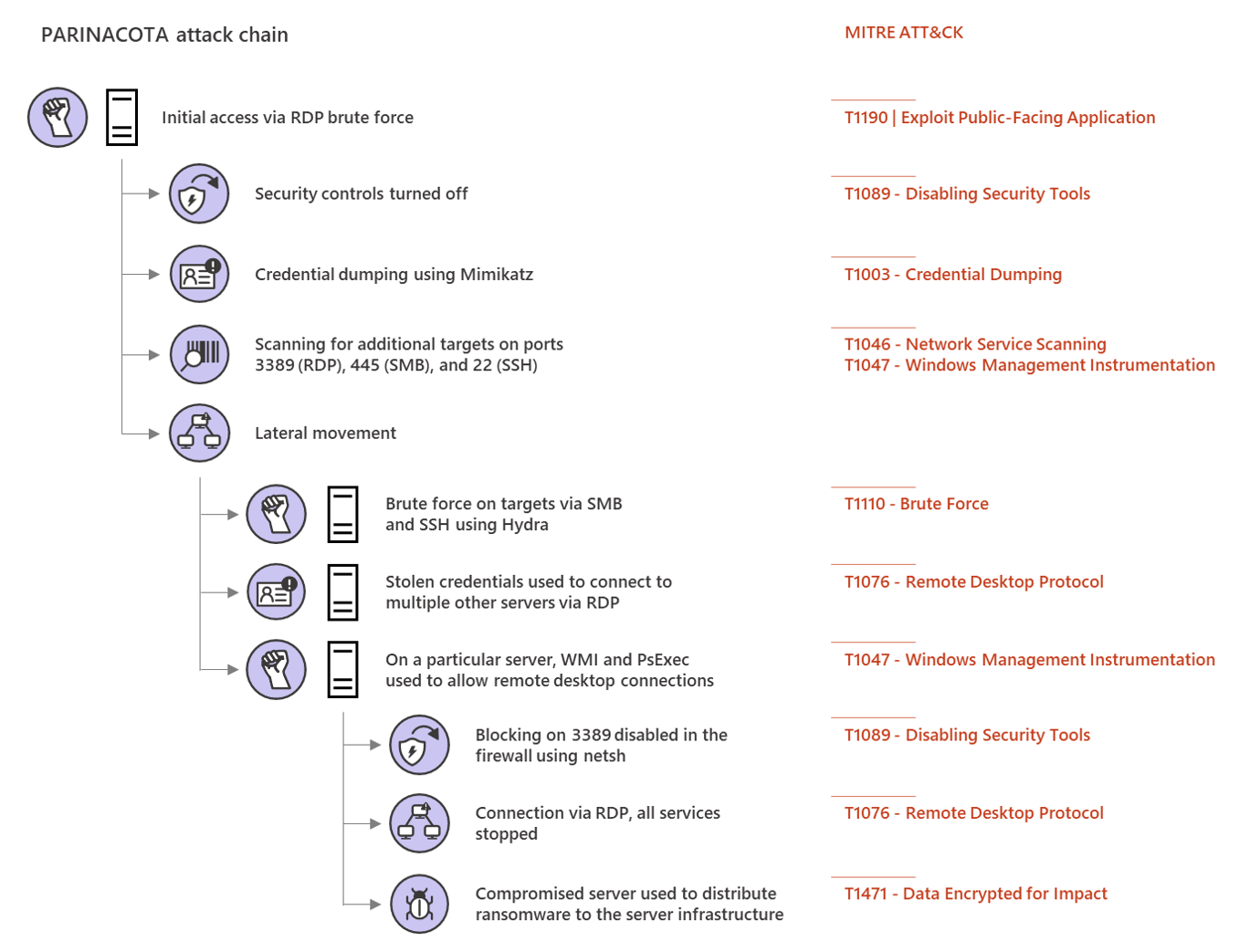
Parinacota attack chain


Picture from Microsoft Security https://www.microsoft.com/security/blog/2020/03/05/human-operated-ransomware-attacks-a-preventable-disaster/ 
The article on Parinacota includes details like how for example persistence is archived:
  • Windows Registry modifications using .bat or .reg files to allow RDP connections Picture from https://www.microsoft.com/security/blog/2020/03/05/human-operated-ransomware-attacks-a-preventable-disaster/
  • Setting up access through existing remote assistance apps or installing a backdoor
  • Creating new local accounts and adding them to the local administrators group 
    Picture from https://www.microsoft.com/security/blog/2020/03/05/human-operated-ransomware-attacks-a-preventable-disaster/

 Wadhrama attack chain

Microsoft Threat Protection Intelligence Team https://www.microsoft.com/security/blog/2020/03/05/human-operated-ransomware-attacks-a-preventable-disaster/

 Ryuk attack chain

Doppelpaymer attack chain


Microsoft Threat Protection Intelligence Team https://www.microsoft.com/security/blog/2020/03/05/human-operated-ransomware-attacks-a-preventable-disaster/

How to increase IT security of a company using quick wins

How to increase my companys IT security? Of course there are many, many, many topics, processes, systems, parameters, awareness and a lot more to implement, adjust, train, improve or get rid of. Following the different available frameworks like MITREs Att&ck, the recommendations from NIST or BSI etc will get you there. However they require a lot of time and some companys want to implement some 'quick wins', before they do they adopt a whole framework (which they should).

So some of those 'quick wins' are:
  • Implement Multi-Factor-Auth or 2FA. Trying to balance security with comfort will let you win your users, for example by implementing MFA or 2FA using PushTokens. 
  • Raising awareness by regularly sending internal phishing mails will make them learn and understand, not to open or click on everything. 
  • Implementing zero trust or microsegmentation will make lateral movement hard. 
  • Regularly scanning your whole environment for vulnerabilities and configurations issues with regular patching and improving hardening will dramatically reduce your attack surface.
  • Restrict administrative permissions, regularly checking if they are still necessary, implementing JIT and securing your directory services using special jump servers with MFA/2FA will help further. Also don't use Microsofts AD Built-in default groups because very often the have to many unnecessary permissions

Some more are described in an article from Microsoft security blog. I personally don't agree on all of them, but it is a possible approach:

Picture from https://www.microsoft.com/security/blog/2020/03/05/human-operated-ransomware-attacks-a-preventable-disaster/
(Picture from Microsoft security blog)
 
 
Keeping in mind the point of view from an attacker might help:
Picture from https://www.microsoft.com/security/blog/2020/03/05/human-operated-ransomware-attacks-a-preventable-disaster/
 (Picture from Microsoft security blog)

Example of Spear Phishing Attack in detail

The McAfee blog released an article about how a current spear phishing attack (T1566) looks like in detail:

https://www.mcafee.com/blogs/other-blogs/mcafee-labs/mcafee-defenders-blog-operation-north-star-campaign/
(Picture from McAfee Blog)

More details about this attack can be found in the McAfee blog article.

Account Lockout Policy - A possible threat

Most companys use an account lockout policy for their directory service like Microsoft Active Directory, LDAP-system, eDirectory or their own environment solution. Locking out accounts is helpful when it comes to password guessing attacks like brute force (https://attack.mitre.org/techniques/T1110/) or similar ones.

However: An attacker is able to use lockout policies, too.

The following scenario is not so old, but was already used in the last two years:
1. Attacker gains access to environment
2. Attacker creates its own administrative accounts
3. Attacker brute forces all other administrative accounts
👉This way, the attacker makes sure, that all legitime administrators are locked out.

This is an advanced threat and a not very common attack, yet. The solution for this is to make sure, that not all accounts are affected by the lockout policy. Instead very few dedicated emergancy accounts, which are normally not used and stored in a safe location, should be excluded from it. Those accounts (as all administrative accounts) should be monitored closely in your SIEM or logging systems.

Windows 10 Core Isolation deactivation via registry

You can deactivate the Windows 10 Core Isolation function by changing the following Registry Key and therefore do "Tampering with Windows 10 Device Protection Security - Switching off Core Isolation or HypervisorEnforcedCodeIntegrity"
HKEY_LOCAL_MACHINE\SYSTEM\CurrentControlSet\Control\DeviceGuard\Scenarios\HypervisorEnforcedCodeIntegrity
Set "Enabled" to
  • 0 = deactivated (off)
  • 1 = activated (on)
Microsoft about Windows 10 Core Isolation or HypervisorEnforcedCodeIntegrity: "Core isolation provides added protection against malware and other attacks by isolating computer processes from your operating system and device. Select 'Core isolation details' to enable, disable, and change the settings for core isolation features."

Mitre ATT&CK tactic: Persistence, Defense Evasion
Mitre ATT&CK sub-technique of T1060 or T1019
Required Permissions: HKEY_LOCAL_MACHINE keys require administrator access to create and modify

OS Credential Dumping - Att&ck T1003

Some places to start to monitor (e.g. for unexpected processes interacting with one of the following), collector forensics and try to protect for OS Credential Dumping Mitre Att&ck T1003 are:

Place ----- ATT&CK Subtechnique ID
LSASS Memory -----T1003.001
Security Account Manager ----- T1003.002
NTDS ----- T1003.003
LSA Secrets ----- T1003.004
Cached Domain Credentials ----- T1003.005
DCSync ----- T1003.006
Proc Filesystem ----- T1003.007
/etc/passwd ----- T1003.008
/etc/shadow ----- T1003.008

Each attack technique is described with examples, as well as possible mitigations and detections.

Monitor UniFi WLAN Access Point with PRTG with SNMPv3 Auth+Encrypted

This is a tiny guide howto monitor your UniFi wireless accesspoint, in this case a Unifi U7 pro with SNMPv3 with AES-Encryption and SHA-Auth...