Showing posts with label Windows Defender ATP. Show all posts

Microsoft Portals overview - msportals.io

The website msportals.io is listing a nice overview of Microsofts portals. For example administrator portals:

Microsoft 365 Admin Portals


Many more can be found on
msportals.io.


Microsoft Windows Defender AntiVirus Performance analysis

When you suspect your Microsoft Defender Antivirus to be a bottleneck for your Windows performance, then you may use Microsofts Defender Antivirus performance analyzer. It helps you with the on-premise Windows Defender Antivirus as well as with the cloud solution Microsoft Defender for Endpoint (Defender ATP).

https://docs.microsoft.com/en-us/microsoft-365/security/defender-endpoint/tune-performance-defender-antivirus?view=o365-worldwide

Especially on developer systems with an IDE Microsoft Defender Antivirus can have a significant performance impact on your system due to the many temporary files, which are not digitally signed but contain exectuable code. Microsofts Defender Antivirus performance can help you to detect:

  • Files with long antivirus scan times
  • Processes with long antivirus scan times
  • File extensions with long antivirus scan times 

Running defender antivirus performance analyzer

  1. Run PowerShell (Admin)
  2. Use the PowerShell command New-MpPerformanceRecording -RecordTo how2itsec-analyze-microsoft-antivirus.etl
  3. Repeate your performance issue, e.g. building your software or opening a programm
  4. Press Enter to stop the trace

Defender Antivirus performance analysis etl

Analysis of the trace 

You can analyze your results using the Get-MpPerformanceReportparameter with one of the following arguments:
Get-MpPerformanceReport    [-Path] <String>
[-TopScans <Int32>]
[-TopFiles  <Int32>
    [-TopScansPerFile <Int32>]
    [-TopProcessesPerFile  <Int32>
        [-TopScansPerProcessPerFile <Int32>]
    ]
]
[-TopExtensions  <Int32>
    [-TopScansPerExtension <Int32>]
    [-TopProcessesPerExtension <Int32>
        [-TopScansPerProcessPerExtension <Int32>]
        ]
    [-TopFilesPerExtension  <Int32>
        [-TopScansPerFilePerExtension <Int32>]
        ]
    ]
]
[-TopProcesses  <Int32>
    [-TopScansPerProcess <Int32>]
    [-TopExtensionsPerProcess <Int32>
        [-TopScansPerExtensionPerProcess <Int32>]
    ]
]
[-TopFilesPerProcess  <Int32>
    [-TopScansPerFilePerProcess <Int32>]
]
[-MinDuration <String>]
[-Raw]

Example Analysis

Get-MpPerformanceReport -Path .\how2itsec-analyze-microsoft-antivirus.etl -TopFiles 10Get-MpPerformanceReport Defender analysis1

Get-MpPerformanceReport -Path .\how2itsec-analyze-microsoft-antivirus.etl -TopFiles 10 -TopScansPerFile 3 Get-MpPerformanceReport Defender analysis files scans per file

Get-MpPerformanceReport -Path .\how2itsec-analyze-microsoft-antivirus.etl -TopExtensions:10 -TopProcesses:10 -TopScans:10Get-MpPerformanceReport Defender analysis2 Top processes top scans per file

Get-MpPerformanceReport -Path .\how2itsec-analyze-microsoft-antivirus.etl -TopScans:100 -MinDuration:100msGet-MpPerformanceReport Defender analysis3 processes scan duration

Get-MpPerformanceReport -Path .\how2itsec-analyze-microsoft-antivirus.etl -TopScans:100 -MinDuration:500ms -Raw | ConvertTo-Js

Debug Windows Defender AntiVirus Performance JSON

Optimize performance 

Based on your analysis results you can carefully set exclusions or adjust parameters in Windows Defender or Defender for Endpoint (Defender ATP) in order to boost performance.

SIEM Use Case - find suspicious powershell commands

Microsofts Powershell is a very mighty tool, which can be used as LoLBin. To detect suspicious powershell commands or scripts, a SIEM use case in order to find suspicious powershell-commands can be:

Logging / Data Source

Active PowerShell Script Block Logging (Event ID 4104) OR use your Advanced Endpoint Protection AEP or Endpoint Detection and Response EDR tool like VMware Carbon Black, Microsoft Defender ATP, Crowdstrike or the other tools.

SIEM use case / fetch suspicious powershell

1. process = powershell.exe

&&

2. cmd = ToBase64String OR FromBase64String OR -e OR -en OR -enc OR -enco OR -encod OR -encode OR -encoded OR -encodedc OR -encodedco OR -encodedcom OR -encodedcomm OR -encodedcomma OR -encodedcomman OR -encodedcommand OR -ec

&&

3. not cmd = Windows\CCM\*

More very useful information

Real world examples of attack chains with Att&ck mapping

Microsoft Threat Protection Intelligence Team released in the past some great detailed articles (e.g. 2020-03 Ransomware, 2018-03 FinFisher, 2017-05 wannacry, 2017-06 petya) about different real world attack chains including a mapping to MITREs framework Att&ck. 

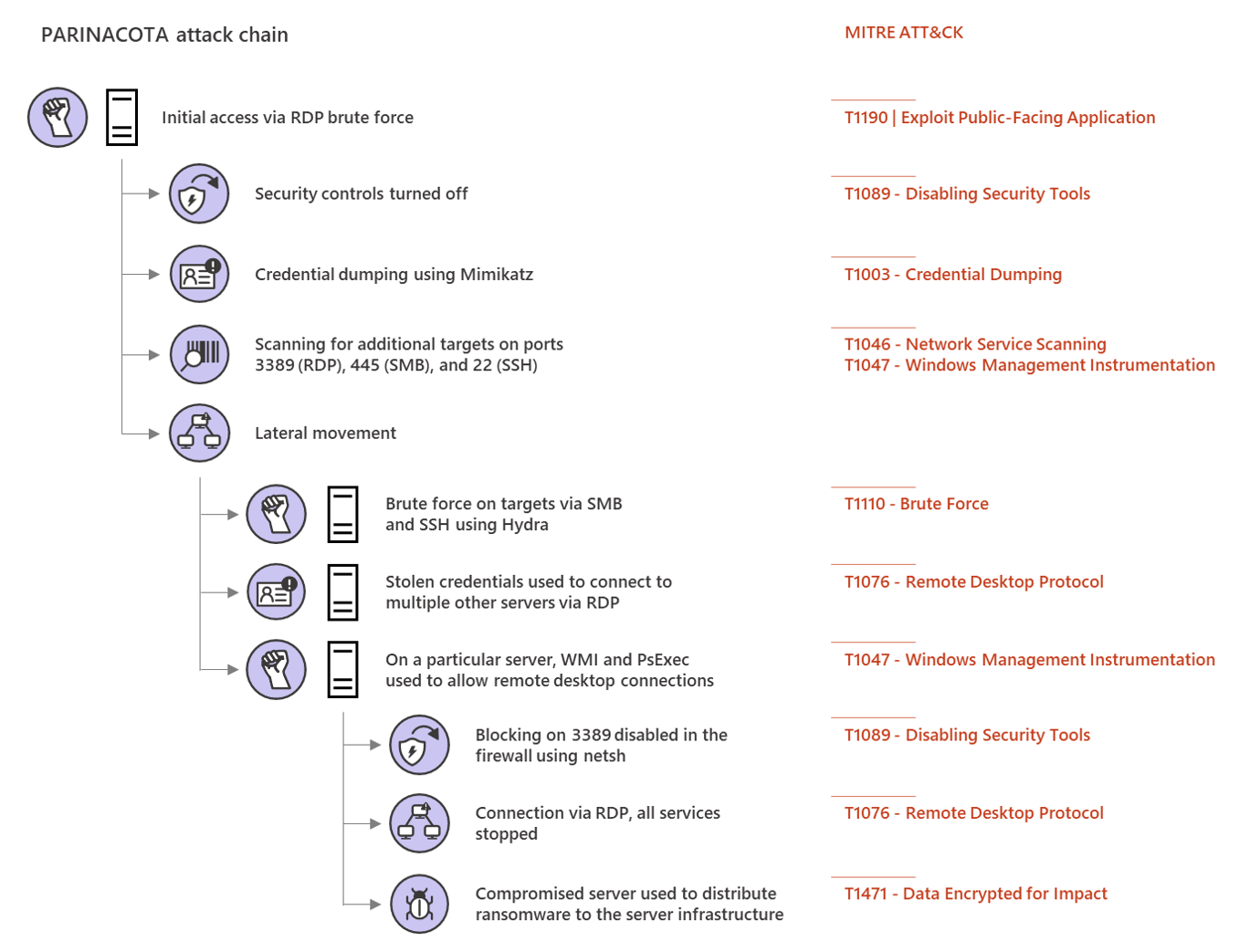
Parinacota attack chain


Picture from Microsoft Security https://www.microsoft.com/security/blog/2020/03/05/human-operated-ransomware-attacks-a-preventable-disaster/ 
The article on Parinacota includes details like how for example persistence is archived:
  • Windows Registry modifications using .bat or .reg files to allow RDP connections Picture from https://www.microsoft.com/security/blog/2020/03/05/human-operated-ransomware-attacks-a-preventable-disaster/
  • Setting up access through existing remote assistance apps or installing a backdoor
  • Creating new local accounts and adding them to the local administrators group 
    Picture from https://www.microsoft.com/security/blog/2020/03/05/human-operated-ransomware-attacks-a-preventable-disaster/

 Wadhrama attack chain

Microsoft Threat Protection Intelligence Team https://www.microsoft.com/security/blog/2020/03/05/human-operated-ransomware-attacks-a-preventable-disaster/

 Ryuk attack chain

Doppelpaymer attack chain


Microsoft Threat Protection Intelligence Team https://www.microsoft.com/security/blog/2020/03/05/human-operated-ransomware-attacks-a-preventable-disaster/

Advanced Endpoint Protection Testing from MITRE using ATT&CK

If you are searching for test results about current Advanced Endpoint Protection/Endpoint Detection and Response tools: MITRE is transparently testing some of them using the great ATT&CK map.

Round 1 Testing


In round 1 the following AEP/EDR products were tested:
The following vendors/products will follow:

Example


As an example you can look at the results of the Microsoft Windows Defender ATP results. You can see all techniques which were tested and how the product worked. You even can see screenshots of it:


Screenshot of Microsoft Defender ATP of MITRE ATT&CK Evaluation Round1 Testing 1.A.1 User Execution T1204:


Summary

This is amazing work done by MITRE! 👍 It provides transparency of the Advanced Endpoint Protection AEP/Endpoint Detection and Response EDR products, lets you compare them, check which techniques they protect against and how they work in terms of forensics.

Round2 is already running. 👌

Monitor UniFi WLAN Access Point with PRTG with SNMPv3 Auth+Encrypted

This is a tiny guide howto monitor your UniFi wireless accesspoint, in this case a Unifi U7 pro with SNMPv3 with AES-Encryption and SHA-Auth...