PRTG Hardening Security CSRF

PRTG version 22.1.74 introduces protection from Cross Site Request Forgery (CSRF) attacks to harden the products security. 
In CSRF the attacker sends the victim an URL with an action, like adding an administrative account, transfering some money to another bankaccount or something similar. When the victim clicks on the link, the (unintended) action is executed with the victims permissions. Implementing XSRF tokens prevent this attack. 
Updating PRTG server to 22.1.74 prevents changes to PRTG via web forms that attackers may use to trick PRTG users into performing requests with the user account's context. (CVE-2021-34547)


Explot payload: 

PRTG user accounts after executing payload:


New log4j 1.x vulnerabilities

Apache.org is warning about new log4j vulnerabilities:

CVE-2022-23302

CVE-2022-23302 is a high severity deserialization vulnerability in JMSSink. JMSSink uses JNDI in an unprotected manner allowing any application using the JMSSink to be vulnerable if it is configured to reference an untrusted site or if the site referenced can be accesseed by the attacker. For example, the attacker can cause remote code execution by manipulating the data in the LDAP store. 

CVE-2022-23305 

CVE-2022-23305 is a high serverity SQL injection flaw in JDBCAppender that allows the data being logged to modify the behavior of the component. By design, the JDBCAppender in Log4j 1.2.x accepts an SQL statement as a configuration parameter where the values to be inserted are converters from PatternLayout. The message converter, %m, is likely to always be included. This allows attackers to manipulate the SQL by entering crafted strings into input fields or headers of an application that are logged allowing unintended SQL queries to be executed. 

CVE-2022-23307

CVE-2022-23307 is a critical severity against the chainsaw component in Log4j 1.x. This is the same issue corrected in CVE-2020-9493 fixed in Chainsaw 2.1.0 but Chainsaw was included as part of Log4j 1.2.x.

iPhone iOS SMB CIFS connection

How to establish a SMB CIFS connection from your iOS device (iPhone or iPad), for example to your NAS storage system or some other network share:

  1. Open the "files-app"
    iOS files app
  2. Select the three dots in the upper right corner
  3. Select "connect to server" (in german "Mit Server verbinden"):iOS files connect with server Mit Server verbinden 
  4. Enter your SMB CIFS destination as IPv4 address or FQDN:iOS files SMB CIFS


Detect "log4shell" log4j RCE - CVE-2021-44228

The very critical CVE-2021-44228 can be detected by the following methods as Florian Roth has posted them on GitHub: https://gist.github.com/Neo23x0/e4c8b03ff8cdf1fa63b7d15db6e3860b

Log4Shell - log4j RCE exploitation detection

You can use these commands and rules to search for exploitation attempts against log4j RCE vulnerability CVE-2021-44228

Grep / Zgrep

This command searches for exploitation attempts in uncompressed files in folder /var/log and all sub folders

sudo egrep -i -r '\$\{jndi:(ldap[s]?|rmi|dns):/[^\n]+' /var/log

This command searches for exploitation attempts in compressed files in folder /var/log and all sub folders

sudo find /var/log -name \*.gz -print0 | xargs -0 zgrep -E -i '\$\{jndi:(ldap[s]?|rmi|dns):/[^\n]+'

YARA

Preliminary YARA rules (work in progress)

rule EXPL_Log4j_CVE_2021_44228_Dec21_Soft {
   meta:
      description = "Detects indicators in server logs that indicate an exploitation attempt of CVE-2021-44228"
      author = "Florian Roth"
      reference = "https://twitter.com/h113sdx/status/1469010902183661568?s=20"
      date = "2021-12-10"
      score = 60
   strings:
      $x1 = "${jndi:ldap:/"
      $x2 = "${jndi:rmi:/"
      $x3 = "${jndi:ldaps:/"
      $x4 = "${jndi:dns:/"
   condition:
      1 of them
}

rule EXPL_Log4j_CVE_2021_44228_Dec21_Hard {
   meta:
      description = "Detects indicators in server logs that indicate the exploitation of CVE-2021-44228"
      author = "Florian Roth"
      reference = "https://twitter.com/h113sdx/status/1469010902183661568?s=20"
      date = "2021-12-10"
      score = 80
   strings:
      $x1 = /\$\{jndi:(ldap|ldaps|rmi|dns):\/[\/]?[a-z-\.0-9]{3,120}:[0-9]{2,5}\/[a-zA-Z\.]{1,32}\}/
      $fp1r = /(ldap|rmi|ldaps|dns):\/[\/]?(127\.0\.0\.1|192\.168\.|172\.[1-3][0-9]\.|10\.)/
   condition:
      $x1 and not 1 of ($fp*)
}

rule SUSP_Base64_Encoded_Exploit_Indicators_Dec21 {
   meta:
      description = "Detects base64 encoded strings found in payloads of exploits against log4j CVE-2021-44228"
      author = "Florian Roth"
      reference = "https://twitter.com/Reelix/status/1469327487243071493"
      date = "2021-12-10"
      score = 70
   strings:
      /* curl -s  */
      $sa1 = "Y3VybCAtcy"
      $sa2 = "N1cmwgLXMg"
      $sa3 = "jdXJsIC1zI"
      /* |wget -q -O-  */
      $sb1 = "fHdnZXQgLXEgLU8tI"
      $sb2 = "x3Z2V0IC1xIC1PLS"
      $sb3 = "8d2dldCAtcSAtTy0g"
   condition:
      1 of ($sa*) and 1 of ($sb*)
} 
Source: https://gist.github.com/Neo23x0/e4c8b03ff8cdf1fa63b7d15db6e3860b 

Nextcloud repairing missing indexes in database

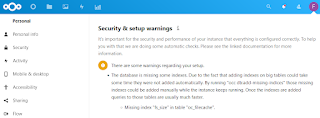
When your nextcloud installation is showing an error like the following, then you could use "occ db:add-missing-indices" to repair it:

Nextcloud database is missing indexes occ db:add-missing-indices

"Security & setup warnings

It's important for the security and performance of your instance that everything is configured correctly. To help you with that we are doing some automatic checks. Please see the linked documentation for more information.

There are some warnings regarding your setup.
  • The database is missing some indexes. Due to the fact that adding indexes on big tables could take some time they were not added automatically. By running "occ db:add-missing-indices" those missing indexes could be added manually while the instance keeps running. Once the indexes are added queries to those tables are usually much faster.

    Missing index "fs_size" in table "oc_filecache"
    .

How to fix it:

privusrA17@nextcloud042:~#
privusrA17@nextcloud042:~# cd /var/www/nextcloud; sudo -u www-data php ./occ db:add-missing-indices
Check indices of the share table.
Check indices of the filecache table.
Adding additional size index to the filecache table, this can take some time...
Filecache table updated successfully.
Check indices of the twofactor_providers table.
Check indices of the login_flow_v2 table.
Check indices of the whats_new table.
Check indices of the cards table.
Check indices of the cards_properties table.
Check indices of the calendarobjects_props table.
Check indices of the schedulingobjects table.
Check indices of the oc_properties table.
privusrA17@nextcloud042:/var/www/nextcloud#


Apache Shiro Vulnerability RCE CVE-2016-4437 - not detected by Qualys and Tenable

Vulnerability-scanning and management is one of the most important topics in IT-security and unfortunately most companies forget or even dont know about it. Recently the US agency CISA published a list of 292 known exploited critical vulnerabilities and a binding operational directive 22-01, which forces US institutions to patch/fix/mitigate the vulnerabilites of the list within 15 or 30 days.

However the vulnerability-scanner-vendors Qualys and Tenable both do not detect the critical rce vulnerability CVE-2016-4437 in apache shiro, or at least not yet:

Both vendors have been contacted, maybe they'll add the signature for the critical vulnerability.

Qualys also has published a dashboard for the binding operational directive 22-01: https://blog.qualys.com/vulnerabilities-threat-research/2021/11/08/qualys-response-to-cisa-alert-binding-operational-directive-22-01


Offtopic PS: I'm a bit excited that a CVE is on the list or CISA, which I reported :-)

Windows VMs have issues resolving DNS names, run into network timeouts or packet loss

Problem

Windows VMs (VMware vSphere) have issues when trying to resolve DNS names and run into network timeouts or packet loss on other protocols, too.

For example running a simple PowerShell script shows the issue (Change *YourFQDN* to your FQDN and '*DNS-Server-IP*' to your DNS server ip-address) :
 

1..1000 | Foreach-Object -Process {
    [pscustomobject]@{
        Try         = $_
        ElapsedTime = (Measure-Command -Expression {
                Resolve-DnsName -DnsOnly -QuickTimeout -NoHostsFile -Name '*YourFQDN*' -Server '*DNS-Server-IP*'
            }).TotalMilliseconds -as [int]
    }
} |
    Group-Object -Property 'ElapsedTime' |
    Sort-Object -Property ‚Count'

PowerShell DNS query test script

From 1000 DNS-queries 541x were answered within 2ms
From 1000 DNS-queries 243x were answered within 1ms
From 1000 DNS-queries 57x were answered within 3ms
From 153 DNS-queries were not answered, timeout >1000ms

Debug-Logs of vnetWFP show the event „DEBUG: ALEInspectInjectComplete : Packet injection status is : c000021b”.

Solution

Update your VMware Tools 11.x with Guest Introspection Driver to version 11.2.6 and reboot your VM or uninstall the Guest Introspection Driver. We first suspected it is VMware NSX-T or VMware Carbon Black EDR, but it was not. It was the NSX Guest Introspection Driver.

Root Cause: Packet drop is seen due to intermittent failure reported by the Microsoft WFP packet injection API.

https://kb.vmware.com/s/article/79185

After the update or removal of the driver the issues were gone:

PowerShell DNS query test script after vmware tools update

From 1000 DNS-queries 985x were answered within 1ms
From 1000 DNS-queries 10x were answered within 2ms
From 1000 DNS-queries 3x were answered within 3ms
From 1000 DNS-queries 1x was answered within 4ms
From 1000 DNS-queries 1x was answered within 35ms
From 1000 DNS-queries 0x timed out.

Microsoft SmartScreen - Mark of the Web Zone.Identifier ReferrerUrl in NTFS Alternate DataStream

From where does Windows know, if a file is from a trusted or untrusted source? Microsofts Smartscreen writes the downloaded origin into the NTFS Alternate DataStreams of the file. In earlier version of windows it was the Zone, since Windows10 its the source URL, too. 

Example: I've downloaded procexp.com from https://live.sysinternals.com/procexp.exe:

SmartScreen Zone.Identifier NTFS Alternate Datastream

as ZoneID, ReferrerURL and HostUrl. This is also called Windows Defender SmartScreen Extended Mark of the Web. 

Additional testing for Microsoft Defender Smartscreen can be found here: https://demo.smartscreen.msft.net/ & https://docs.microsoft.com/en-us/deployedge/microsoft-edge-security-smartscreen

Windows Credential Guard CredGuard active?

If you want to check if Microsofts Windows Credential Guard CredGuard is active, you may do so by either checking msinfo32.exe or powershell:

CredGuard Status - msinfo32.exe:

msinfo32.exe credential guard

CredGuard Status - Powershell

[bool] (Get-CimInstance -ClassName Win32_DeviceGuard -Namespace root\Microsoft\Windows\DeviceGuard).SecurityServicesRunning -eq $true

true = active
false =inactive


Information about Credential Guard

Credential Guard CredGuard explained

"Kerberos, NTLM, and Credential manager isolate secrets by using virtualization-based security. Previous versions of Windows stored secrets in the Local Security Authority (LSA). Prior to Windows 10, the LSA stored secrets used by the operating system in its process memory. With Windows Defender Credential Guard enabled, the LSA process in the operating system talks to a new component called the isolated LSA process that stores and protects those secrets. Data stored by the isolated LSA process is protected using virtualization-based security and is not accessible to the rest of the operating system. LSA uses remote procedure calls to communicate with the isolated LSA process.

For security reasons, the isolated LSA process doesn't host any device drivers. Instead, it only hosts a small subset of operating system binaries that are needed for security and nothing else. All of these binaries are signed with a certificate that is trusted by virtualization-based security and these signatures are validated before launching the file in the protected environment.

When Windows Defender Credential Guard is enabled, NTLMv1, MS-CHAPv2, Digest, and CredSSP cannot use the signed-in credentials. Thus, single sign-on does not work with these protocols. However, applications can prompt for credentials or use credentials stored in the Windows Vault which are not protected by Windows Defender Credential Guard with any of these protocols. It is strongly recommended that valuable credentials, such as the sign-in credentials, not be used with any of these protocols. If these protocols must be used by domain or Azure AD users, secondary credentials should be provisioned for these use cases.

When Windows Defender Credential Guard is enabled, Kerberos does not allow unconstrained Kerberos delegation or DES encryption, not only for signed-in credentials, but also prompted or saved credentials."

https://docs.microsoft.com/en-us/windows/security/identity-protection/credential-guard/credential-guard-how-it-works


Ransomware video by Last Week Tonight with John Oliver

 A quite nice explanation of ransomware as a video by Last Week Tonight with John Oliver:


Zenmap show SSHv2 algorithms/cipher suite

Discover the used SSHv2 algorithms/cipher suite using nmap or zenmap can be done using the follwing nse-script and steps:

URL: https://nmap.org/nsedoc/scripts/ssh2-enum-algos.html
Download: https://svn.nmap.org/nmap/scripts/ssh2-enum-algos.nse

Howto Use Guide

  1. Download NSE-Script
  2. Save nse-script-file into your ...\NMap\Scripts\ folder
    NMap\Scripts\ folder screenshot
  3.  Run nmap or zenmap and the command: nmap --script ssh2-enum-algos *your-target*
    Zenmap screenshot

Example Output

Starting Nmap 7.80 ( https://nmap.org ) at 2021-07-03 21:18 Mitteleuropäische Zeit
Nmap scan report for 10.140.68.24
Host is up (0.016s latency).
Not shown: 997 filtered ports
PORT STATE SERVICE
22/tcp open ssh
| ssh2-enum-algos:
| kex_algorithms: (10)
| curve25519-sha256
| curve25519-sha256@libssh.org
| ecdh-sha2-nistp256
| ecdh-sha2-nistp384
| ecdh-sha2-nistp521
| diffie-hellman-group-exchange-sha256
| diffie-hellman-group16-sha512
| diffie-hellman-group18-sha512
| diffie-hellman-group14-sha256
| diffie-hellman-group14-sha1
| server_host_key_algorithms: (5)
| rsa-sha2-512
| rsa-sha2-256
| ssh-rsa
| ecdsa-sha2-nistp256
| ssh-ed25519
| encryption_algorithms: (6)
| chacha20-poly1305@openssh.com
| aes128-ctr
| aes192-ctr
| aes256-ctr
| aes128-gcm@openssh.com
| aes256-gcm@openssh.com
| mac_algorithms: (10)
| umac-64-etm@openssh.com
| umac-128-etm@openssh.com
| hmac-sha2-256-etm@openssh.com
| hmac-sha2-512-etm@openssh.com
| hmac-sha1-etm@openssh.com
| umac-64@openssh.com
| umac-128@openssh.com
| hmac-sha2-256
| hmac-sha2-512
| hmac-sha1
| compression_algorithms: (2)
| none
|_ zlib@openssh.com 

Author: Kris Katterjohn
License:
Same as Nmap--See https://nmap.org/book/man-legal.html

"gpupdate" vs "gpupdate /force" & Group Policy Processing Order

gpupdate vs gpupdate /force

 
Microsoft Windows Group Policy refresh can be manually using the command "gpupdate". There is a option called "/force". The difference between both is:
  • gpupdate = if there are not changes, we dont change anything
  • gpupdate /force = reapply all settings eventhough nothing has changed; changes are immediatly applied

Source: https://docs.microsoft.com/en-us/windows-server/administration/windows-commands/gpupdate

Group Policy Processing Order

With this keep in mind the group policy processing order, in which the group policies are applied to windows:
  1. At first Local Group Policies are applied
  2. Second comes the Site Group Policies
  3. Third are the Domain Group Policies
  4. Final are the OU Group Policies (If there are multiple OUs, they are applied top to down)
Sources: https://docs.microsoft.com/en-us/previous-versions/windows/it-pro/windows-server-2003/cc785665(v=ws.10)?redirectedfrom=MSDN & https://docs.microsoft.com/en-us/previous-versions/windows/it-pro/windows-server-2003/cc757050(v=ws.10)?redirectedfrom=MSDN

eBPF will change a lot like JavaScript did - Netflix example

Netflix released an article about how they use eBPF in order to track and analyze network application traffic without having issues with ressources as well as without having to load extra kernel modules, which almost always break, when the next kernel update is installed. 

In my opinion eBPF will change a lot like JavaScript did, not only network analysis, but also for security products (like advanced endpoint protection, antivirus, forensic tools, etc), for interface extensions, monitoring systems and so on.

Netflix article about how they use eBPF: https://netflixtechblog.com/how-netflix-uses-ebpf-flow-logs-at-scale-for-network-insight-e3ea997dca96?gi=669388aa6aa6 

Apache2 wont start due to missing dhparam.pem

If your apache2 on linux system (in this case ubuntu 20) does not start due to "'dhparam.pem' does not exist or is empty", because you might have changed your letencrypt certbot from http to dns in order to get a wildcard certificate, then the error might look like this:

Example:

user@ubuntu:/etc/apache2/sites-available#
user@ubuntu:/etc/apache2/sites-available# systemctl status apache2.service
● apache2.service - The Apache HTTP Server
     Loaded: loaded (/lib/systemd/system/apache2.service; enabled; vendor preset: enabled)
     Active: failed (Result: exit-code) since Sun 2021-06-01 21:51:33 CET; 13s ago
       Docs: https://httpd.apache.org/docs/2.4/
    Process: 542668 ExecStart=/usr/sbin/apachectl start (code=exited, status=1/FAILURE)

Jun 01 21:51:33 *yourdomain.tld* systemd[1]: Starting The Apache HTTP Server...
Jun 01 21:51:33 *yourdomain.tld* apachectl[542686]: AH00526: Syntax error on line 70 of /etc/apache2/sites-enabled/*yourdomain.tld*.conf:
Jun 01 21:51:33 *yourdomain.tld* apachectl[542686]: SSLOpenSSLConfCmd: file '/etc/letsencrypt/live/*yourdomain.tld*/dhparam.pem' does not exist or is empty
Jun 01 21:51:33 *yourdomain.tld* apachectl[542668]: Action 'start' failed.
Jun 01 21:51:33 *yourdomain.tld* apachectl[542668]: The Apache error log may have more information.
Jun 01 21:51:33 *yourdomain.tld* systemd[1]: apache2.service: Control process exited, code=exited, status=1/FAILURE
Jun 01 21:51:33 *yourdomain.tld* systemd[1]: apache2.service: Failed with result 'exit-code'.
Jun 01 21:51:33 *yourdomain.tld* systemd[1]: Failed to start The Apache HTTP Server.
user@ubuntu:/etc/apache2/sites-available#

Solution

To solve this issue, you have to create the missing dhparam.pem file. This is used as a Diffie-Hellman group, which is used in negotiating Perfect Forward Secrecy with clients.

sudo openssl dhparam -out /etc/letsencrypt/live/*yourdomain.tld*/dhparam.pem 2048

Example: 

user@ubuntu:/etc/apache2/sites-available#
user@ubuntu:/etc/apache2/sites-available# sudo openssl dhparam -out /etc/apache2/sites-enabled/*yourdomain.tld*
/dhparam.pem 2048
Generating DH parameters, 2048 bit long safe prime, generator 2
This is going to take a long time
...................+...........+.............+......
....................................................
.+.............................+....................
....................................................
...........................[...]..................++*
user@ubuntu:/etc/apache2/sites-available#


Splunk PowerShell SIEM use cases from splunk .conf

Ryan Kovar and Steve Brant from Splunk released on Splunk .conf 2016 a bunch of useful PowerShell SIEM use cases: https://conf.splunk.com/files/2016/slides/hunting-the-known-unknowns-the-powershell-edition.pdf

Finding Un-­encoded IEX Acivity  

Splunk search: sourcetype="WinEventLog:Security" Process_Command_Line=* | evalProcess_Command_Line=lower(Process_Command_Line) | search Process_Command_Line="*iex (new-­‐object net.webclient).downloadstring(*" | stats VALUES(Process_Command_Line) BY host

Screenshot Page 70 from https://conf.splunk.com/files/2016/slides/hunting-the-known-unknowns-the-powershell-edition.pdf

Source: Page 69 and 70 from https://conf.splunk.com/files/2016/slides/hunting-the-known-unknowns-the-powershell-edition.pdf

New Process Started (EventCode 4688)

Splunk search: index=windows source="WinEventLog:Security" (EventCode=4688) NOT (Account_Name=*$) (at.exe OR bcdedit.exe OR chcp.exe OR cmd.exe OR cscript.exe OR ipconfig.exe OR mimikatz.exe OR nbtstat.exe OR nc.exe OR netcat.exe OR netstat.exe OR nmap OR nslookup.exe OR bcp.exe OR sqlcmd.exe OR OSQL.exe OR ping.exe OR powershell.exe OR powercat.ps1 OR psexec.exe OR psexecsvc.exe OR psLoggedOn.exe OR procdump.exe OR rar.exeOR reg.exe OR route.exe OR runas.exe OR sc.exe OR schtasks.exe OR sethc.exe OR ssh.exe OR sysprep.exe OR systeminfo.exe OR system32\\net.exe OR tracert.exe OR vssadmin.exe OR whoami.exe OR winrar.exe OR wscript.exe OR winrm.* OR winrs.* OR wmic.exe OR wsmprovhost.exe) | evalMessage=split(Message,".") | evalShort_Message=mvindex(Message,0) | table _Ome, host, Account_Name, Process_Name, Process_ID, Process_Command_Line, New_Process_Name, New_Process_ID, Creator_Process_ID, Short_Message

Page 83 from https://conf.splunk.com/files/2016/slides/hunting-the-known-unknowns-the-powershell-edition.pdf
 

Source: Page 82 and 83 from https://conf.splunk.com/files/2016/slides/hunting-the-known-unknowns-the-powershell-edition.pdf

Finding Modules (EventCode 4103 or 4104)  

Splunk search: sourcetype="WinEventLog:Microsoft-Windows-PowerShell/Operational" (EventCode=4104) OR (EventCode=4103)(Set-ExecutionPolicyOR Set-MasterBootRecordl OR Get-WMIObject OR Get-GPPPassword OR Get-Keystrokes OR Get-TimedScreenshot OR Get-VaultCredential OR GetServiceUnquoted OR Get-ServiceEXEPerms OR Get-ServicePerms OR Get-RegAlwaysInstallElevated OR Get-RegAutoLogon OR Get-UnattendedInstallFiles OR Get-Webconfig OR Get-ApplicationHost OR Get-PassHashes OR Get-LsaSecret OR GetInformation OR Get-PSADForestInfo OR Get-KerberosPolicy OR Get-PSADForestKRBTGTInfo OR Get-PSADForestInfo OR GetKerberosPolicy OR Invoke-Command OR Invoke-Expression OR iex OR Invoke-Shellcode OR Invoke--Shellcode OR Invoke-ShellcodeMSIL OR InvokeMimikatzWDigestDowngrade OR Invoke-NinjaCopy OR Invoke-CredentialInjection OR Invoke-TokenManipulation OR InvokeCallbackIEX OR Invoke-PSInject OR Invoke-DllEncode OR Invoke-ServiceUserAdd OR Invoke-ServiceCMDOR Invoke-ServiceStart OR Invoke-ServiceStop OR Invoke-ServiceEnable OR Invoke-ServiceDisable OR Invoke-FindDLLHijack OR Invoke-FindPathHijack OR Invoke-AllChecks OR Invoke-MassCommand OR Invoke-MassMimikatz OR Invoke-MassSearch OR Invoke-MassTemplate OR Invoke-MassTokens OR Invoke-ADSBackdoor OR Invoke-CredentialsPhish OR Invoke-BruteForce OR Invoke-PowerShellIcmp OR Invoke-PowerShellUdp OR Invoke-PsGcatAgent OR Invoke-PoshRatHttps OR Invoke-PowerShellTcp OR Invoke-PoshRatHttp OR Invoke-PowerShellWmi OR Invoke-PSGcat OR Invoke-Encode OR Invoke-Decode OR Invoke-CreateCertificate OR InvokeNetworkRelay OR EncodedCommand OR New-ElevatedPersistenceOption OR wsman OR Enter-PSSession OR DownloadString OR DownloadFile OR Out-Word OR Out-Excel OR Out-Java OR Out-Shortcut OR Out-CHM OR Out-HTA OR Out-Minidump OR HTTP-Backdoor OR FindAVSignature OR DllInjection OR ReflectivePEInjection OR Base64 OR System.Reflection OR System.Management OR Restore-ServiceEXE OR Add-ScrnSaveBackdoor OR Gupt-Backdoor OR Execute-OnTime OR DNS_TXT_Pwnage OR WriteUserAddServiceBinary OR Write-CMDServiceBinary OR Write-UserAddMSI OR Write-ServiceEXE OR Write-ServiceEXECMD OR Enable-DuplicateToken  OR Remove-Update OR Execute-DNSTXT-Code OR Download-Execute-PS OR Execute-CommandMSSQL OR Download_Execute OR Copy-VSS OR Check-VM OR Create-MultipleSessions OR Run-EXEonRemote OR Port-Scan OR Remove-PoshRat OR TexttoEXE OR Base64ToString OR StringtoBase64 OR Do-Exfiltration OR Parse_Keys OR Add-Exfiltration OR AddPersistence OR Remove-Persistence OR Find-PSServiceAccounts OR Discover-PSMSSQLServers OR DiscoverPSMSExchangeServers OR Discover-PSInterestingServices OR Discover-PSMSExchangeServers OR DiscoverPSInterestingServices OR Mimikatz OR powercat OR powersploit OR PowershellEmpire OR Payload OR GetProcAddress) 

Page 85 from https://conf.splunk.com/files/2016/slides/hunting-the-known-unknowns-the-powershell-edition.pdf

Source: Page 84 and 85 from https://conf.splunk.com/files/2016/slides/hunting-the-known-unknowns-the-powershell-edition.pdf

Howto verify your cloudflare API token

In order to verify your cloudflare API token, simply use the following command: 

curl -X GET "https://api.cloudflare.com/client/v4/user/tokens/verify" \
>      -H "Authorization: Bearer *YourCloudflareAPIToken*" \
>      -H "Content-Type:application/json"

Example if your API token is valid:

user@lin:~#
user@lin:~# curl -X GET "https://api.cloudflare.com/client/v4/user/tokens/verify" \
>      -H "Authorization: Bearer YourCloudflareAPIToken" \
>      -H "Content-Type:application/json"

{"result":{"id":"YourCloudflareID","status":"active"},"success":true,"errors":[],"messages":[{"code":10000,"message":"This API Token is valid and active","type":null}]}
user@lin:~#
user@lin:~#

Example if your API token is invalid:

user@lin:~#
user@lin:~# curl -X GET "https://api.cloudflare.com/client/v4/user/tokens/verify" \
>      -H "Authorization: Bearer WrongCloudflareAPIToken" \
>      -H "Content-Type:application/json"

{"success":false,"errors":[{"code":6003,"message":"Invalid request headers","error_chain":[{"code":6111,"message":"Invalid format for Authorization header"}]}],"messages":[],"result":null}
user@
lin:~#
 

Microsoft 365 License Maps

I just found some nice Microsoft 365 licnese maps, which might be useful comparing serives, for example of Microsoft 365 Enterprise E3 vs E5. Those maps can be found here: https://m365maps.com/

Example map of Microsoft 365 Enterprise E3:

https://m365maps.com/viewsvg.htm#Microsoft%20365%20Enterprise%20-%20E3

Example map of Microsoft 365 Enterprise E5

https://m365maps.com/viewsvg.htm#Microsoft%20365%20Enterprise%20-%20E5

Access Azure Key Vault Secrets and Keys with Azure CLI

List all your Azure Key Vaults

Azure:~$
Azure:~$ az keyvault list --query [0].name
"my-keyvault-93456"
Azure:~$
Azure:~$ az keyvault list --query [0].name --output tsv
my-keyvault-93456
Azure:~$

Azure Key Vault in Azure GUI

Show secret of entry 'MyPassword' of your Azure Key Vault

Azure:~$
Azure:~$ az keyvault secret show  --name MyPassword  --vault-name $(az keyvault list --query[0].name --output tsv)  --query value  --output tsv
ThisIsYourVerySecureAndOfcourseLongPasswordIMeanPassSentence
Azure:~$
Azure:~$

Azure Key Vault Secrets in Azure GUI

Show key of entry 'SomeExampleKey' of your Azure Key Vault

The key 

Azure:~$
Azure:~$ az keyvault key show  --name SomeExampleKey  --vault-name $(az keyvault list --query [0].name --output tsv)
{
  "attributes": {
    "created": "2021-03-31T19:27:21+00:00",
    "enabled": true,
    "expires": null,
    "notBefore": null,
    "recoveryLevel": "Recoverable+Purgeable",
    "updated": "2021-03-31T19:27:21+00:00"
  },
  "key": {
    "crv": "P-256",
    "d": null,
    "dp": null,
    "dq": null,
    "e": null,
    "k": null,
    "keyOps": [
      "sign",
      "verify"
    ],
    "kid": "https://my-keyvault-93456.vault.azure.net/keys/SomeExampleKey/413xxxxxxxxxxxxxxbb8d6",
    "kty": "EC",
    "n": null,
    "p": null,
    "q": null,
    "qi": null,
    "t": null,
    "x": "OBlxxxxxxxxxxxxxxxxxxxxxxxxxxxxxxVlBrE=",
    "y": "Gi/xxxxxxxxxxxxxxxxxxxxxxxxxxxxxxx+XRE="
  },
  "managed": null,
  "tags": null
}
Azure:~$


More Azure CLI commands for Azure Key Vault can be found here: https://docs.microsoft.com/en-us/cli/azure/keyvault?view=azure-cli-latest

Splunk GUI enhancement - 100% client-side - browser DOM manipulation

Problem Cisco Splunk Enterprise is awesome and the Splunk GUI is, too. However sometimes you need to quickly search the result data. Solutio...